Read-only Rootfs: Preserve Configuration, Logs and Update State Safely
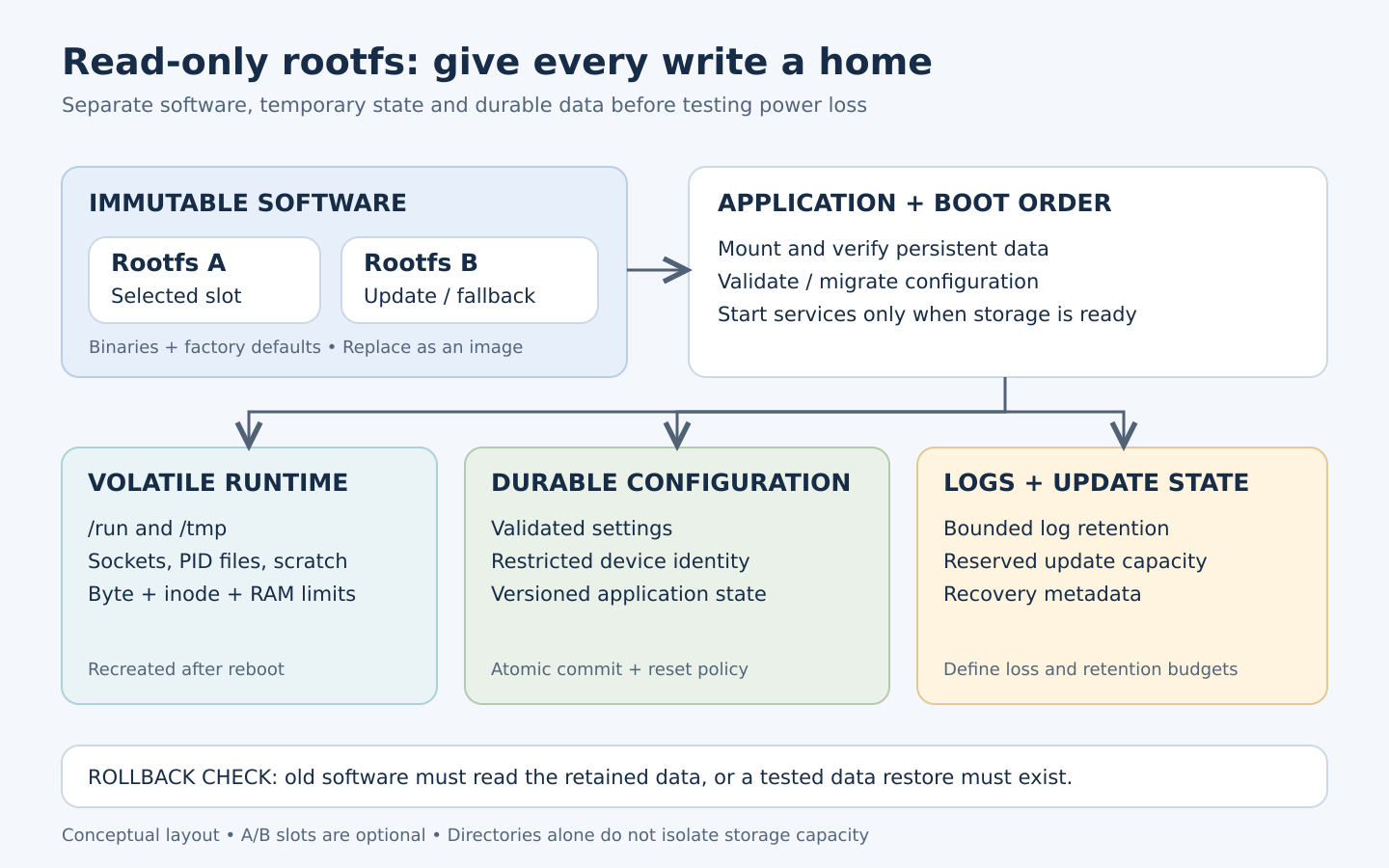
A read-only Linux root filesystem can keep the software image stable through routine operation, but the product still needs writable state. Network settings must survive reboot, logs need a bounded destination, and an update must preserve enough information to recover. The design task is to give each kind of data an explicit lifetime, owner and failure policy.
Start with a write inventory
For every service, list what it writes, when it writes, how much it may write and what happens when the write fails. Include early-boot programs, DHCP clients, SSH identity, clock state, databases and crash dumps. An application that writes only occasionally can still prevent startup when its default path is on a read-only mount.
| Data class | Typical location | Required behavior |
|---|---|---|
| System binaries and factory defaults | Read-only rootfs | Replaced by a controlled software update |
| Runtime sockets, PID files and scratch data | Bounded tmpfs under /run or /tmp | Recreated after every boot |
| Customer configuration | Persistent application directory | Validated, versioned and preserved across supported updates |
| Device identity and credentials | Restricted persistent or hardware-backed storage | Unique provisioning and an explicit reset policy |
| Diagnostics | Bounded volatile and/or persistent log area | Retention, privacy and storage budgets enforced |
| Update metadata and staging | Reserved persistent area or inactive slot | Survives the required recovery transitions |
Paths in this table describe roles, not a universal partition map. A board with eMMC, a small NOR device and raw NAND need different storage integration. Select the filesystem and update arrangement supported by the actual BSP, bootloader and flash technology.
Choose the immutable layer and the writable boundaries
SquashFS is a compressed read-only filesystem. An ext4 root mounted read-only is another possible design, with different image and recovery considerations. Neither choice alone authenticates the running software. Where verified software is required, design a chain of trust; dm-verity checks block integrity against a trusted root hash and must be integrated with a trusted boot path.
Prefer application-specific writable paths over making all of /etc writable. Keep default configuration in the image and store explicit customer overrides separately. For legacy software requiring a fixed path, a bind mount can expose a persistent application directory at that location. Build mount points into the image and establish ownership before starting the service.
A whole-root OverlayFS can accommodate software with many hard-coded writes, but it creates additional update behavior. An old upper-layer file can hide a corrected file in a new lower image. Deletion markers can also retain an obsolete view. Define whether the upper layer is disposable, migrated or tied to a particular image generation.
When using OverlayFS, the writable upper filesystem must support the required extended attributes and directory entry information; its work directory must be empty and on the same filesystem as the upper directory. Check the kernel OverlayFS documentation against the deployed kernel. Avoid treating arbitrary vendor-kernel versions as interchangeable.
Make boot ordering a correctness condition
Mount persistent storage, check its expected identity and layout, initialize required directories, perform any approved migration, and only then start applications. Do not silently fall back to an empty RAM directory when essential persistent configuration is missing. Choose a visible recovery mode or a documented limited-function mode.
For a legacy application, this illustrates the relationship between paths after the data volume is successfully mounted. Both directories must already exist and permissions must match the service account. Integrate the steps into the chosen init system rather than running them late in boot.
# /data is the verified, mounted persistent filesystem.
# /etc/myapp is a mount point created in the rootfs image.
mount --bind /data/config/myapp /etc/myapp
# Start myapp only after this mount succeeds.
Systemd dependencies and BusyBox/SysV scripts express ordering differently. Inspect the real Buildroot skeleton, init selection and service scripts. Check /proc/mounts on the target to establish what actually mounted, including whether a failed mount left an ordinary directory underneath.
Preserve configuration through interrupted writes
Validate a new configuration before making it active. For a single-file format, a typical application-level commit sequence writes a temporary file in the same directory, flushes it, renames it over the current file, and flushes the directory. Check every return value and retain a known-good generation when the product requires recovery.
validate(candidate)
write(temp_in_same_directory, candidate)
fsync(temp_file)
rename(temp_file, active_file)
fsync(parent_directory)
report_success()
This is pseudocode, not a ready-to-run utility. Apply file permissions before publishing the new file, handle concurrent writers, and use a transactional database when several records must change together. Linux fsync documentation explains why flushing a file alone does not necessarily persist its directory entry. Durability still depends on filesystem, driver and storage-device behavior; test power loss on the actual hardware.
Give logs and temporary files separate budgets
A tmpfs uses virtual memory, can use swap when enabled, and loses its contents when unmounted. Limit its bytes and inodes, then include that budget in peak memory testing. A large unbounded log directory in RAM can make an otherwise healthy application run out of memory.
For systemd-based images, Storage=volatile keeps journal data under /run/log/journal; persistent storage uses /var/log/journal when available. Configure RuntimeMaxUse or SystemMaxUse for the selected mode, following the journald documentation for the shipped version. BusyBox syslog needs its own size, rotation and destination settings.
Reserve space for configuration and updates independently of verbose diagnostics. Directories on one filesystem do not provide capacity isolation by themselves; use suitable quotas, partitions or explicit reservations. Define which events must survive power loss and redact credentials. Remote logging helps only when connection loss, queue growth and delivery gaps have defined behavior.
Design persistence together with rollback
A/B software slots do not automatically provide A/B application data. A new application may migrate a shared database into a format the old application cannot read. Options include backward-compatible schemas, separate data generations or an explicitly tested restoration path. RAUC’s data-storage guidance discusses shared and redundant data partitions and makes clear that migration requires product-specific handling.
Keep update staging from exhausting configuration storage. Distinguish a downloaded package, a verified package, a selected boot slot and a confirmed healthy boot. Persist only the state needed by the selected update framework. Factory reset should have a written contract identifying whether it clears customer settings, retained logs, credentials and device identity; those categories often require different treatment.
Acceptance tests and troubleshooting
| Fault injection | Expected result to define | First evidence to inspect |
|---|---|---|
| Power removed during configuration commit | Valid previous or new generation, never silently malformed settings | Configuration validation, generation markers and filesystem errors |
| Persistent volume missing or corrupt | Documented recovery behavior | Mount log, device identity and application start ordering |
| Log bytes or inodes exhausted | Configuration and update policy still honored | Filesystem capacity, inode usage and logger errors |
| Upgrade followed by rollback | Old software can use the retained or restored data | Schema versions and migration journal |
| Cold boot after heavy temporary-file use | Runtime state rebuilt within the memory budget | tmpfs limits and peak memory records |
| New rootfs with existing overlay | Updated defaults and binaries are visible as intended | Upper-layer files, deletion markers and migration policy |
If settings vanish, first verify the writable path is persistent and mounted before use. If old behavior survives an update, inspect overlay masking and retained configuration. If a service reports “read-only filesystem,” identify the exact attempted write rather than broadly remounting the root read-write. These tests need controlled laboratory fault injection and an agreed recovery procedure; no power-loss results are claimed here.
Obeita’s Firmware/BSP diagnostics service is a relevant starting point for a storage and boot review. The delivered Linux/Qt HMI project supplies related terminal context. This case does not establish validation of the persistence architecture described here.