Yocto Image Conversions: Trace Compressed Outputs to Their Generated Base Tasks
A recipe requests ext4.gz, but there is no separate do_image_ext4_gz task to inspect. Another build creates a checksum yet does not retain the intermediate file that was hashed. Both observations follow from Yocto's image-conversion graph: conversion suffixes are resolved into commands associated with a base image task, and unrequested intermediate artifacts can be removed afterward.
Trace the requested output suffixes before adding a custom task. A filename transformation and a new filesystem type do not have the same implementation requirements.
Separate the base image command from conversions
The CONVERSION_CMD reference covers transformations such as compression and checksums. A base IMAGE_CMD creates an image; a conversion consumes an existing image-derived file.
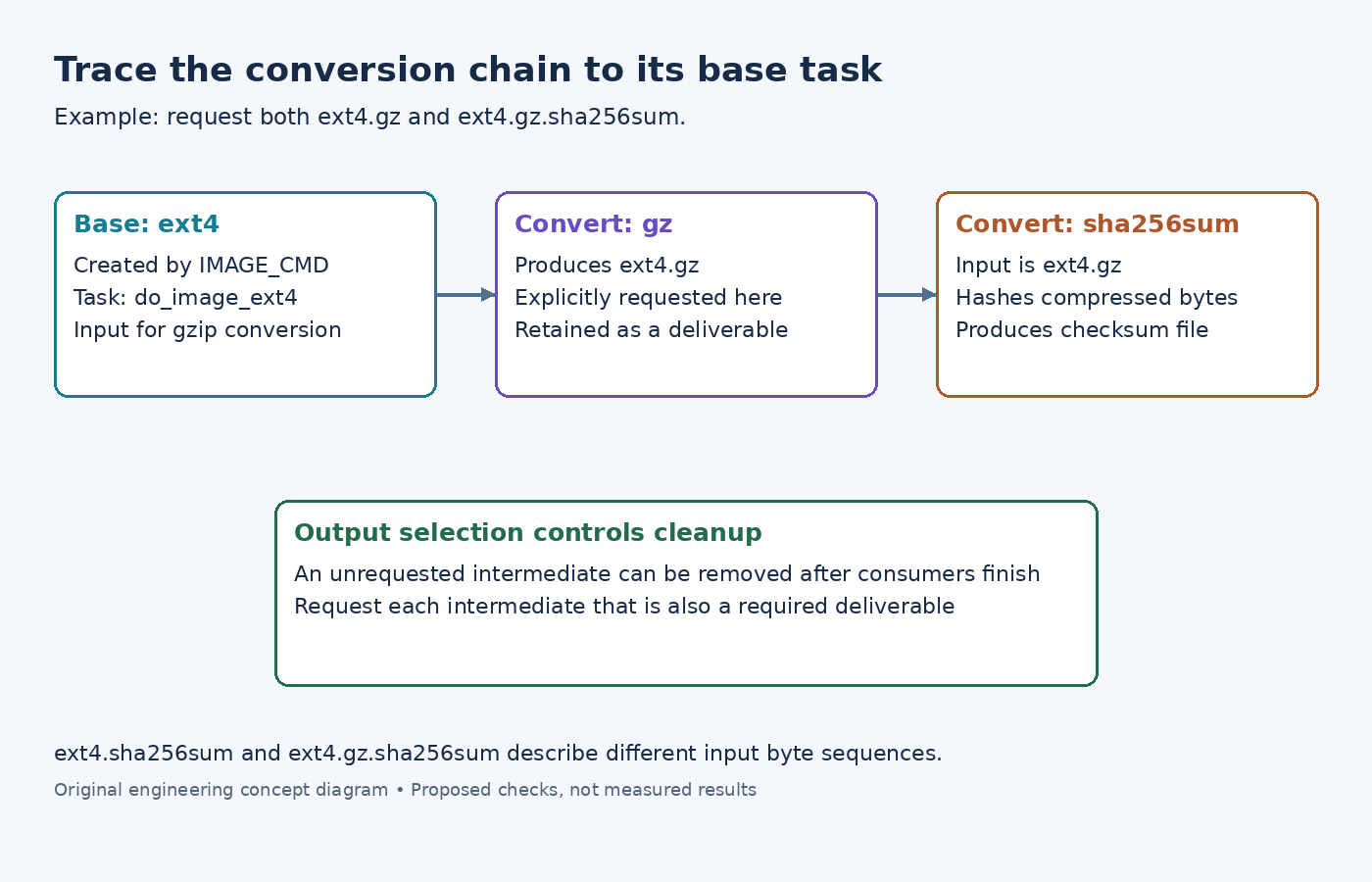
The examined image class recursively removes recognized CONVERSIONTYPES suffixes to find the base type. It groups requested variants under that base and generates a task named from the base type. For ext4.gz and ext4.gz.sha256sum, the relevant generated task is therefore do_image_ext4.
Use bitbake -c listtasks product-image and inspect the generated task body for the real image recipe. Searching only for a task named after the complete compressed filename can miss the operation. The task reference describes generated image tasks and their place after rootfs construction.
If a suffix is misspelled or lacks conversion support, the unresolved string can instead be treated as a base type requiring its own IMAGE_CMD. A missing image-command diagnostic is then a useful clue about classification, not necessarily a missing compression executable.
Name the exact bytes that the checksum should cover
Consider IMAGE_FSTYPES = "ext4.gz ext4.gz.sha256sum" in an appropriate image configuration. The desired delivered objects are the compressed image and a checksum of that compressed image.
The examined image-type definitions define gzip conversion and a sha256sum conversion. During expansion, the conversion's type identifies its input suffix. Chaining sha256sum after gz therefore hashes the compressed file; requesting ext4.sha256sum hashes the uncompressed ext4 image instead.
Choose the chain according to the consumer. A downloader verifying the compressed artifact needs the former relationship. A process verifying a decompressed image may need the latter. Neither checksum should be described merely as the image checksum without naming which byte sequence it covers.
Request intermediates that are also deliverables
The image class emits prerequisite conversion commands before their consumers. It collects intermediate filenames that are not requested outputs and removes them after the conversions have finished. Cleanup is delayed so conversions sharing an input can all use it.
This creates a practical trap: requesting only ext4.gz.sha256sum can produce the checksum while leaving ext4.gz as a removable intermediate. Request ext4.gz explicitly when it is part of the deliverable. Likewise, request ext4 if a manufacturing process needs the uncompressed image as well.
Inspect the final generated task for both conversion commands and cleanup commands. If a file was generated and then deliberately removed, rerunning the same task cannot change the output contract. Correct the requested type list instead of copying the transient file opportunistically during the build.
Check dependencies at the correct level
The image-type class declares conversion tool dependencies separately, such as pigz-native for gzip and xz-native for xz. Its dependency helper resolves those declarations for requested conversion suffixes. A custom converter needs its build-side tool dependency as well as a command that produces the promised filename.
IMAGE_TYPEDEP expresses a different relationship: one image type requires another image type. The variable reference describes this image-to-image dependency. It is not a substitute for naming the native executable's provider.
For a failing conversion, locate the first command that lacks its expected input or tool. For a successful task with a missing deliverable, inspect explicit output requests and cleanup. For a checksum mismatch, compare the intended input suffix with the command's expanded filename. Those three branches usually provide a clearer correction than introducing another postprocessing hook.