TinyML Arduino Camera Inputs: Verify Real Pixels Before Trusting a Detection Score
A person-detection sketch prints that an image was captured and then reports a classification score. Before investigating model accuracy, confirm that the selected provider actually acquired pixels. A successful placeholder implementation can satisfy the software interface without reading a camera.
That is exactly the boundary examined here: the Nano 33 BLE Arduino image provider at the pinned 2023 commit of the archived TensorFlow examples. This finding does not describe every Arduino camera library or imply that current boards lack camera support.
Inspect the implementation behind the capture message
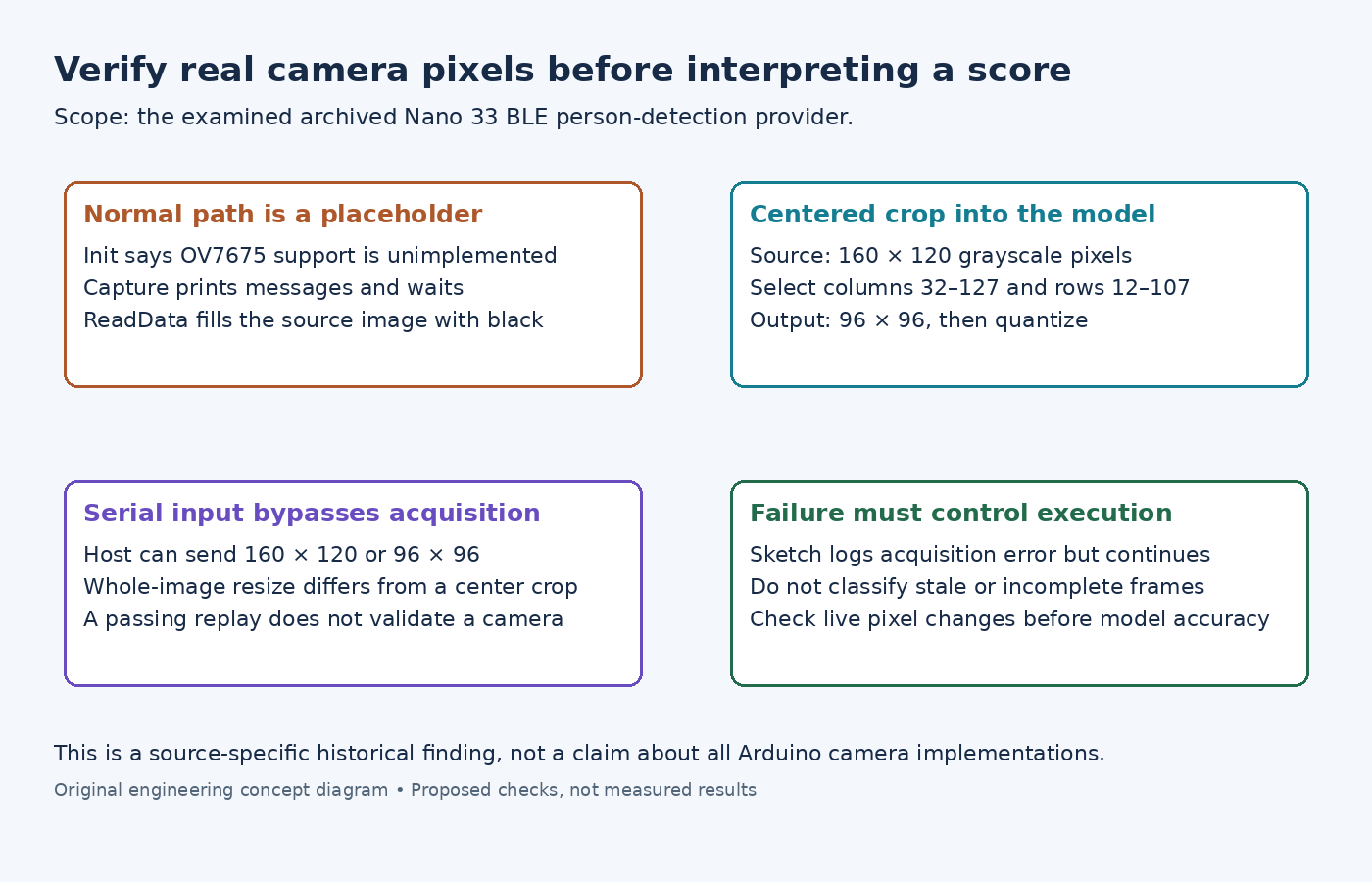
In the examined image provider, InitCamera reports that OV7675 support is not implemented. PerformCapture prints progress messages and delays, while ReadData fills the image buffer with zeros. All three return success.
The normal path therefore passes a black placeholder image into preprocessing. The message saying capture completed is not a hardware observation. Moving an object in front of a connected camera cannot change bytes that this implementation never reads.
Confirm the provider source and symbols selected for the actual board build. A file with a familiar camera name elsewhere in a project does not replace the linked functions. Then inspect a small diagnostic summary of the acquired bytes before model invocation: dimensions, minimum/maximum values and whether a controlled scene change changes the frame.
Follow the exact crop rather than guessing a resize
The model settings specify a 96-by-96, one-channel input. The provider's camera-sized buffer is 160 by 120. Its preprocessing selects the centered 96-by-96 rectangle; it does not shrink the entire frame to that size.
For those dimensions, the selected columns are 32 through 127 and rows 12 through 107. A subject near an outer edge can disappear from the tensor even when visible in the uncropped image. Use a spatial test pattern to verify row stride, crop origin and orientation before assessing detection behavior.
The crop routine converts grayscale bytes through normalized pixel values and the tensor's scale and zero point. A black source image therefore need not become an array whose int8 storage bytes are numerically zero. Inspect source pixels and quantized input as different representations.
Recognize what serial-fed images exercise
The provider also has a test-input path. The host test script converts an image to grayscale and prepares either 160-by-120 or 96-by-96 data. The former still reaches the centered crop; the latter supplies the model-sized image directly through the same preprocessing function.
These choices do not represent the same image transformation. Resizing a complete scene to 96 by 96 can preserve objects that a center crop removes. Keep that distinction visible when comparing a host-fed result with a real-camera implementation.
A successful serial image test establishes something about the supplied pixels, preprocessing and inference path. It provides no evidence that sensor initialization, frame synchronization or pixel acquisition works.
Make failed acquisition stop the affected inference
The archived sketch loop logs a GetImage failure but continues to Invoke. It likewise logs invocation failure before continuing to inspect output. A production adaptation needs explicit control flow that prevents stale or incomplete data from being presented as a fresh detection.
Test the distinction with an unavailable camera, a failed frame read, a fixed known image and a changing live scene. Each case should expose its acquisition status separately from its score. Only a verified live-pixel path makes a live-camera model evaluation meaningful. No image inference or camera capture was executed for this article.