Rust Embedded Graphics Borders: Measure the Styled Shape Before Placing It at a Screen Edge
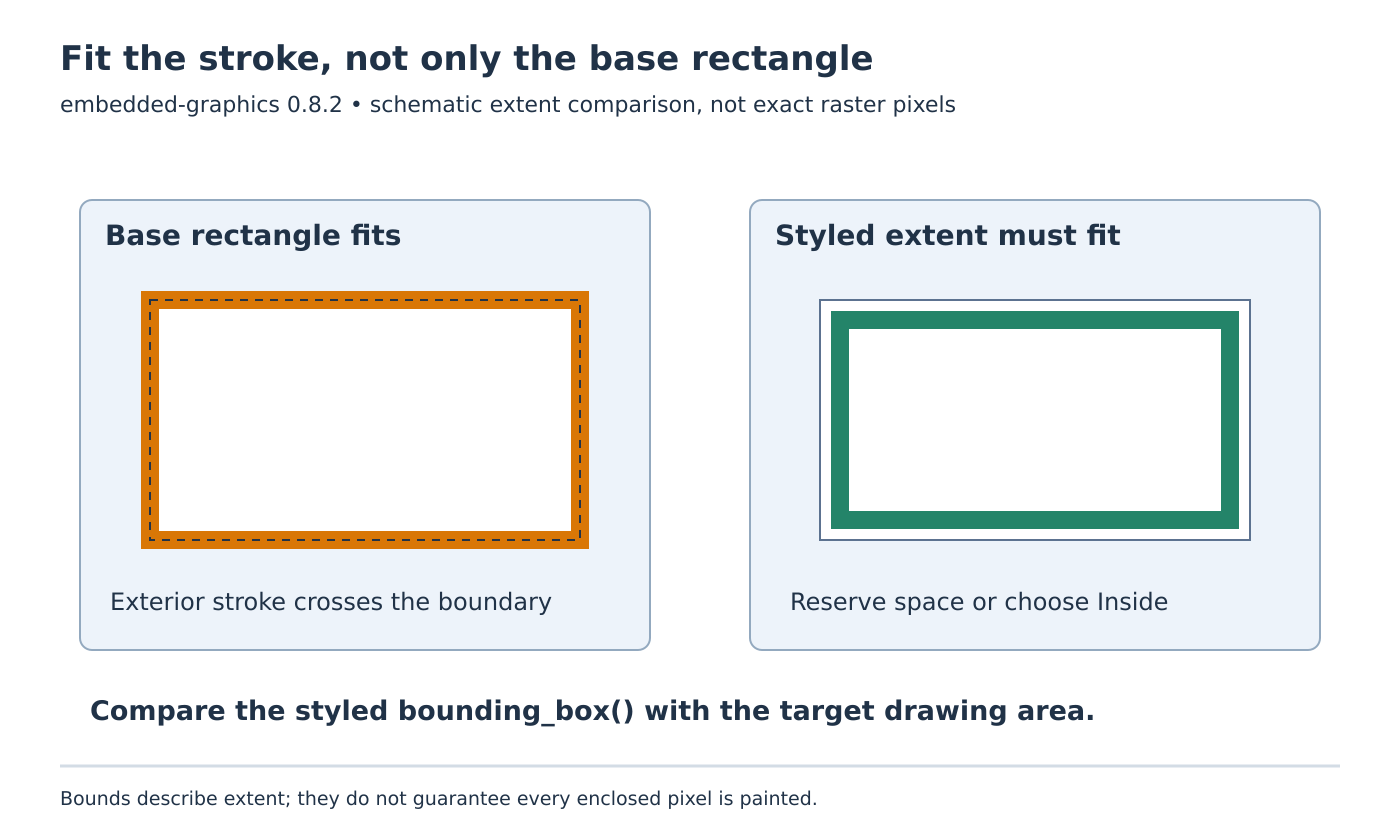
A rectangle can fit inside a display while its styled border extends beyond it. If the edge disappears after increasing stroke width or changing alignment, inspect the styled shape’s bounds before changing the pixel driver. The base rectangle and the drawable produced from it are not interchangeable layout measurements.
This guide uses embedded-graphics 0.8.2 and embedded-graphics-core 0.4.1. It focuses on rectangle stroke geometry before clipping. The proposed fixtures have not been compiled or drawn on a physical display.
Measure after applying the final style
The Dimensions contract explicitly warns that a styled primitive can be larger than its underlying geometry. The rectangle implementation calculates styled bounds by expanding the base rectangle using the style’s outside stroke width.
That makes the order of operations important. First select the rectangle and its actual stroke settings. Then query the styled object’s bounding_box(). Compare that result with the target’s drawing area. Checking only the rectangle before into_styled(...) answers whether the unstroked geometry fits, not whether the chosen border fits.
Keep signed coordinates through this calculation. A stroke extending left of an origin-based display can legitimately produce a negative geometric coordinate before the target clips it. Converting that value to an unsigned controller address early creates a different defect and hides the original layout evidence.
Choose which edge the design intends to preserve
If the design says that the outside of a frame must coincide with the display edge, an inside-aligned stroke is often the direct expression. The official 0.8.2 shapes example uses StrokeAlignment::Inside for a display-edge outline. Review the resulting interior space because a thicker inward border leaves less room for the contents.
If the rectangle instead represents a fixed content boundary, an outside stroke may be appropriate. In that case reserve exterior space for the border. Moving the primitive inward until the styled bounds fit can preserve the stroke, but it also changes the content placement; that should be an explicit layout decision.
Center alignment splits the stroke around the base boundary according to the implementation’s integer geometry. Avoid assuming that an odd-width stroke produces two equal fractional pixel bands. Query the result for the exact width rather than importing a continuous vector-graphics intuition into an integer raster layout.
For a hypothetical layout diagnostic, suppose the base rectangle fits the target but the final styled bounds begin at x = -2. That negative extent explains why the target cannot show the complete left border. A correct clip operation discards those off-screen pixels. Increasing the transfer buffer cannot bring them back onto the display.
Keep extent and paint coverage distinct
A bounding rectangle encloses a drawable; it is not a promise that every pixel inside it is painted. An outline leaves an interior region, and absent colors can suppress writes. The upstream rectangle tests also show bounds that remain the same for a transparent and filled rectangle.
Use the box for containment and placement, and inspect actual pixel writes when testing appearance. Do not infer a filled background, erasure of an older shape, or a hit-testing policy solely from the existence of the bounding rectangle. Those decisions depend on the chosen style and the application’s interaction design.
This distinction matters when a focus indicator changes thickness. The application may need more exterior space even though its control’s logical content area has not changed. Conversely, changing a fill color does not necessarily alter the geometry that layout should reserve.
Qualify border changes with an interior fixture first
Start with a small rectangle well inside a host-side drawing target. Exercise Inside, Center and Outside alignment with both an odd and an even stroke width. Record the base rectangle, styled bounds and affected pixel area for each case. The upstream source uses MockDisplay::affected_area() in its own bound checks, which provides a useful pattern for the proposed fixture.
Only after those interior cases are understood should the same styles be placed against each screen edge. Distinguish an intentionally clipped border from a requirement that every border pixel remain visible. Include a style change at the same base coordinates so a regression catches geometry that grows beyond a previously valid placement.
Accept the placement when the final styled extent satisfies the intended boundary contract and the rendered pattern matches the chosen alignment. Driver clipping remains necessary, but it is the last protection against an off-screen drawing request, not a replacement for deciding where the border belongs.