Yocto devtool deploy-target: Supply Runtime Dependencies Even When the Recipe Declares Them Correctly
An application can build successfully, have correct runtime package dependencies, and still fail after devtool deploy-target copies it to a minimal development device. The deployment command does not install the packages that satisfy those dependencies. A correct package relationship cannot supply a library through a transfer path that bypasses dependency installation.
This article follows Yocto Project 5.0.12 Scarthgap, devtool reference sections 7.14–7.16. The examples concern a disposable development target. No SSH connection, file transfer, package installation, target command or image build was performed.
Identify the artifact that crosses the connection
The reference describes deployment of files installed by the recipe’s do_install task. This is a different boundary from asking a target package manager to install an application package and its runtime dependency set.
The target must provide an SSH server for this workflow. A package manager is not required; when one exists, the deployment command bypasses it. Consequently, the presence of package-management tools on the device does not change this command into a package transaction.
Start a diagnostic record with the recipe identity, workspace revision, built output and target base-image identity. Do not call the transfer “package installation” unless that is the path actually used. The selected path determines what supporting software can reasonably be expected to arrive.
Separate successful linking from target availability
Suppose a hypothetical application named sample-reader links against libsample.so.1. Its recipe can correctly provide the build-time dependency, and packaging can correctly infer the runtime shared-library dependency. Neither fact establishes that the minimal target image contains that library.
The reference explicitly includes automatically inferred shared-library requirements in its warning. Adding the same dependency again to RDEPENDS does not make deploy-target install the provider. Conversely, weakening dependency metadata merely to quiet a diagnostic would damage the package path without repairing the development transfer.
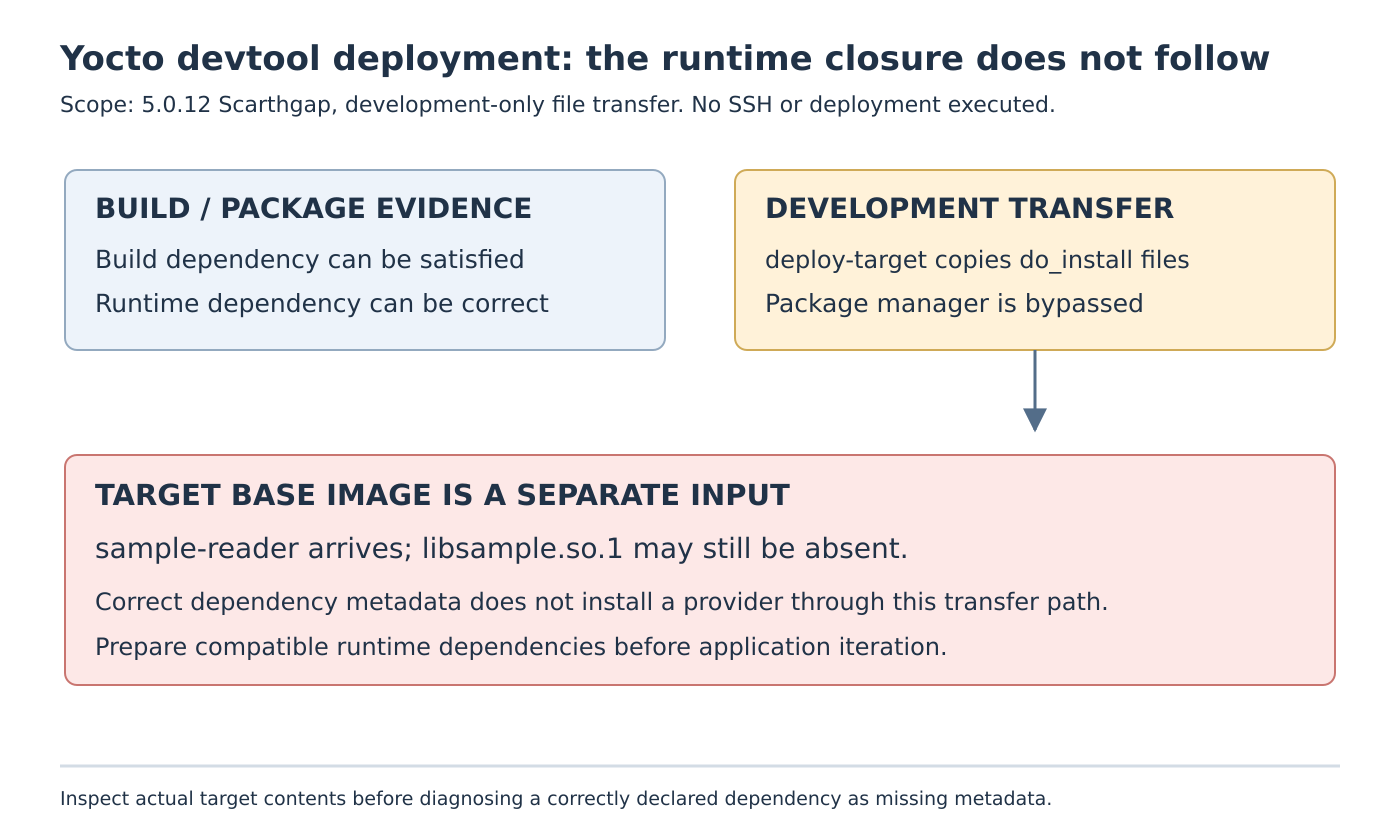
Keep three inventories separate: libraries available to the build, runtime requirements recorded for the generated package, and actual compatible files on the target. A library in the recipe sysroot answers the first question. A dependency entry answers the second. Only the target inventory and runtime evidence can answer the third.
The invented library name is an explanatory fixture, not an observed error from a real product. In an actual investigation, preserve the exact missing name and the deployed binary’s identity rather than assuming every startup failure is this same missing-dependency case.
Verify the missing dependency before changing the recipe
Inspect the generated package’s dependency information for the affected application and identify the provider package. Then compare that requirement with the base image’s package inventory and actual files. Keep the versions and target architecture associated with those records.
If the provider is absent, the observed failure is consistent with the documented deployment boundary. If a file of the same name exists, continue with compatibility and loader-path diagnosis instead of declaring success from its basename. A different ABI, an unresolved secondary dependency or an unexpected application build can require a different explanation.
Also examine which installed files belong to the deployed recipe. A recipe can install more than the one executable a developer is thinking about. The file-transfer scope follows its installation output; a human label such as “just update the app” should not replace an inventory of what the development operation would change.
This inspection does not require copying arbitrary libraries from a workstation. Host files are not substitutes for target-built dependencies. Keep the correction within the product’s versioned build and development-image process.
Prepare the development image deliberately
The documented assumption is that the target already contains the dependencies. For a future disposable fixture, prepare a known development image with the required runtime packages installed through the project’s supported image or package workflow. Record that base before using the file-transfer shortcut for application iteration.
A useful comparison would hold the application output fixed while contrasting a minimal image lacking the provider with a compatible image that includes it. The expected distinction is dependency availability, not a claim that every application behavior becomes correct once one loader error disappears.
Continue to test the application’s relevant execution paths. Optional plugins, data files or services may introduce requirements that a simple startup check does not exercise. Their presence should be established from the actual software contract rather than assumed from successful linking.
Keep removal and release integration separate
devtool undeploy-target is documented for removing output previously deployed through this workflow. That statement does not establish whole-device transactional rollback, restoration of application data, or reconstruction of every prior service state. Define a disposable target’s restoration procedure independently before an experiment.
The reference limits this deployment facility to development and excludes production-image updates. Once the application change is ready for integration, validate it through the maintained recipe and intended image or package delivery path, including its dependency closure.
The useful conclusion is precise: the recipe may be correct while the selected development transport leaves required packages untouched. Diagnose the transport boundary and target inventory first, then preserve correct dependency metadata for the package-based integration that actually consumes it.