Yocto Configuration Fragments: Trace an Enabled Build Setting Through OE_FRAGMENTS and toolcfg.conf
Two Yocto build directories can use the same layer checkout yet apply different top-level configuration fragments. The fragment file’s presence establishes availability. Its enabled name is another input, and the setting ultimately used by BitBake depends on the resulting configuration.
This article follows Yocto Project 5.3.1 configuration-fragment tooling. These are top-level build configuration fragments, not kernel Kconfig fragments. Do not assume the same tool is supplied by an older Scarthgap checkout. No setup command, parser, build or configuration change was executed here.
Separate available, enabled and effective
bitbake-config-build list-fragments reports available fragments and whether they are enabled. Finding a name in that list does not, by itself, show that its statements participate in the build. Record the enabled state instead of treating discovery as activation.
Use show-fragment to inspect the selected fragment’s location and content. This answers a different question: what would this named fragment contribute? It does not establish that another configuration statement cannot affect the same variable.
For a hypothetical local layer, suppose a fragment intends to set BB_NUMBER_THREADS to three. The number is a fixture value, not a performance recommendation. One build directory can list that fragment as available but disabled, while another enables it. Identical source checkout paths do not explain away that difference.
Trace the persisted enablement record
The documented enable-fragment operation appends the qualified fragment name to OE_FRAGMENTS in build/conf/toolcfg.conf. Its configuration variables are then parsed and available globally in the build. The setting is therefore not merely a temporary side effect of the shell command that selected it.
A missing shell-history entry is weak evidence that a fragment was never enabled. Conversely, a setup script containing an enable command is not proof that the intended build directory received it. Examine the persisted configuration associated with the actual environment being used.
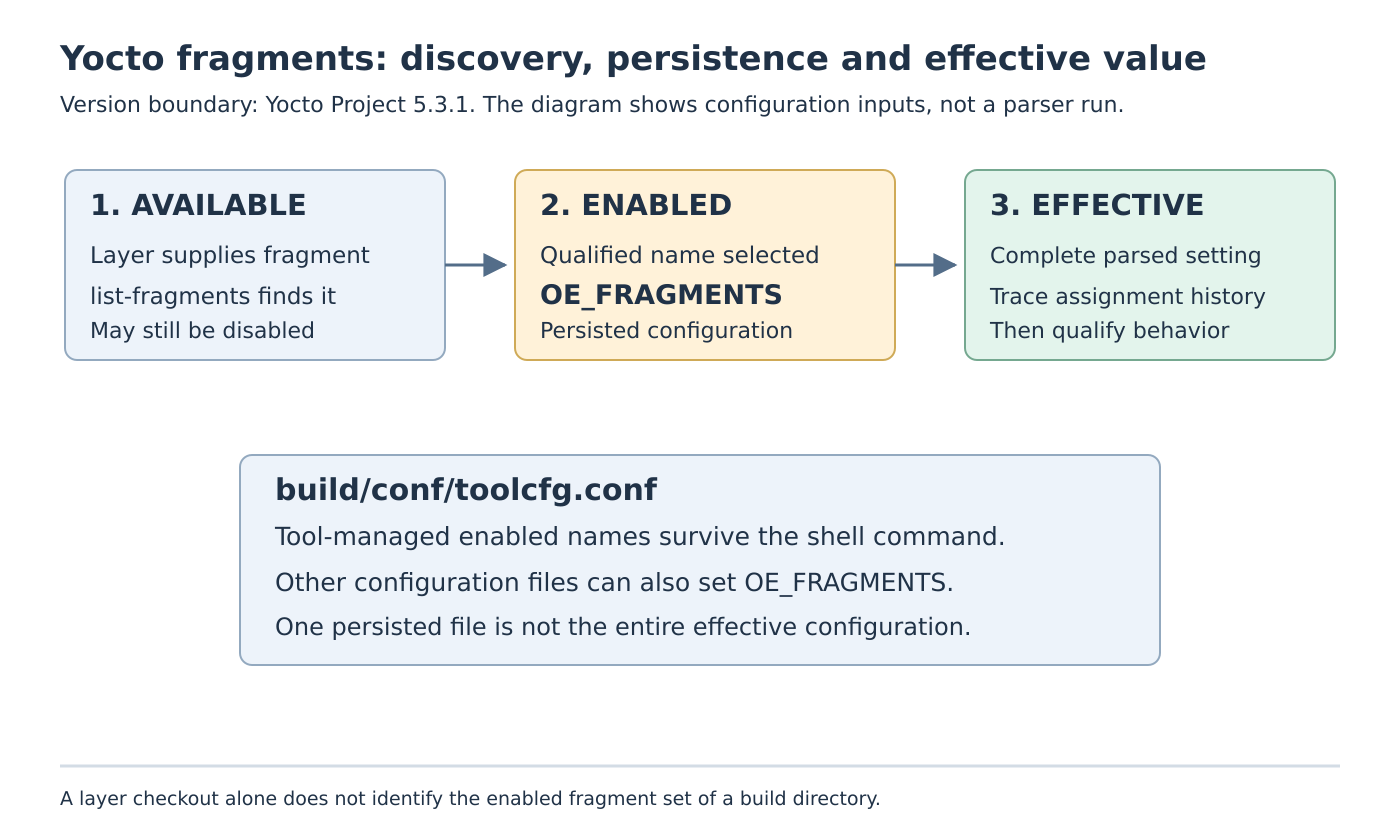
The reference also permits setting OE_FRAGMENTS in other configuration files, including local.conf. Treat toolcfg.conf as an important source, not an exclusive registry. If a name appears enabled after a tool-managed entry is removed, investigate other contributions before assuming that the tool ignored the request.
Give the fixture a qualified name
The fragment-creation guide places standard files under conf/fragments by default and requires summary and description metadata. For the hypothetical limit fixture, its content could be:
BB_CONF_FRAGMENT_SUMMARY = "Three task threads for a disposable comparison"
BB_CONF_FRAGMENT_DESCRIPTION = "Fixture only; not a host sizing recommendation."
BB_NUMBER_THREADS = "3"
Suppose the layer’s collection identity is bench and the file is conf/fragments/host-limit.conf. The corresponding qualified name is bench/host-limit. The prefix follows BBFILE_COLLECTIONS, so the repository directory’s basename is insufficient to establish it.
Keep that naming detail as a prerequisite, not the entire diagnosis. Once the correct file is discoverable, the remaining questions are whether its qualified name is enabled and what value the complete parsed configuration supplies. Renaming a layer directory cannot substitute for checking those states.
Distinguish built-in values from standard files
Built-in fragments assign a variable using the value in the selected name. The reference illustrates machine/qemuarm64 and a later selection of machine/qemux86-64, with the latter replacing the selected machine value. That is a parameterized setting, not two independent machine configurations combined into one build.
Do not search indefinitely for a standard fragment file corresponding to every built-in value. Identify the built-in mechanism first. For custom built-ins, the creation guide places registration in conf/layer.conf through OE_FRAGMENTS_BUILTIN:append and warns that ordinary addition or an arbitrary configuration-file location can behave differently because of parsing order.
That registration detail matters when a custom prefix is unavailable. It is a separate failure from a correctly registered fragment that remains disabled. Preserve the earliest failed boundary instead of adding the same setting to several files until the output happens to change.
Compare two configurations deliberately
A proposed fixture uses two disposable build directories with the same pinned layers. Keep the host-limit fragment disabled in one and enabled in the other. Collect the fragment listing, selected file content, OE_FRAGMENTS contributions, toolcfg.conf and the final parsed BB_NUMBER_THREADS value with its assignment history.
If enabled state differs, explain the persisted input. If enabled state agrees but the effective value differs, inspect the remaining configuration contributions. Do not infer execution concurrency or build speed from the variable alone; those are later observations with additional constraints.
For a handoff, transfer the intended enabled set and its layer revisions explicitly rather than relying on another engineer’s shell history. The useful result is an auditable chain from an available fragment through persisted enablement to the effective setting, with global configuration scope and release compatibility kept visible.