Rust Embedded Graphics Sprite Atlases: Reject Truncated Source Rectangles Before Drawing
A sprite atlas can return a valid subimage that is smaller than the icon the application requested. If an atlas edit moves a sprite past the source boundary, embedded-graphics can intersect the requested rectangle with the parent image instead of reporting a catalog error. Validate the sprite catalog before treating a successful draw as proof that the intended icon was selected.
This guide uses embedded-graphics 0.8.2 and embedded-graphics-core 0.4.1. It focuses on source-image selection, not cropped drawing targets or widget viewports. The examples are coordinate calculations and proposed checks; no Rust executable or panel test was run.
Give source selection and screen placement different names
An atlas rectangle identifies pixels inside the source image. A screen position identifies where the selected sprite should appear. Keeping these values in different fields prevents a common confusion: adding the atlas offset to the destination and drawing the icon in the wrong place.
The image module describes subimages for selecting portions of an image. Image then supplies the drawing position. For example, a 16-by-16 sprite beginning at atlas coordinate (32, 0) can be drawn at screen coordinate (4, 20); the source offset is not another destination translation.
Choose descriptive names such as atlas_area and screen_position. Preserve that separation in any generated catalog, animation descriptor and diagnostic log. A log containing only “x = 32” leaves the engineer unable to tell which coordinate system is being reported.
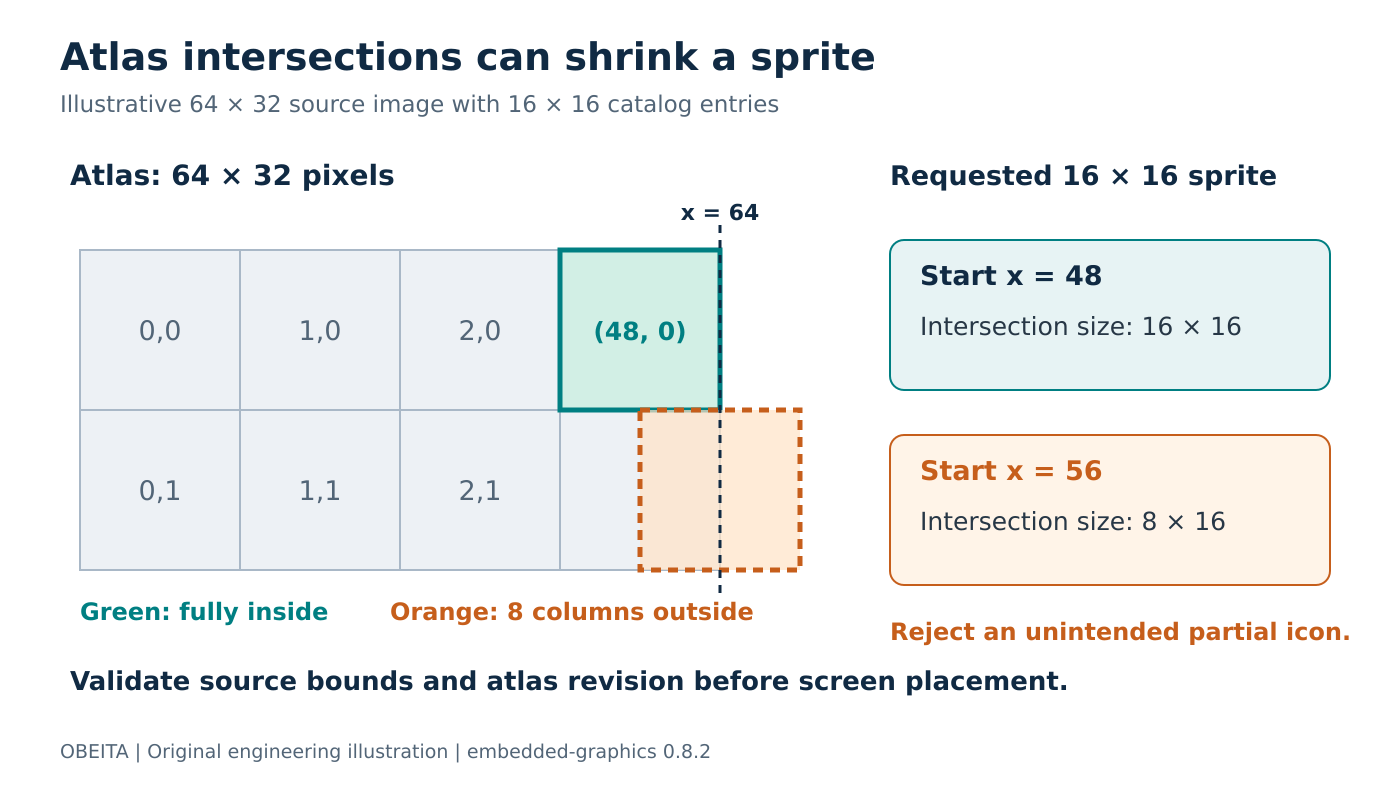
Original source-selection diagram. Rectangles and dimensions are illustrative arithmetic.
Understand the intersection performed by SubImage
The SubImage constructor source intersects the requested area with the parent’s bounding box. The resulting area’s size becomes the subimage’s size. This is useful for bounded image selection, but it does not validate an application’s promise that every catalog entry represents a complete fixed-size sprite.
Consider an atlas 64 pixels wide and 32 pixels high. A requested 16-by-16 rectangle at (48, 0) fits exactly. Moving its start to (56, 0) leaves only eight columns within the source. The constructed subimage is therefore eight pixels wide rather than the intended sixteen.
A caller expecting an icon-sized result should reject that entry before drawing. Otherwise, a partly missing status symbol may look like a transparent region or an intentionally narrow icon. Neither an Ok drawing result nor a nonempty source selection establishes completeness.
Use a catalog validation rule that compares the requested area with its intersection against the source bounds. For fixed-size entries, also compare the resulting size with the declared sprite dimensions. Treat a deliberately cropped decorative element as a separately declared asset type rather than silently weakening the icon rule.
Use the high-level selection path
A proposed drawing sequence, after catalog validation, is:
use embedded_graphics::{
    image::{Image, ImageDrawableExt},
    prelude::*,
    primitives::Rectangle,
};

let atlas_area = Rectangle::new(Point::new(32, 0), Size::new(16, 16));
let sprite = atlas.sub_image(&atlas_area);
let screen_position = Point::new(4, 20);
Image::new(&sprite, screen_position).draw(&mut display)?;
Here atlas and display stand for compatible image and drawing-target objects provided by the application. This is an API-level example, not a standalone compiled program.
The ImageDrawable contract directs application code to use Image and SubImage rather than calling its lower-level drawing methods directly. This matters when investigating apparently different handling of invalid areas.
For instance, the pinned ImageRaw subimage implementation returns without drawing when a directly supplied area is zero-sized or partly outside the raw image. That implementation detail is not a reason to bypass the public composition path. It is a reason to validate the catalog and avoid relying on invalid input as an error-detection mechanism.
Test the atlas boundary and the catalog revision
Include entries ending exactly at the final source column and row, entries exceeding either boundary by one pixel, and an entry entirely outside the atlas. Verify the validator rejects all unintended partial or empty selections. Keep one visibly asymmetric sprite to expose wrong catalog coordinates even when its rectangle remains fully inside the source.
Bind the catalog to the atlas revision or checksum. Repacking an atlas can preserve its total dimensions while moving every sprite, so a bounds test alone cannot detect a stale catalog. Compare sprite identity using reference pixels or approved image fixtures as well as size.
For nested subimages, remember that a second selection is relative to the selected parent image. Test that path separately if the product actually uses it. Avoid adding nesting simply to compensate for an unclear source-coordinate convention.
The release result should establish three independent facts: the requested source rectangle is complete, it selects the intended artwork from the current atlas, and the selected sprite is placed at the intended screen location. Together they prevent a successful drawing call from concealing an incomplete or stale icon definition.