U-Boot Port Acceptance: Boot Media, Environment and Recovery
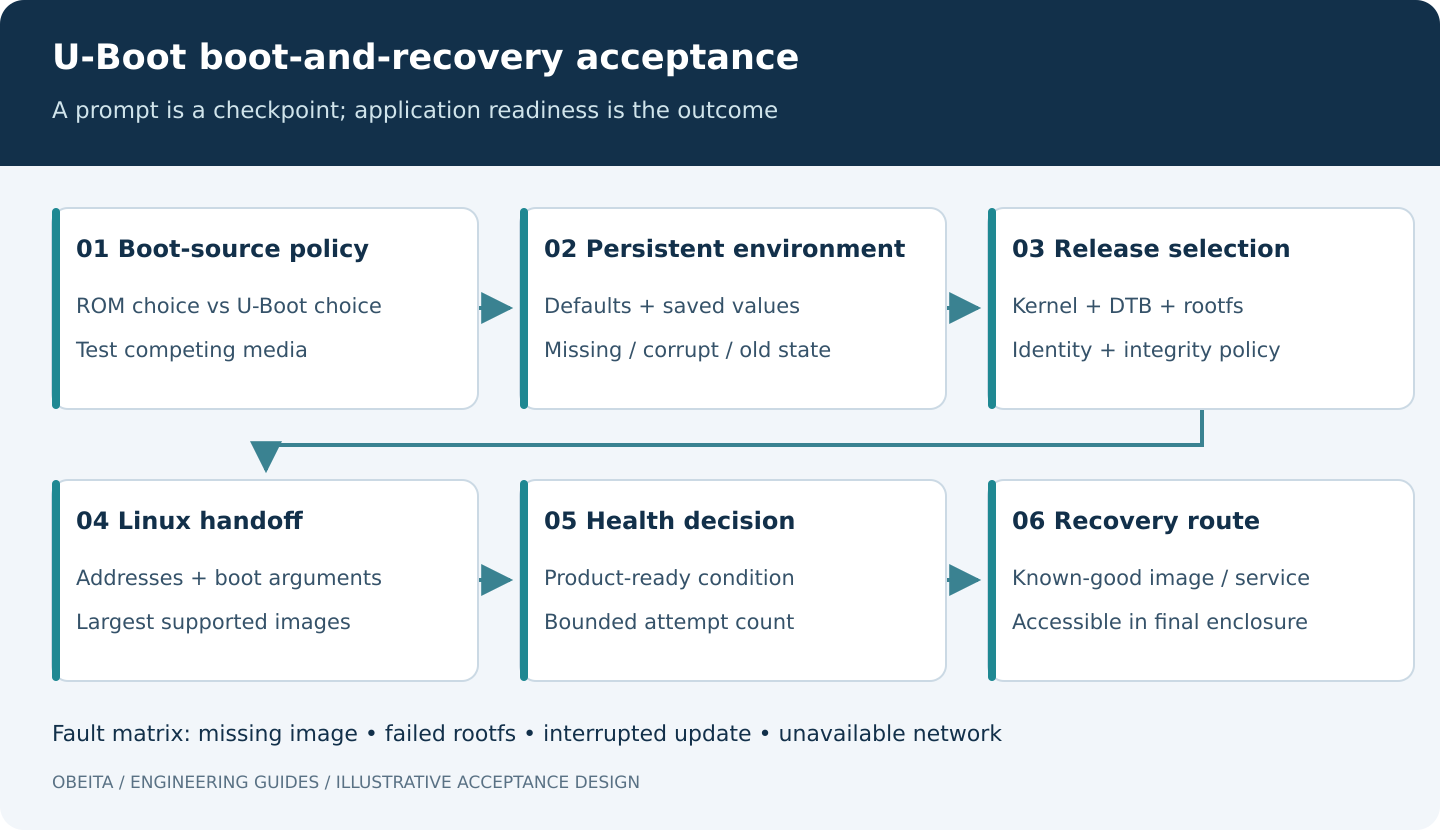
A U-Boot port should be accepted as a boot-and-recovery system, not merely as a working prompt. The port must select the intended boot source, load the correct software set, handle invalid persistent state and provide a documented way back when the main image cannot start.
This checklist targets products that use U-Boot within an embedded Linux boot chain. Commands, storage backends, early loaders and security features vary by U-Boot release and board configuration. The examples are acceptance designs; they do not assert that a particular Obeita board has passed them.
1. Define what the port actually includes
List the SoC ROM, any SPL or vendor first-stage loader, DDR initialization component, trusted firmware, U-Boot proper and the Linux handoff. Assign an owner and version to every component. If a proprietary DDR binary is required, include its permitted distribution method and the exact board memory configuration it supports.
Define the supported hardware revisions and boot media. “Supports eMMC and SD” leaves open whether SD is a development-only path, automatic fallback or authorized field-recovery mechanism. State how boot straps, removable media and software settings interact. The acceptance plan should distinguish the ROM’s media selection from U-Boot’s later selection of a kernel or bootflow.
Agree whether secure boot, signed updates, anti-rollback and console restrictions are included. These features require an end-to-end design; a U-Boot build option alone does not establish a complete trust chain.
2. Test the media policy with conflicting inputs
For each supported medium, record controller identity, numbering, partition map, image offsets and supported filesystem. Capture the detected device in a boot log. Do not assume U-Boot device numbers and Linux device names always correspond one-to-one.
Test the normal medium alone, recovery medium alone, both present and neither containing a valid application. Use two visibly different test builds when checking precedence; otherwise a boot from the wrong medium may appear successful. Confirm the behavior after both a cold start and a warm reset.
For systems using U-Boot Standard Boot, document the enabled boot devices and methods and the intended search policy. It is a configurable framework, not an assurance that every medium or format is supported by every build. Refer to the U-Boot Standard Boot documentation for the selected release.
A read-only inventory session may include the following commands when they exist in the board build. Device selection and detailed storage inspection remain board-specific.
version
bdinfo
printenv bootcmd bootargs bootdelay
mmc list
Store the output with the release record. Do not copy erase, write or environment-reset commands from an unrelated board: a wrong offset can destroy the only bootable copy.
3. Make the environment a controlled interface
Document where the persistent environment lives, its size, redundancy if any, erase-unit constraints and relationship to the partition map. Distinguish compiled defaults, currently loaded values and values actually saved to nonvolatile storage. In U-Boot, changing an environment value in memory and saving it are separate operations; see the environment documentation.
Classify variables into boot policy, development conveniences and per-unit identity. A factory reset should not accidentally duplicate or erase unique identity, calibration or provisioning data. Define which settings a field technician may change and how unsupported values are rejected or recovered.
On recoverable test units, exercise a missing environment, an invalid integrity check and an interrupted environment update. The expected result should identify which defaults or redundant copy are selected and how the operator can tell. Redundant storage only helps when the chosen backend and update ordering actually support the intended power-failure behavior.
Test migration from an older valid environment as well. A new binary can continue loading an old boot command and silently bypass the new defaults. Include environment-schema or migration policy in the release procedure rather than assuming reflashing U-Boot resets persistent state.
4. Verify the complete Linux handoff
Keep kernel, device tree, optional initramfs and root filesystem identities together. Confirm load addresses do not overlap each other, reserved firmware memory or decompression requirements. Repeat with the largest permitted image, not only the small development image.
Check that the final kernel command line selects the intended root filesystem and console. Confirm board identity and memory information passed to Linux. A successful handoff must reach the product’s defined application-ready condition; reaching an early kernel message alone cannot validate the filesystem or application image.
For signed-image designs, test a valid authorized image and deliberate changes to protected content using a bench recovery plan. U-Boot’s verified-boot documentation describes signature-based verification within a trust chain. A checksum detects accidental corruption; it is not a substitute for authentication, and signatures alone do not establish rollback prevention.
5. Define failure counting and a meaningful success signal
A boot-attempt counter must match the storage backend and reset behavior. Decide which failures increment it, when it persists and when it is cleared. The U-Boot boot-count documentation describes boot-limit and alternate-boot behavior, including implementation-specific persistence details. Validate the behavior in the exact build rather than assuming a variable name guarantees it.
Clear an update-attempt state only after the required health check succeeds. Starting the init process too early can mark an image good while the control application is still unable to open its devices. Conversely, a health check that requires an unavailable external server may roll back a healthy local system. Define the success boundary around product requirements and distinguish local readiness from optional network availability.
Choose a bounded recovery policy: a known-good slot, a dedicated recovery image or a documented service path. Avoid an endless reboot loop that destroys evidence or wears persistent storage without creating a usable device.
6. Run an explicit fault matrix
- Missing kernel: the boot path reports a recognizable reason and enters the agreed fallback.
- Wrong or damaged DTB: incompatible release combinations are rejected where the design supports validation, or fail into a recoverable path.
- Unusable root filesystem: the system does not falsely mark the update successful merely because the kernel started.
- Interrupted update: a known-good image or recovery method remains available at every agreed interruption point.
- Unavailable network: development network-boot attempts and production fallback have defined time limits.
- Recovery control: the authorized operator can enter recovery with the final enclosure and cable arrangement.
Do not test by overwriting all redundant copies at once unless total-media loss is explicitly in scope and external restoration has been proved. Document sample count, interruption points and observed results. Passing selected interruption tests does not prove arbitrary power-cut tolerance.
7. Deliver enough information to restore the board
The acceptance package should include source revisions, defconfig and patches, build tools, packaged images and hashes, a storage map, environment policy, test evidence and step-by-step restoration instructions. State which recovery steps require physical access, vendor tools or a separately maintained signing service. Never put private signing keys in an ordinary release archive.
Obeita’s RK3528 Linux Network Gateway project configuration explicitly discusses recovery access and separate power/OTG considerations. It is a relevant scope example, not a claim that every U-Boot mechanism in this article is implemented there. For a port review, see Firmware and BSP Diagnostics and prepare the current boot log, storage map and recovery procedure.