Replacing a Wi-Fi Module: Linux Driver and Device-Tree Validation
Replacing a Wi-Fi module on a Linux product is a hardware, driver, firmware and operating-policy change. A module that fits the footprint may still need a different power sequence, firmware file, bus configuration or userspace capability. Successful scanning is only the first checkpoint.
This guide covers engineering validation for embedded Linux products using SDIO, USB or PCIe Wi-Fi devices. It does not assume that every module uses the same Linux wireless stack or device-tree model. The suggested tests are an acceptance plan, not measured throughput, regulatory approval or a claim of drop-in compatibility.
1. Write a substitution matrix before editing software
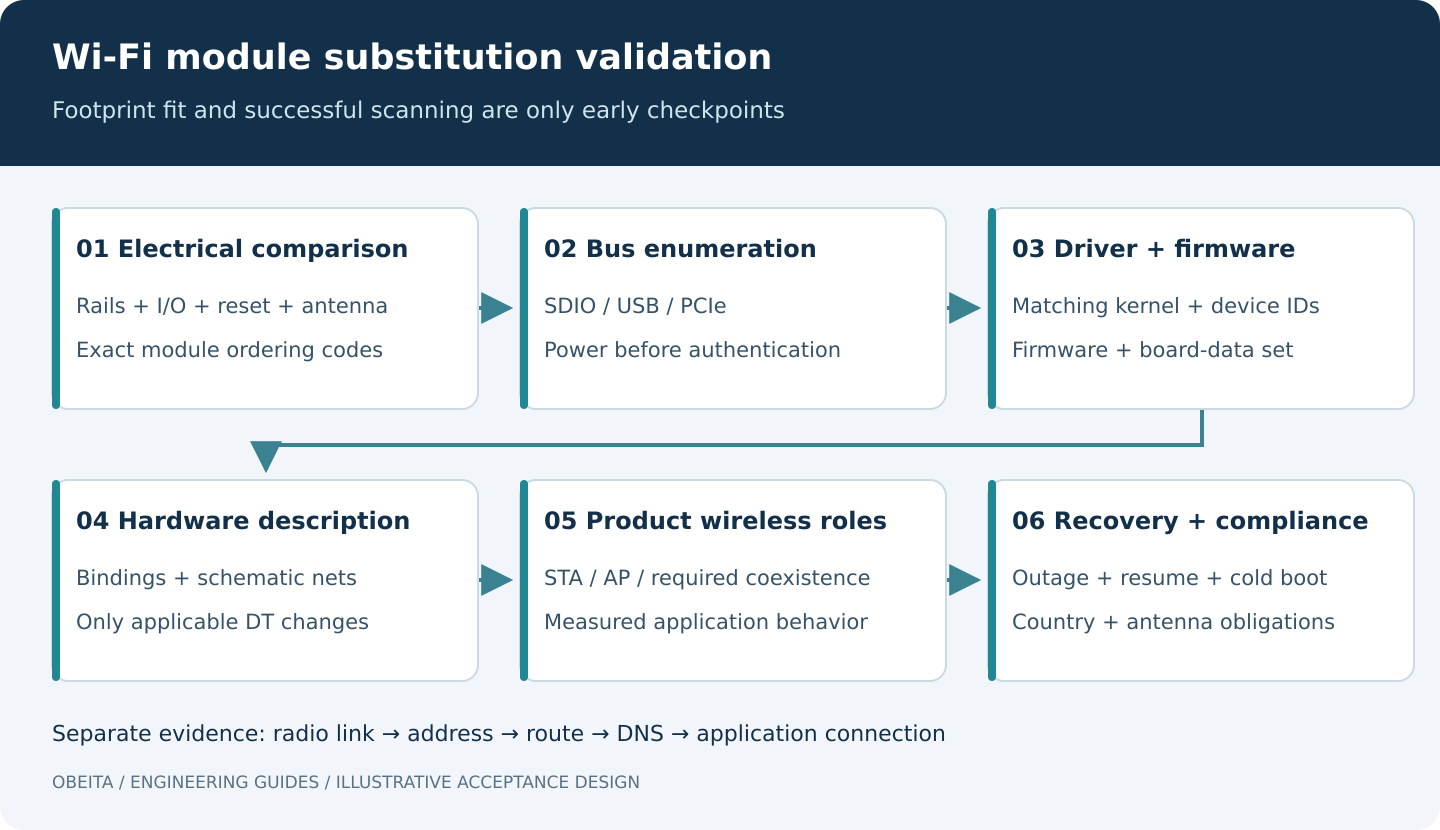
Compare the old and proposed modules by exact ordering code and hardware revision. Record host interface, supply rails, I/O voltage, reset and enable signals, reference clocks, interrupt or wake signals, antenna connections and coexistence interfaces. Check pin functions individually. A compatible outline and connector do not prove electrical compatibility.
List the product roles: station, access point, concurrent interfaces, suspend/wake, roaming and Bluetooth coexistence if required. A driver that can associate as a station may not support the requested AP mode or interface combination. Identify the target kernel and BSP branch before evaluating driver availability.
Obtain the module supplier’s integration documents and firmware redistribution terms. Record any board-specific calibration or nonvolatile configuration files and how they are associated with the assembled board. Do not reuse another product’s calibration data simply because the chipset name matches.
2. Establish a driver and firmware baseline
Identify whether the intended driver is in the selected kernel tree, supplied by the BSP or maintained out of tree. Capture its exact commit and configuration, supported device IDs and dependencies. An out-of-tree module built for another kernel may fail because of API, configuration or module-version differences; copying its binary is not a porting strategy.
Separate the host driver from firmware executed inside the radio. The Linux firmware-loader API provides a mechanism for requesting named firmware, but the correct files and board configuration remain driver- and device-specific. See the kernel’s firmware request documentation. Capture requested filenames and initial probe errors rather than repeatedly renaming unrelated blobs until a warning disappears.
Build a release manifest containing kernel, modules, DTB, radio firmware, board data and userspace networking configuration. Confirm that the files installed on the root filesystem match this manifest. A working development filesystem can hide missing firmware that a clean production image will not contain.
3. Change only the hardware description that applies
For an SDIO module, review the host controller, bus width, supply references, pin configuration, power sequencing, removable-media assumptions and any out-of-band interrupt or wake wiring. Use bindings present in the actual kernel tree. A property accepted by one vendor driver is not automatically meaningful to another.
USB and PCIe devices usually enumerate through their bus, although their board-level power, reset or host-controller resources may still need description. Do not add an arbitrary Wi-Fi node solely to force a USB driver to load. First determine whether the bus can see the device and whether its identifiers match the intended driver.
Compile and validate the modified device tree with the selected tree’s tooling. The Linux binding-schema guide documents checks such as dtbs_check. A clean schema check establishes structural consistency with available bindings; it does not validate reset polarity, voltage or the PCB connection.
Keep a reviewed diff showing every changed node and the corresponding schematic net or supplier requirement. If the new module needs a board modification, record that dependency explicitly instead of representing it as a software-only replacement.
4. Diagnose in order: bus, probe, radio, network
Start with bus enumeration. If the device is absent, investigate power, reset, clock and host-controller configuration before debugging authentication. If it enumerates but the driver does not bind, inspect device IDs, configuration and module availability. If the driver binds but firmware loading fails, inspect requested filenames, package contents and board-data selection.
Once a wireless interface exists, verify capabilities and the active link. For drivers exposing the standard nl80211 interface, the following read-only commands are useful; replace the interface name with the actual one. Some vendor drivers require their own supported tools.
uname -r
ip link show
iw dev
iw phy
# Example interface name only:
iw dev wlan0 link
iw reg get
The Linux Wireless iw documentation explains capability and link inspection. A listed capability is not evidence that the assembled antenna system or application meets its performance requirement.
Then separate association, address configuration, routing, DNS and the application connection. A successful radio link can coexist with a DHCP failure. A successful ping to a local peer does not prove that the required TLS application endpoint is reachable or that certificate time is valid.
5. Validate the exact roles used by the product
Use the real access-point models and security modes in the deployment requirements. Test each required band and channel width where lawful and supported. For AP mode, check client association, reconnect behavior and the supported interface combinations. For roaming, record the application interruption and packet behavior rather than relying only on a changed access-point address.
Measure throughput, latency, loss, CPU load and power together under a defined distance, antenna orientation, RF environment, traffic direction and peer configuration. Record the test tool and version. Separate a repeatable wired reference path from the wireless path so that a slow server is not mistaken for a radio limit.
If Bluetooth shares the module or antenna, include the required simultaneous use case. A Wi-Fi-only run does not establish coexistence behavior. Do not publish a throughput or range number without its conditions and actual evidence.
6. Include recovery and negative tests
- Access point disappears: verify bounded retries, application timeout behavior and recovery after the AP returns.
- Invalid credentials: show an actionable status without an endless high-rate reconnect loop or exposing the secret in logs.
- No address service: distinguish radio association from unavailable DHCP, and test the product’s documented fallback.
- Firmware absent: on a disposable image, confirm that startup diagnostics identify the missing dependency.
- Suspend and resume: exercise each required wake source and verify that the interface and application both recover.
- Cold and warm restart: test both; a module that retains power can conceal an incomplete cold-start sequence.
Run fault tests on an authorized test network and preserve a wired or physical recovery route. Do not unload a driver or replace firmware on the only remote-management connection without a restoration plan.
7. Treat regulatory configuration as a separate requirement
The deployment country, permitted channels, antenna design and supplier restrictions affect the finished product. Linux regulatory configuration helps constrain operation; it is not product certification. Do not force unsupported channels or power levels to make a test pass. The Linux Wireless regulatory documentation explains how regulatory information is handled, while the module supplier and appropriate compliance specialists must establish the product-specific obligations.
Acceptance evidence for a replacement decision
Deliver the substitution matrix, schematic and device-tree differences, driver/firmware manifest, boot logs, role-specific tests, failure results and known limitations. If the old and new modules are compared, use the same fixture and workload and disclose every unavoidable difference.
Obeita’s RK3528 Linux Network Gateway project configuration lists an AP6275S radio direction and distinct station/AP and Bluetooth software paths. That makes it a useful scope example, not proof that an alternative module is compatible. For replacement assessment, see Firmware and BSP Diagnostics and provide both module ordering codes, the schematic, kernel/BSP version and required wireless roles.