ESP32 Wi-Fi Provisioning Recovery: Wrong Passwords, Router Changes and Power Loss
A provisioning failure should end in a known state with a usable next action. Rebooting repeatedly or erasing all stored settings can hide the original fault while making recovery harder. First establish the last successful layer, then choose a bounded retry, an authorized credential replacement, or a specific repair.
Scope: ESP32 recovery design, with ESP-IDF v5.5 as the manager-behavior reference. ESP-IDF v6.0 uses the separate network_provisioning component. The state machine and fault-injection cases below are engineering proposals, not reported hardware results.
Separate Provisioning from Application Connectivity
Track seven checkpoints: device discovery, security session, credential acceptance, router association, IP assignment, DNS/TLS establishment, and application verification. Give the phone a precise message for each. “Settings received,” “network connected,” and “account connected” answer different questions and should not share one ambiguous success flag.
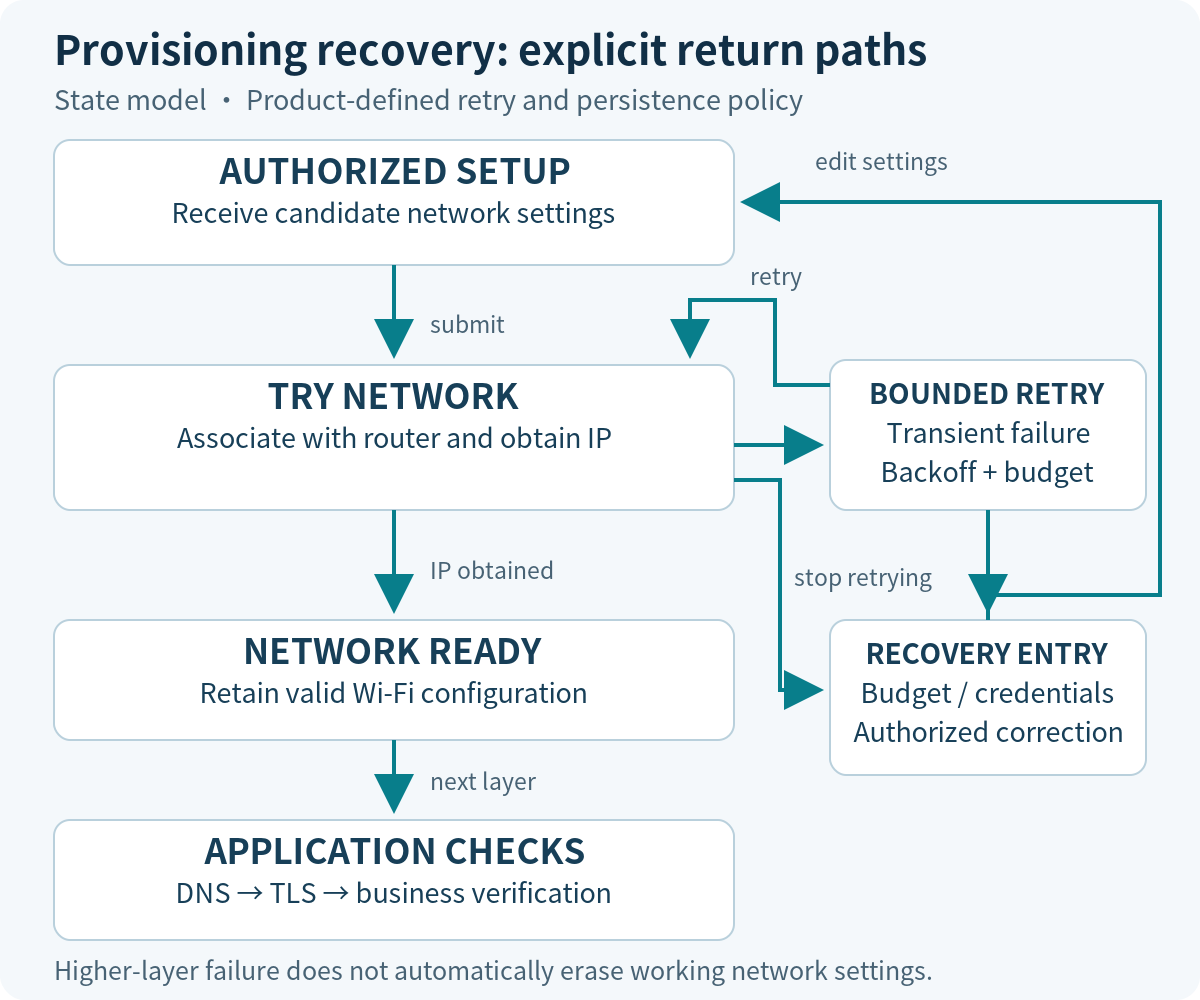
In the v5.5 manager reference, the provisioned-state query checks stored Wi-Fi credentials. It does not prove that the router is currently reachable or the product account is valid. A cloud outage after IP assignment therefore belongs to application recovery; it should not automatically erase working network settings.
A layered fault triage
| Last good evidence | Next branch to inspect |
|---|---|
| Device discovered only | Transport connection and authenticated session. |
| Credentials accepted | Association reason, router availability and supported configuration. |
| Associated, no IP | Address acquisition and network configuration. |
| Valid IP, no service | DNS, route, time, TLS and application authentication, in order of observed failure. |
| Device reports success; phone timed out | Phone routing, lifecycle and missing final acknowledgement. |
Collect a Minimal Reproduction Log
Record chip and module, firmware identifier, IDF and provisioning-component versions, app build, phone OS, and router configuration. For each event capture a boot identifier, monotonically increasing event sequence, relative timestamp, state before and after, attempt number, and available driver or protocol error. Preserve the distinction between a provisioning failure category and the underlying Wi-Fi reason.
Correlate phone and device records with a generated attempt identifier rather than assuming their clocks agree. Include the last device response and the phone’s network/background transition. Redact passwords, proof-of-possession material, tokens, and identifying SSID content. Use consistent labels such as network-A so that a support engineer can follow the sequence without receiving unnecessary secrets.
Handle Wrong Credentials and Missing Access Points
An authentication error suggests reviewing credentials and security compatibility; an absent AP suggests checking availability, supported band, visibility, and installation conditions. Neither category alone proves a unique root cause. Repeated weak-signal failures may resemble other faults, so retain the driver’s reason and the surrounding scan or association evidence.
Use a product-defined retry budget with backoff. When it is exhausted, expose an actionable status and keep an authorized correction path available. Resetting the provisioning manager’s failed state, replacing stored Wi-Fi settings, and factory reset are distinct operations. Check the exact manager implementation before assigning a reset call to a transition.
The following is SDK-neutral pseudocode for the v5.5/v6.0 design boundary. It has not been compiled and the capitalized actions are application responsibilities, not ESP-IDF APIs.
on network_attempt_finished(result):
    if result == IP_READY:
        RECORD_NETWORK_READY()
        START_APPLICATION_CHECKS()
    elif result == CREDENTIAL_REVIEW_NEEDED:
        REPORT_CORRECTION_REQUIRED()
        WAIT_FOR_AUTHORIZED_NEW_SETTINGS()
    elif retry_budget_available():
        SCHEDULE_BACKOFF_RETRY()
    else:
        REPORT_NETWORK_UNAVAILABLE()
        KEEP_CONTROLLED_RECOVERY_ENTRY()
For the renamed v6.0 failure-reset and reprovisioning calls, use the migration checklist. Do not make a generic event handler both erase settings and restart services without checking pending callbacks and resource ownership.
Make Reprovisioning Reachable After a Router Change
Define three separate user actions. Reconnect retries the stored network. Replace network opens a time-limited, authorized setup session. Factory reset removes the product’s documented set of settings and identity associations. A customer changing routers usually needs the second action, not an unexplained loss of calibration, ownership, or application configuration.
Test the recovery entry with no internet, an unavailable old router, and a restarted phone. If the design uses a button, document its duration, feedback, cancellation and accessibility after installation. If it uses an app command, explain how authorization still works when normal cloud access is unavailable. Close the setup window when it expires or completes.
Recover from Power Loss at Each Commit Point
A network replacement spans several operations: receiving candidate settings, storing them, trying the connection, and recording acceptance. The NVS documentation discusses recovery of its storage structures after power interruption. That is not a transaction guarantee for an application’s collection of Wi-Fi, ownership and business-state changes.
Choose a policy explicitly. A product may preserve a last-known-good configuration while a candidate is tested, or deliberately replace it and offer local recovery on failure. The standard provisioning manager does not automatically implement a product-specific two-slot transaction. If adding that design, assign one owner to credential persistence and test the interaction with the driver’s own storage.
| Interruption point | Acceptance criterion |
|---|---|
| Before candidate settings are committed | Boot follows the previously committed state; partial input cannot become accepted settings. |
| After storage, before successful connection | Boot identifies an unverified candidate and applies the declared retry or recovery policy. |
| After network success, before application checks | Network status remains separate from account or service readiness. |
| During acceptance-marker update | Recovery selects a complete, interpretable configuration or a controlled setup state. |
Perform interruption tests only on designated test hardware with controlled power switching. Repeat near each boundary and retain boot logs; one successful reboot does not establish coverage.
Check SoftAP and Phone-Side Failure Paths
If the app times out, first inspect the device’s timeline. The device may already have joined the router while the phone left the no-internet SoftAP, switched interfaces, or moved to the background. Also inspect whether a status response was queued but the device stopped its AP before the phone received it.
Design acknowledgement, status polling and shutdown as an observable sequence. A timeout should produce “result unknown, checking status” when that is what the evidence supports. Avoid resubmitting a state-changing request simply because its response was lost. The SoftAP transition concerns are described in the transport guidance; actual phone behavior requires testing.
Turn Recovery Requirements into Acceptance Cases
| Injected fault | Required observable result |
|---|---|
| Wrong password during first setup | Clear correction path; bounded retries; successful authorized second attempt. |
| Old router removed | Local recovery remains reachable without erasing unrelated state. |
| Power cut at each commit point | Boot state matches the declared persistence policy. |
| Phone leaves SoftAP or backgrounds | Device and app eventually reconcile success, failure or an explicit unknown result. |
| DNS or cloud failure after IP | Working Wi-Fi settings are retained; the failing higher layer is identified. |
Give every case a starting state, injection point, maximum retry count, recovery deadline, retained-data expectation, and stop condition. Thresholds belong to the product requirements and remain unmeasured here. Archive both failed and successful attempts, including any manual cleanup. A case that works only after an unplanned full erase has not passed its original requirement.
For focused diagnosis, send the failed checkpoint and a redacted event sequence to Obeita’s firmware diagnostics service, together with the chip, app, router and exact software versions.