LVGL Text Areas: UTF-8 Cursor Positions, Input Validation and Password Handling
Choose the unit before moving the cursor
A text field works with ASCII, then deletes the wrong character when the user enters a Chinese name. The likely boundary error is mixing UTF-8 byte offsets with character positions. This guide uses LVGL 9.2 documentation and v9.2.2 source. It covers editing and validation policy; font coverage, text shaping and a complete operating-system input method are separate capabilities that must be checked for the actual platform.
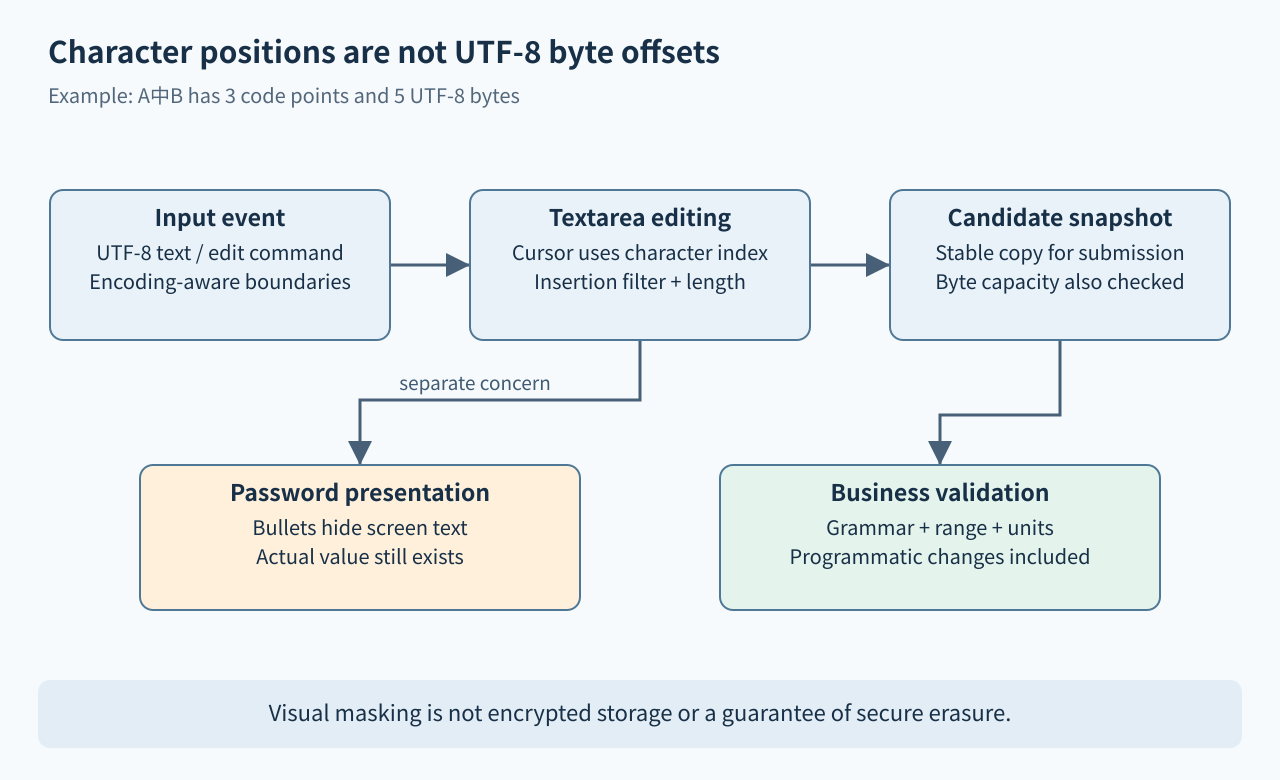
The v9.2.2 textarea header defines cursor position as a character index. A C string length measured in bytes is not that index. For example, the UTF-8 string “A中B” contains three Unicode code points but five encoded bytes. Moving one byte into 中 does not identify a valid character boundary. Keep the original encoded string and use an encoding-aware conversion whenever an external interface requires a byte offset.
Distinguish code points from what a user sees
Even counting Unicode code points is not always the same as counting user-perceived characters. A letter followed by a combining accent can occupy multiple code points while appearing as one unit; emoji sequences can be more complex. Do not advertise grapheme-aware editing solely because basic Chinese characters work. Decide which input repertoire the product supports and test its editing behavior against that promise.
For a constrained industrial field, it may be acceptable to support a documented set of names and symbols. For unrestricted personal text, cursor movement, selection and deletion need broader Unicode testing. Establish how malformed UTF-8 from an external source is rejected or replaced before it enters the model. Never repair a byte-length overflow by truncating in the middle of a multibyte sequence. Also keep storage capacity, displayed character limit and backend field limits as separate constraints.
Use widget editing operations consistently
The 9.2 textarea reference provides lv_textarea_add_text(), lv_textarea_delete_char(), lv_textarea_delete_char_forward() and cursor movement APIs. Use a UTF-8 string when inserting multibyte text rather than assuming an ordinary C character literal can express the intended input. Deletion to the left and deletion to the right have different meanings at the same cursor position, so test both at the start and end of the field.
Selection introduces another state: the next inserted text may replace or interact with selected content according to the configured behavior. Enable selection deliberately and test drag, keyboard and programmatic editing separately. Do not store a pointer returned by lv_textarea_get_text() across later mutations and assume it remains stable. If another subsystem needs the value asynchronously, copy an appropriately bounded snapshot into storage owned by that subsystem.
Separate admission filters from business validation
Accepted-character lists and maximum length are useful input constraints, but they do not establish that a completed value is meaningful. Allowing digits, signs and a decimal point does not make “–1..2” a valid number. A numeric field needs a grammar, a range, a unit and a rule for incomplete editing states. It is reasonable to permit a temporary minus sign while the user is typing, then reject it when the value is submitted.
Use LV_EVENT_INSERT for insertion-specific decisions and LV_EVENT_VALUE_CHANGED for reacting to changed content. If replacing inserted text with lv_textarea_set_insert_replace(), keep the replacement storage alive after the event callback returns as the documentation requires. Avoid recursive content updates without a guard or a clearly separated model update. Validate the complete candidate in application code before committing it to a device setting or backend, including values supplied through programmatic replacement rather than keyboard input.
Check implementation details instead of trusting one comment
For this release, the v9.2.2 implementation is especially useful when reviewing how set_text, accepted characters and maximum length interact. Header comments and high-level examples should not replace a test of the actual configured path, particularly when password mode is also involved. Keep the business model’s validation independent so a widget-side difference cannot silently change the accepted configuration.
Record a validation result separately from the displayed text. On submission, use one validated snapshot for parsing and applying the setting; do not validate one pointer and later fetch different text after another event. Return a specific, localized error that identifies the field and allowed range without discarding useful input. Keep formatting, such as decimal separators or whitespace normalization, deterministic and agreed with the receiving system.
Password bullets do not protect the underlying secret
lv_textarea_set_password_mode() masks visual presentation. lv_textarea_get_text() still returns the actual entered value, as the documentation states. Therefore a debug log, screen-model dump or copied buffer can disclose the secret even when the screen shows bullets. Define who may read it, when it is cleared, and how long a newly typed character remains visible. The widget is not encrypted storage or a credential vault.
Avoid logging raw field contents during validation, including rejected input. Limit copies and lifetime in the surrounding application, and review whether the platform can provide the required secure storage or transport. Clearing a widget should not be presented as a guaranteed secure wipe of every previous allocation or diagnostic buffer. Security claims need evidence beyond visual masking.
Test an editing matrix
Proposed cases include ASCII, “A中B”, a combining sequence, an allowed symbol, an unsupported sequence, malformed external input, and the largest permitted value. Move and delete at every boundary, replace a selection, paste several characters, and set text programmatically. Check the encoded result, cursor index, character limit, backend byte limit and final parsed value.
Test password mode with diagnostic logging disabled and verify that no test report captures real credentials. Confirm which keyboard and input-method features the platform actually provides; rendering text does not imply composition support. No simulator, input method or device-security test was executed for this article. Acceptance requires both correct editing and a validated application value, with explicit limits for Unicode and secret handling.