littlefs On-Disk Limits Versus Build Limits: Qualify a Smaller Firmware Configuration
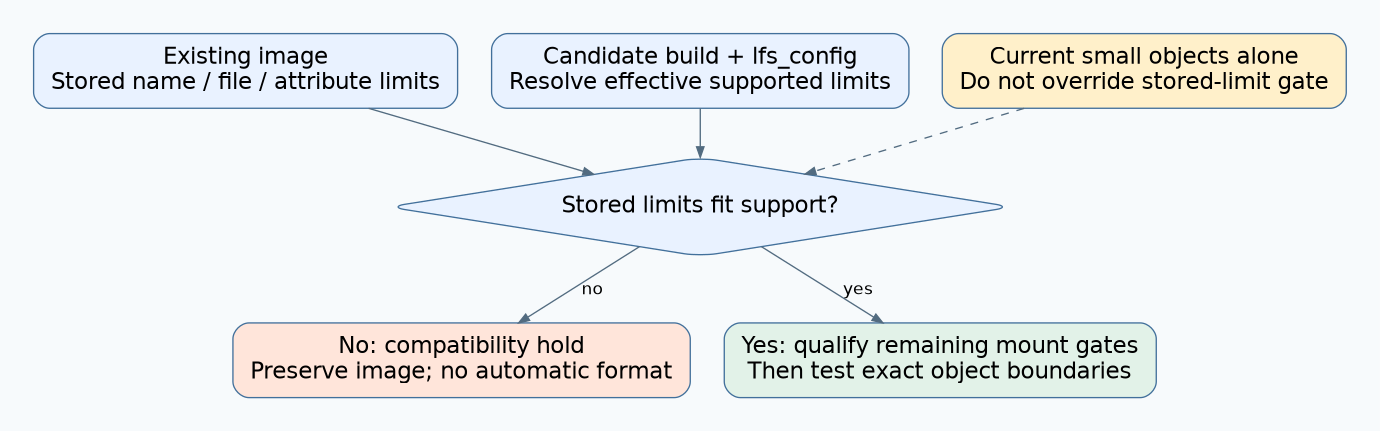
Check the limits stored in the existing littlefs superblock before reducing firmware’s name, file or attribute limits. An image can be incompatible with a smaller build even when every current filename and file happens to be short. The stored capability contract matters independently of today’s contents.
This guide is pinned to littlefs v2.11.2. It qualifies reduced implementation/configuration limits against existing media; it does not shrink a partition, grow capacity or authorize formatting a store that fails to mount. The proposed compatibility tests were not executed against littlefs or hardware.
1. Compare three different quantities
For each limit, record the compile-time maximum, the configured mount limit and the stored filesystem limit. Then inventory actual objects separately. A directory containing only ten-byte names does not imply that its filesystem was created with a ten-byte name limit.
The v2.11.2 header defines LFS_NAME_MAX, LFS_FILE_MAX and LFS_ATTR_MAX, plus the corresponding configuration fields. Names are measured in bytes. LFS_NAME_MAX also sizes the name array in struct lfs_info, so changing it affects more than an application’s filename policy.
| Quantity | Where to establish it | What it answers |
|---|---|---|
| Compile-time maximum. | Actual build definitions used by library and callers. | What representation capacity does this build support? |
| Configured maximum. | Initialized lfs_config. |
What limit does this mount attempt offer? |
| Stored maximum. | Existing filesystem information/superblock. | What limit was recorded for this filesystem? |
| Largest current object. | Complete names/files/attributes inventory. | What does the present dataset use? |
2. Understand zero-valued configuration fields
In the v2.11.2 initialization path, zero name/file/attribute configuration limits initially use the corresponding compile-time maxima. Mount then checks nonzero stored limits against those effective maxima and adopts the stored values when compatible.
Zero therefore means documented default handling, not unlimited support. A smaller compile-time maximum with a zero configuration field still cannot accept a larger nonzero stored limit. Setting a configuration limit above the compiled maximum violates the initialization assertions rather than expanding the build’s capability.
Use one consistent configuration definition across the library and every translation unit that includes its public types. Inspect the final build settings, not merely one application’s header. Mixed definitions can create structure-size disagreements that a filesystem compatibility table does not solve.
3. Work through the name-limit gate
The following hypothetical cases isolate the name-limit check. Passing this check alone does not prove that disk version, geometry, integrity or other limits are compatible.
| Stored name limit | Build maximum | Configured limit | Expected limit decision |
|---|---|---|---|
| 255 bytes. | 31 bytes. | 0. | Reject: stored limit exceeds effective support. |
| 255 bytes. | 255 bytes. | 31 bytes. | Reject for the same limit mismatch. |
| 31 bytes. | 255 bytes. | 0. | Accept this gate and adopt stored 31-byte limit. |
| 31 bytes. | 31 bytes. | 0. | Accept this gate; other mount requirements still apply. |
The mount source has parallel checks for stored file and attribute maxima, returning LFS_ERR_INVAL for an unsupported stored limit. This check happens without first proving that every existing object would fit the proposed smaller limit.
Do not edit the superblock manually to silence the rejection. The desired lower contract requires a supported, reviewed migration strategy and an inventory proving what must be preserved. Shortening names or dropping attributes can change application meaning.
4. Decide whether the reduction is worth its compatibility cost
Identify the actual benefit. A smaller name array can reduce some object storage, but reducing every numerical maximum does not automatically save meaningful RAM. The header specifically notes no real benefit from reducing LFS_ATTR_MAX. Measure the real build effect before accepting a migration burden.
If the requirement is simply to prevent new application filenames from exceeding a product policy, enforce that policy at the application boundary while retaining the filesystem capability needed for existing media. Keep that choice distinct from changing the library’s public maximum.
If a smaller on-disk contract is required, qualify a preserved-data migration to a deliberately created compatible filesystem on disposable copies first. Production reinitialization requires explicit authority to discard the exact destination and verified preservation of its valuable contents. There is no format-on-mount-error fallback in this workflow.
5. Build boundary fixtures for every allowed reader
Prepare images from the actual older creation configuration, not just newly formatted images using the proposed small build. Record their stored limits and hashes. Include the bootloader or maintenance reader if it accesses the same filesystem.
- Test mount with stored limits below, equal to and above the candidate’s effective support.
- Include an image with a large stored limit but only small current objects.
- For compatible images, test names at the accepted byte limit and one byte beyond it.
- Exercise file writes at the supported file-size boundary and a write that would exceed it.
- Exercise attributes at the accepted length and an oversized attribute request.
- Remount and enumerate preserved objects with every permitted reader, comparing exact names, sizes, contents and attributes.
Choose practical small test limits and sufficient disposable capacity so the intended limit check is not obscured by unrelated space exhaustion. Keep the library revision, compiler definitions and configuration with each expected result.
6. Interpret errors and truncated reads correctly
The pinned operation paths distinguish an overlong newly created name, a write beyond the file limit, and an oversized attribute request. Notably, an attribute-size limit can return LFS_ERR_NOSPC; that result alone does not prove the physical device is full.
The attribute-read contract also allows truncation to the caller’s buffer while reporting the on-disk attribute size. A small read buffer that returns a prefix is not evidence that the whole attribute fits the new application representation. Check the returned size before parsing or accepting it.
Preserve the first failure and the exact comparison that caused it. Avoid collapsing every mount or operation error into “corrupt media.” A deliberate capability mismatch has a different remedy from an unreliable storage read.
Hypothetical small-build failure
A maintenance build reduces its name maximum to 31 bytes because all observed filenames are shorter. Existing field images were created with a stored maximum of 255. The new build rejects them before normal file access, despite the apparently compatible dataset.
The team keeps the necessary filesystem capability and applies its shorter naming policy only to new application-generated names. Any later on-disk limit migration is reviewed separately. Release with the stored/build/configuration table and boundary fixtures, so a memory optimization cannot silently invalidate existing devices.