Retiring WPS from a Legacy Product: Preserve a Supported Installer Recovery Path
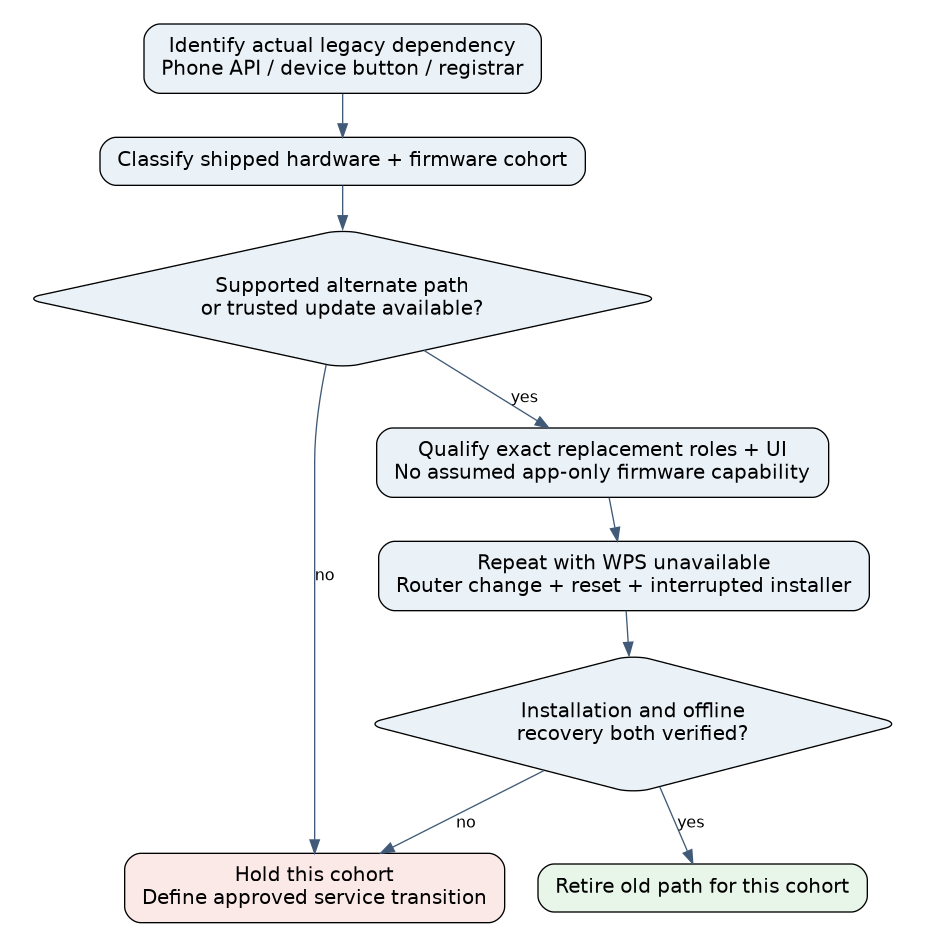
Retire WPS by qualifying a replacement installation and recovery path for every shipped device cohort before removing the old entry point. Updating the phone app alone cannot give a WPS-only embedded device a different provisioning protocol. The migration decision must include the device firmware, installer platform, access network and the recovery route available after credentials are lost.
This guide uses Android 15, API level 35, with android-15.0.0_r1 source as the phone reference, and wpa_supplicant 2.11 as an inspectable legacy implementation. It is a migration qualification procedure, not a general comparison of QR codes, DPP, SoftAP and BLE. No installer, phone or device firmware was changed.
Find the actual WPS dependency
Inventory what the old workflow does. Does the Android app call a WPS API? Does it merely instruct the installer to press a router and device button? Does an embedded registrar provision another station? These dependencies can share the same “WPS setup” label while breaking at different boundaries.
Wpa_supplicant 2.11’s WPS documentation distinguishes enrollee and registrar operations and their control commands. Record the role and operation used by the shipped firmware instead of assuming that every device performs the same exchange. Preserve the existing device’s supported credential-storage and recovery behavior during the audit. wpa_supplicant 2.11 README-WPS
On the pinned Android 15 implementation, WifiManager.startWps() does not start an exchange. With a non-null callback, it immediately reports an internal failure; cancelWps() behaves similarly. Repeating that call or extending a progress spinner cannot restore the missing operation. This says nothing by itself about a separate hardware-button exchange between an AP and embedded enrollee. Android 15 WifiManager WPS methods
Build a cohort matrix with a real recovery column
| Cohort | New installation path | After router replacement or reset | Migration decision |
|---|---|---|---|
| Legacy firmware with a qualified alternate local interface | Use that supported authenticated path | Verify it remains reachable without the old network | Eligible after end-to-end testing |
| Legacy firmware updateable through an existing trusted path | Install and verify replacement capability first | Test recovery on the updated image | Stage rollout; retain a documented rollback/recovery plan |
| Legacy WPS-only device with no qualified update or alternate path | No software-only replacement established | Installer cannot assume a new app can recover it | Hold removal for this cohort or define an approved service transition |
| New device with supported replacement protocol | Qualify exact phone/device roles | Test reset, ownership and offline recovery | Do not inherit legacy compatibility claims |
Use hardware and firmware identifiers rather than a marketing model name alone. A factory image, field-updated image and repaired unit can expose different capabilities. Record whether a device already belongs to an owner and whether replacement provisioning is authorized in that state.
Qualify a replacement through its supported interface
AOSP documents Android 9’s WPS deprecation and Android 10’s introduction of Wi-Fi Easy Connect. It identifies a public capability query and a system activity intent for application integration, while requiring support across supplicant, driver and firmware. Use those as capability gates, not as proof that every current phone and embedded peer supports the same roles. AOSP Wi-Fi Easy Connect implementation guide
For Android 15, isEasyConnectSupported() is a feature query. The direct configurator-initiator method in WifiManager is a system API requiring privileged setup/settings permissions; it is not a general third-party-app workaround for the retired WPS method. Use the supported system UI integration appropriate to the app and confirm the actual role combination on the target. Android 15 Easy Connect feature and permission boundaries
Do not copy Android 10’s documented role list onto every later release without checking. Likewise, replacing a WPS label with a QR image does not add protocol support to old firmware. The new label, bootstrap material and installed implementation must refer to the same intended device and supported exchange.
Separate migration stages from connection success
- Detect the cohort and installer capability. Determine the device firmware and the phone’s supported path before presenting an actionable setup button. If the needed method is unavailable, show a specific supported next step rather than an endless generic retry.
- Establish update eligibility. Where a firmware update supplies the replacement, prove the existing authenticated update route works before changing credentials or resetting the product. An update that requires the network being removed is not an offline recovery path.
- Install and verify the replacement capability. Read back the actual firmware and provisioning state. Keep update completion, provisioning readiness and network connection as separate results.
- Provision a dedicated test network. Exercise the supported installer UI, user consent and device authorization window. Verify intended network association and the product’s authenticated service, not just transfer of configuration.
- Remove dependence on the old path. In the test environment, ensure the legacy WPS path is unavailable and repeat installation. A successful trial that silently falls back to WPS has not validated retirement.
- Exercise recovery before rollout. Replace the test router, change credentials, interrupt the installer and perform the documented device reset. Confirm that the replacement remains usable without the former network or an obsolete phone API.
Include an already owned device, an unowned factory device and a unit restored from an older image. Confirm that migration does not bypass ownership or erase unrelated calibration and application state. Credential transfer and product-account reassignment are separate authorized actions.
Use a hypothetical mixed-fleet decision
Suppose cohort A has WPS-only firmware, while cohort B already exposes a qualified authenticated USB setup interface. The new Android installer cannot use its old WPS API. B can enter the replacement qualification campaign through USB. A remains held until a supported firmware or service transition exists; calling the same phone API repeatedly is not a recovery plan.
A newer DPP-capable cohort needs its own phone-role and system-UI tests. Success there does not clear A or B automatically. Keep the matrix visible to installers so a serial-number or firmware mismatch produces the correct instructions.
No WPS or DPP exchange, firmware update or factory reset was executed for this guide. The exact Android methods and official implementation boundaries were inspected. Release retirement only when each supported cohort has installation, router-change and reset evidence, plus truthful handling of cohorts that cannot migrate through the available interface.