Wi-Fi Link Rate Is Not Application Goodput: Build a Useful Throughput Test
A high reported Wi-Fi bitrate and low useful delivery are compatible observations. The bitrate describes a radio transmission parameter; useful delivery includes contention, retries, protocol work and endpoint processing. The practical task is to align direction, measurement window and counter meaning before deciding which component limits the product.
This guide uses Linux 6.12 nl80211/mac80211 statistics and the iperf3 3.17.1 command contract. It assumes a single-link infrastructure connection for the reference analysis. Multi-link devices, firmware-specific counters and vendor drivers need their own field mapping. No throughput, range or module comparison was measured here; the executed tests concern a synthetic analysis helper.
Make the receiver and direction explicit
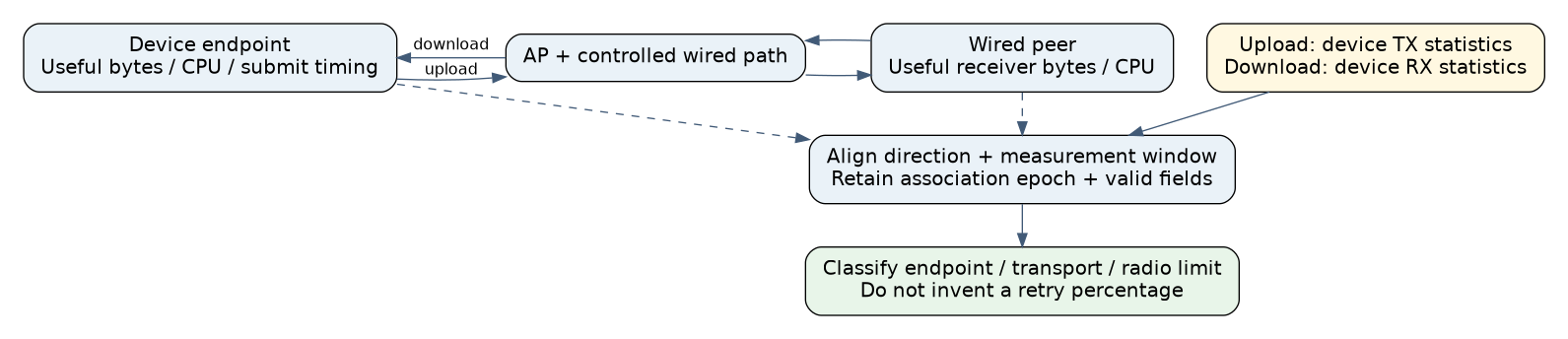
Write the test as “device sends to wired peer” or “wired peer sends to device.” Avoid calling both “the Wi-Fi speed.” Place the peer on a controlled wired side of the AP where possible, and verify that its CPU, storage and wired path are not already limiting the workload. Record the selected interface and route so an alternate network cannot silently carry the transfer.
For product goodput, count unique useful bytes accepted at the agreed receiving boundary over a declared elapsed window. Exclude application framing and duplicate records if they are not useful work. Sender enqueue counts do not prove reception. State whether connection setup, warm-up, final draining and receiver storage are included; changing those boundaries changes the metric.
An explicitly synthetic example receives three unique 1,000-byte records over two seconds, with one duplicate also observed. Useful goodput is 12,000 bits/s, not 16,000 bits/s. This arithmetic defines the counter contract. It is not a Wi-Fi performance result.
Do not turn station statistics into invented percentages
Linux 6.12 marks available station-information fields with a validity bitmap. Missing retry or rate information means unavailable evidence, not a measured zero. Its nl80211 contract describes TX packets as MSDUs and MMPDUs, while TX retries and failed transmissions are counted in MPDUs. Consequently, dividing retry count by packet count does not automatically produce the percentage of application packets retried. Aggregation and differing accounting units matter. Linux 6.12 nl80211 station-information attributes
Preserve raw counter deltas and their units. Validate any derived ratio against the actual driver’s accounting before giving it a percentage label. A cumulative counter must also belong to the same association/device lifetime at both ends of the window. After reassociation, firmware restart or a counter decrease, start a new segment or mark the delta unknown. Do not silently interpret every decrease as integer wraparound.
Rate direction needs equal care. The 6.12 mac80211 implementation fills TX rate from local transmit statistics and RX rate from receive statistics for its ordinary single-link path. A station-side TX observation concerns device-to-AP transmission; the AP’s corresponding station record has the opposite local perspective. Some prose field comments are less clear than the actual assignment path, so retain the tool, interface role and implementation mapping in the report. Linux 6.12 sta_set_sinfo()
Use iperf as a controlled transport probe
In iperf3 3.17.1, the default client sends to the server; -R reverses that direction, and --bidir runs both simultaneously. The output identifies sender and receiver summaries, while interval output reflects the emitting endpoint. Preserve both perspectives rather than comparing a sender interval from one run with a receiver summary from another. iperf3 3.17.1 manual
The same manual specifies a default UDP target rate of 1 Mbit/s. A UDP run left at that default cannot establish the radio’s saturation capacity. Declare offered rate, datagram size, stream count and duration. For parallel streams, its bitrate limit applies per stream. A higher multi-stream result can reveal an endpoint or transport limitation without proving that a single product connection will achieve it.
These option descriptions are source-checked, not an executed benchmark. Run traffic generation only on the authorized test path. Use synthetic transport throughput as a diagnostic layer, then repeat with the product’s real encryption, parsing, storage and record validation.
Build the comparison in stages
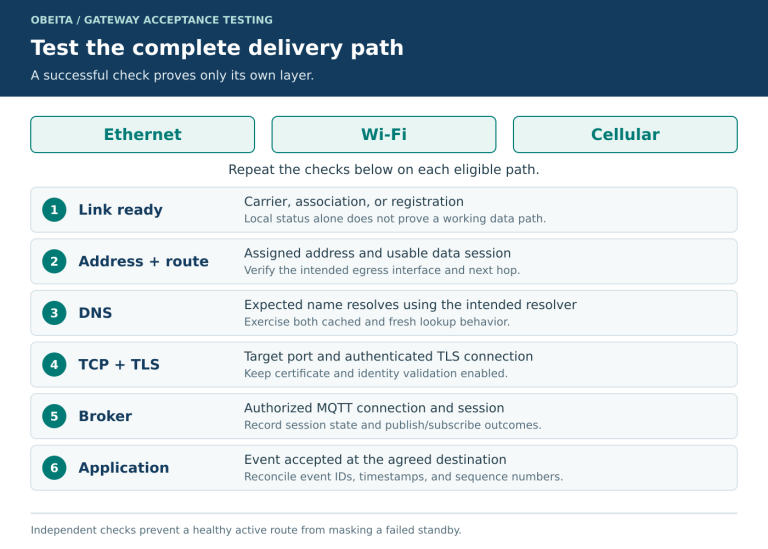
- Inventory the path. Record board, antenna/enclosure, kernel, driver, firmware, AP, lawful channel configuration, security mode, transport and peer versions. Keep the actual regional operating constraints fixed.
- Check the wired reference and endpoints. Confirm the sink can consume the intended workload and monitor per-core CPU, scheduling pressure and storage waits. Total CPU utilization can hide one saturated worker.
- Run one direction at a time. Align receiver useful-byte counts with local TX/RX rate samples and valid retry/failure deltas. Keep association epochs and timestamp uncertainty explicit.
- Sweep offered load deliberately. Compare low load, the representative product workload and a clearly labeled stress case. With UDP, separate offered rate, delivered rate and missing datagrams. With TCP, retain retransmission and congestion behavior without treating them as equivalent radio counters.
- Change the endpoint work. Compare a memory-backed source/sink with the real application path while holding the network case steady. An improvement isolates a processing contribution; it does not establish a new RF capability.
- Add simultaneous directions last. Treat the combined case as a new shared-resource workload. Do not add two isolated one-way maxima and call that bidirectional capacity.
Interpret the evidence conditionally
| Observation | Next discriminating check |
|---|---|
| Low delivery with a saturated endpoint worker | Reduce processing cost or use the controlled sink before changing radio settings |
| Delivery falls as valid retry/failure deltas rise | Correlate RF conditions and capture evidence; counters alone do not identify interference |
| Transport probe is healthy but product records are slow | Trace parsing, storage, encryption and application backpressure |
| Only one direction is poor | Inspect that sender’s queueing and that receiver’s processing, with the correct local rate perspective |
For a hypothetical image-upload gateway, a high TX rate with a saturated compression worker and an underfilled send queue suggests a producer bottleneck. That is a testable interpretation, not a measured diagnosis. A radio replacement should wait for evidence that the radio path is actually limiting useful delivery.
Keep the analysis reproducible
A Python 3.12.14 host fixture verified unique-byte accounting, rejected conflicting duplicate sizes and invalid windows, and marked counter deltas unknown across missing fields, decreases and changed epochs. It did not execute iperf, access a radio or model driver accounting.
The release report should contain receiver goodput, direction, workload, raw valid counter deltas, endpoint load and all changed conditions. That package explains a bottleneck without promising performance from a PHY label or manufacturing a retry percentage from incompatible counters.