Greengrass Thing-Group Removal: Verify When the Old Components Actually Leave a Gateway
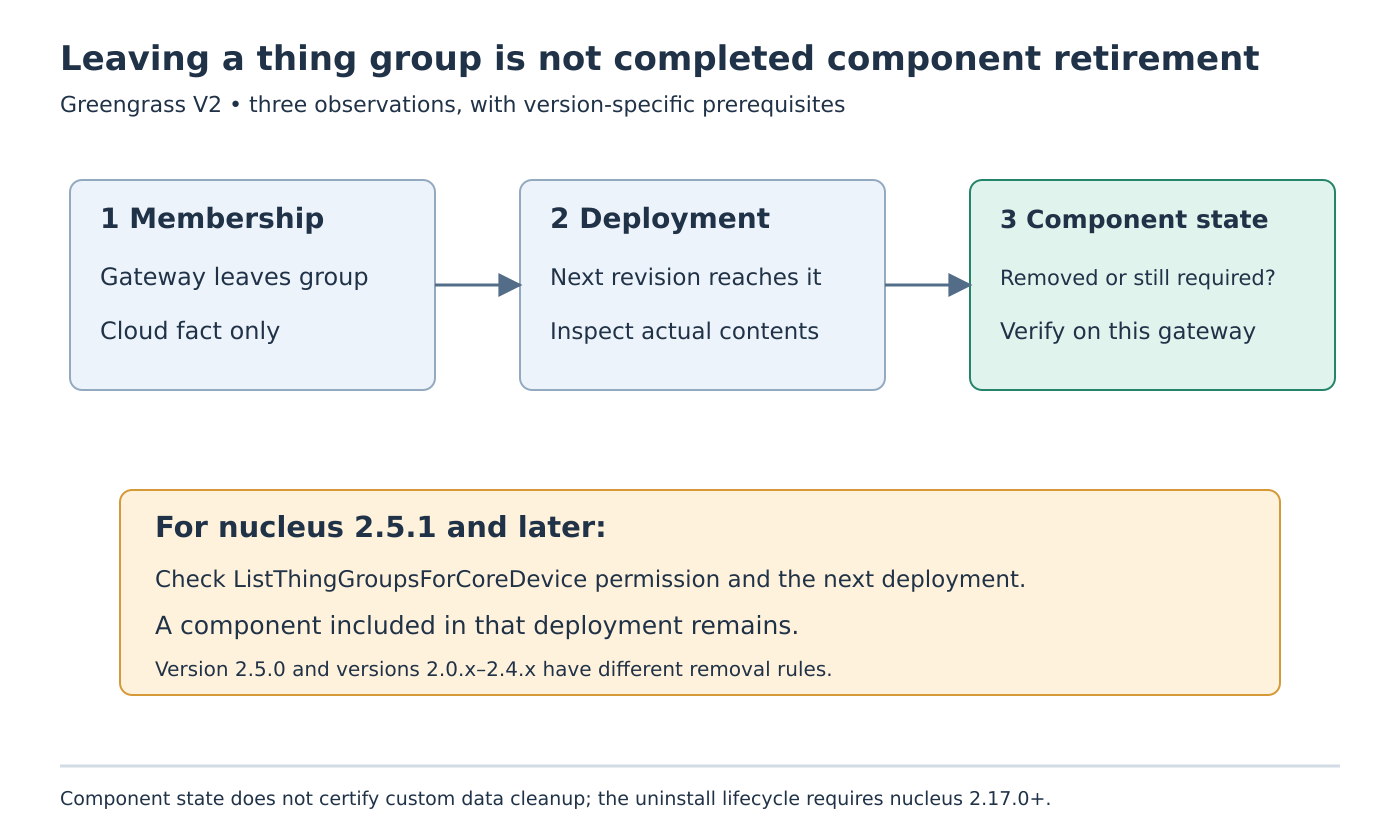
Removing a Greengrass core device from an AWS IoT thing group is not proof that the group’s components have already disappeared from the gateway. Group membership, deployment reconciliation and component state are separate observations. Their relationship also depends on the installed nucleus version and the device’s authorization.
Start by identifying which component should retire and why. The workflow below reviews Greengrass V2 documentation read on 19 October 2026. It does not remove a device, change a policy, submit a deployment or delete component data.
Establish the version-specific removal path
The Greengrass deployment guide distinguishes three nucleus cases:
- Version 2.5.1 and later: with
greengrass:ListThingGroupsForCoreDevice, the former group’s components are removed on the next deployment to the device, except components included in that next deployment. Without the permission, the old group components are not deleted by this membership change. - Version 2.5.0: the next-deployment behavior also needs that permission; without it, deployments fail to apply.
- Versions 2.0.x through 2.4.x: leaving the group does not automatically delete its components.
Keep these branches in the maintenance record. “Greengrass V2” alone is too broad to choose the expected outcome, and the missing-permission outcome is not identical in 2.5.0 and later releases.
For a newer device, inspect the applicable AWS IoT policy rather than assuming that successful MQTT connectivity proves the group-listing permission exists. Any policy correction still needs the responsible owner’s approval and bounded scope.
Name the subsequent deployment
Consider a synthetic Gateway17 that leaves PackagingLab. Its installed nucleus is in the 2.5.1-or-later branch, and the required permission has been verified. At this point, record only that the membership change occurred. Do not mark the component-retirement task complete.
Identify the later deployment that reaches this device. Preserve its target, revision and contents, then inspect its outcome. A deployment prepared for another target or a gateway that has not yet received the intended revision does not establish the required reconciliation step.
If com.example.LabelCollector is included in that next deployment, the documentation says it remains. Its continued presence is then consistent with the desired deployment contents, not evidence that group removal was ignored. Compare the proposed retirement list with the actual subsequent deployment before investigating a runtime defect.
Also inventory remaining deployment requirements. A component still needed by another approved application should not be removed merely because one group’s ownership ended. Reconcile the intended software set before choosing a cleanup operation.
Use a three-part completion record
First, retain the cloud membership observation showing that the device no longer belongs to the specified group. Second, retain the relevant subsequent deployment and its actual device-side outcome. Third, inspect the resulting component state on that gateway.
These records should name the same device and intended component. A console view of group membership cannot substitute for the device-side component observation. Conversely, a component process being stopped does not establish why it stopped or whether a deployment still requires it.
For a proposed isolated fixture, compare four cases: permission present but no later deployment yet; permission present with a later deployment omitting the component; the later deployment still including the component; and the applicable missing-permission branch. Use harmless components and preserve the expected difference between versions.
Do not repeatedly remove local files to make the installed state look correct. That bypasses the ownership question and can leave a runtime inconsistent with its deployment requirements.
Separate component removal from application-data cleanup
A removed component is not a claim that every file it created has been erased. If retirement includes application-owned data, define that requirement and its approved retention policy separately.
The recipe reference documents an uninstall lifecycle only for nucleus 2.17.0 and later. It runs for permanent component removal, not version upgrades. It also states that a failed or timed-out uninstall script does not prevent component removal or fail the deployment.
Consequently, successful deployment status cannot alone prove that custom cleanup succeeded. Capture that script’s result and inspect the particular non-secret test artifacts when cleanup is part of a qualified retirement. Older nuclei must not be assumed to run this lifecycle.
No removal or cleanup test was performed here. The useful endpoint is evidence that the correct membership change was reconciled by the correct deployment and that the resulting component state matches the reviewed requirement. Any additional data-erasure requirement remains its own verified outcome.