systemd Timers on Intermittently Powered Devices: A Catch-Up Trigger Is Not a Backlog
A device returns after three missed nightly runs and its maintenance service starts once. With a persistent systemd calendar timer, that can be the intended behavior. The timer remembers enough trigger history to request catch-up activation; it does not create a durable queue containing one job for every missed calendar occurrence.
This article pins the systemd v257 timer manual. The example is an intermittently powered laboratory gateway reconciling local report records. No timer was installed, no system clock was changed, and no maintenance operation was run.
Define the work separately from its wake-up
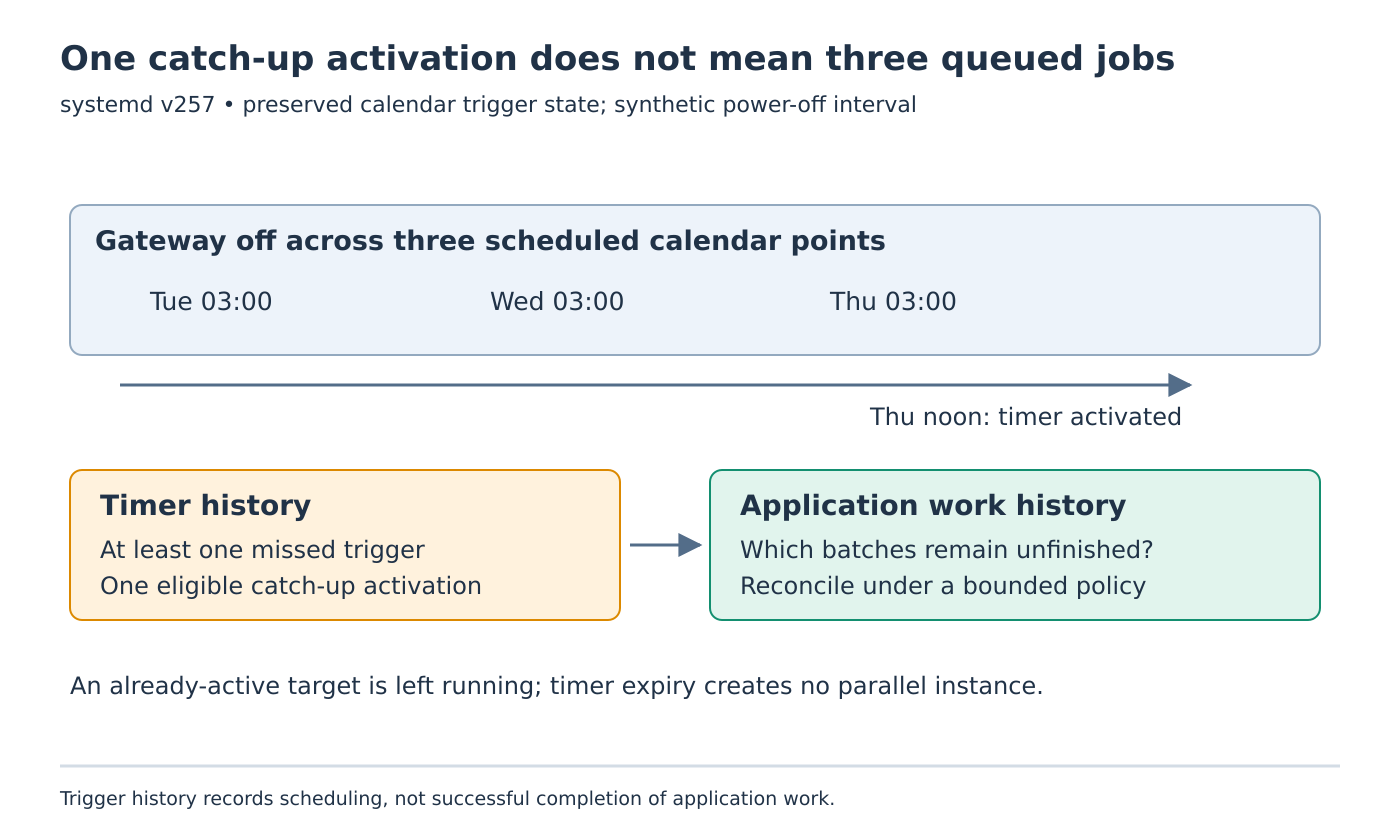
Suppose the calendar schedule is daily at 03:00 UTC. The gateway completes Monday’s reconciliation, then remains powered off across Tuesday, Wednesday and Thursday’s scheduled times. It boots on Thursday at noon with its timer state preserved and a valid wall clock.
With Persistent=yes, activating the calendar timer can cause a catch-up activation because at least one scheduled trigger was missed. It does not supply three separate service invocations representing the three days. Any configured RandomizedDelaySec= still applies to the catch-up trigger.
The distinction matters when the job processes intervals. A service that always handles only “today” could leave older records unreconciled even though the timer behaves correctly. A service that scans its own outstanding records can make one activation useful for several intervals, under an explicit workload and completion policy.
Keep two different histories
Maintain an application checkpoint describing completed work, independently of the timer’s last-trigger state. For example, a reconciliation record can identify the latest fully processed source batch plus any unresolved batches. Its meaning belongs to the application, not to systemd’s timer timestamp.
A trigger followed by a failed or interrupted service does not prove the batch completed. Conversely, manually completing a batch does not necessarily change the timer’s trigger history. Combining these two histories into one “last run” field makes recovery ambiguous.
For the synthetic gateway, let a bounded invocation inspect outstanding batch identifiers, process eligible records, and save completion only after the application’s commit requirement succeeds. If the invocation reaches its work budget, retain remaining identifiers for another permitted run. This is a proposed application policy, not behavior supplied by Persistent=.
Check whether the target is still active
Timer expiry does not restart an already-active target service or spawn a parallel instance. This creates two important fixtures.
First, consider a long-running reconciliation that is still active when the next calendar point arrives. The existing invocation remains running. Do not count that expiry as proof that another worker was launched or that an additional queued invocation will follow automatically.
Second, consider a Type=oneshot service with RemainAfterExit=yes. Its command can finish while the unit remains active. Repeated timer events then normally leave that active unit alone. The absence of another process is consistent with the configured lifecycle, even though the first invocation exited successfully.
For a recurring finite job, inspect the target’s active state as well as its process list. The v257 service manual explains the oneshot lifecycle and the effect of RemainAfterExit=. Removing that setting is a design choice to review against the unit’s purpose, not a diagnosis to apply blindly to every service.
Keep the clock domain explicit
Persistent= has an effect on timers using OnCalendar=. It does not turn an OnBootSec= or OnUnitInactiveSec= monotonic schedule into a replay log across powered-off periods. These timer families answer different scheduling questions.
A valid wall clock is also an input to the example. A gateway without a reliable clock at boot needs a reviewed time-synchronization policy before its calendar behavior can be interpreted. Do not use the noon catch-up fixture to claim that an unset clock produces the same sequence.
Actual activation timing also depends on timer accuracy and delay settings. The calendar expression defines intended occurrences; it does not guarantee exact process-start timestamps or completion deadlines.
Review a state table before deployment
Use three proposed cases: inactive target after several missed calendar points, an already-running target at an expiry, and a completed oneshot deliberately left active. Record timer configuration, preserved trigger state, target active state, invocation count and application checkpoints separately.
The expected interpretation is one eligible catch-up activation in the first case and no new instance simply because an expiry occurs in the latter two. Then make the application fail partway through a synthetic batch in a separate controlled test. Its recovery must follow the work checkpoint rather than assume the timer’s timestamp certifies success.
The useful contract is concise: the timer offers an opportunity to reconcile, while the application identifies and completes outstanding work. Once those responsibilities are explicit, a single catch-up invocation stops looking like lost scheduling history and becomes a testable recovery design.