Yocto Layer Compatibility: Review More Than the Declared Release Series
A layer's compatibility diagnostic disappears after someone adds the current release name to its configuration. The next parse then fails because a required class is unavailable. Editing the declaration changed what the metadata claimed; it did not repair the missing interface. Diagnose the failed compatibility boundary before deciding which file to change.
This article uses the Yocto Project 5.0.12 layer-check definitions and BitBake 2.8 variable reference. It concentrates on release-series declarations, dependency declarations, and interpreting specific check results. The examples are illustrative, and no layer-check run or product build is claimed.
Record the combination that produced the diagnostic
Capture the exact revision of the candidate layer, OE-Core, BitBake, and each dependency layer. Save the enabled layer list, configuration, command line, and first diagnostic. A branch name alone is insufficient because its contents may move between investigations.
Reproduce the issue in a separate build configuration, keeping the failed checkout available for comparison. Avoid accumulating edits to several declarations at once. If the diagnostic changes, the review should be able to identify the one change responsible.
Before running a suite, read yocto-check-layer --help from the checkout being evaluated. Use the options supported by that revision and record any dependency setup. An invocation copied from another release can fail before testing the candidate layer at all.
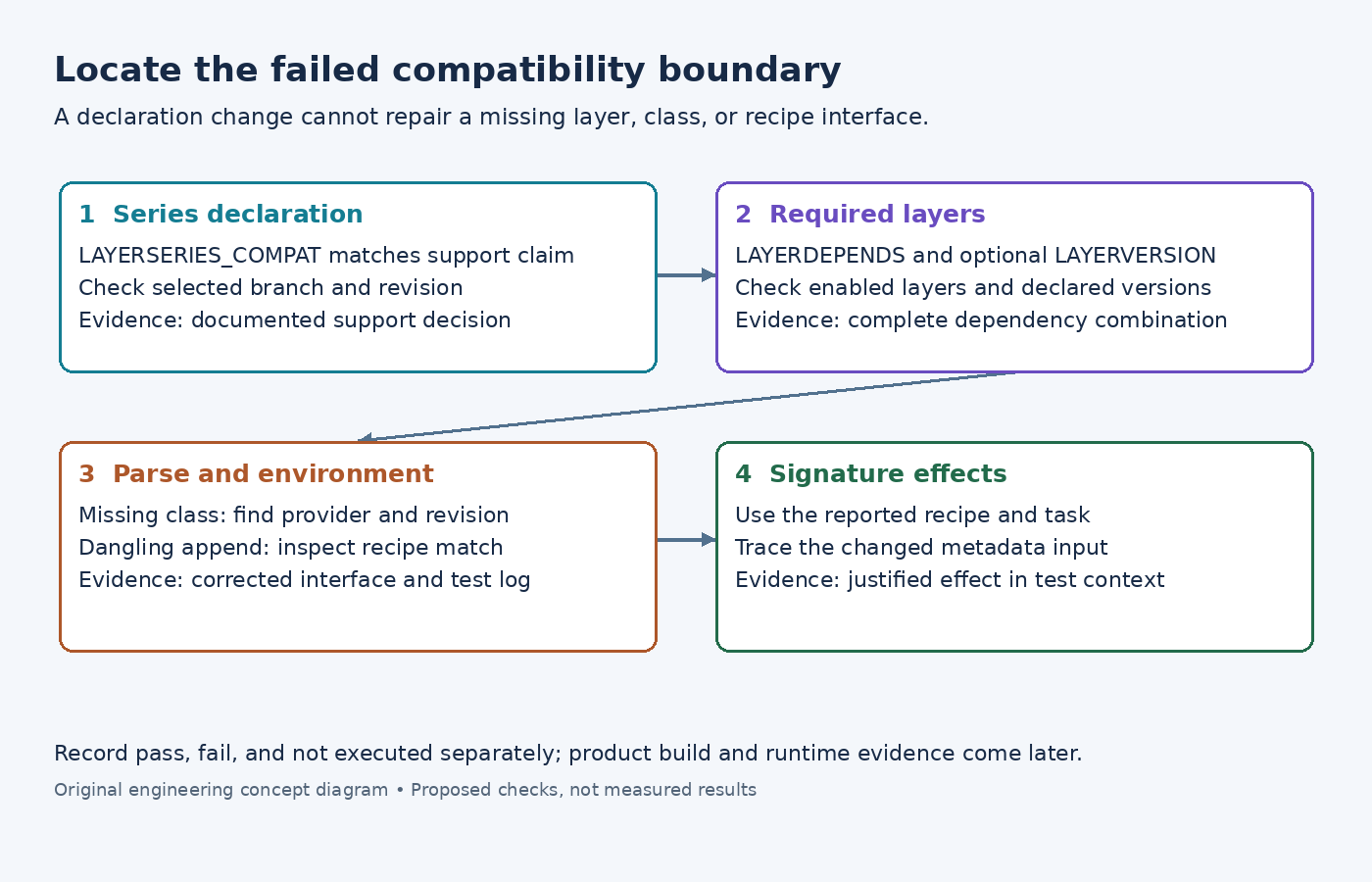
Failure boundary one: the release-series declaration
The LAYERSERIES_COMPAT definition identifies the OE-Core release series a layer claims to support. An illustrative declaration is LAYERSERIES_COMPAT_product = "scarthgap", with the suffix corresponding to the layer's configured identity.
When the current series is absent, check whether the intended branch or revision was selected. If the layer genuinely has not been ported, retain that as a compatibility gap. Adding the series name is appropriate only as part of a reviewed support change with evidence for the interfaces the layer uses.
Keep declaration evidence separate from execution evidence. A correctly spelled, matching series name does not establish that a recipe can configure, that an append still matches its target, or that a board boots. It answers an earlier question about the support claim represented in metadata.
Failure boundary two: a missing or mismatched dependency layer
The LAYERDEPENDS reference describes required layers and optional exact layer-version constraints. A missing dependency or a specified version mismatch produces an error. Those layer version values are not substitutes for repository commit IDs.
For a missing dependency, inspect the candidate's declaration and the configured layers before modifying recipe-level DEPENDS. These are different dependency systems. Confirm that the required layer is both present on disk and enabled in the build configuration. Then check that its revision belongs with the proposed release combination.
If an exact layer-version constraint fails, find the dependency's declared LAYERVERSION and the maintainer's compatibility rationale. Removing the constraint merely to continue parsing discards an explicit requirement. Determine whether the dependency is wrong or whether the requirement itself needs a reviewed update.
Failure boundary three: metadata interfaces no longer match
The official layer-check definitions include common.test_parse, which checks bitbake -p, and common.test_show_environment, which checks environment evaluation. Begin with the first failing diagnostic rather than the final count of failed tests.
For an unavailable inherited class, locate the inherit statement and establish which enabled layer is supposed to supply that class. Check the file's existence and name in the selected revision. A dependency-layer omission and a class removed during migration can produce similar symptoms but require different corrections.
For a dangling append, compare the append filename with the recipe versions actually available. Use bitbake-layers show-appends once parsing permits it. The layer guide explains that appends need matching recipes. Renaming an append can restore the match, but the append's assumptions still need review against the new recipe's tasks, variables, and installed paths.
For an environment-evaluation failure, inspect the named expression, include, or function. Reduce the investigation to one affected recipe where possible. Preserve the original diagnostic and the minimal metadata correction; do not invent a successful test output for the review record.
Failure boundary four: the signature check finds an effect
The documented common.test_signatures check examines signature changes associated with BSP and distribution layers. This is a different kind of evidence from common.test_layerseries_compat, which examines the compatibility declaration. A layer can satisfy the declaration check while still affecting task inputs in an unacceptable way.
Use the check's reported recipes and tasks to locate the responsible metadata change. Inspect relevant assignment history with bitbake -e recipe-name; the variable-inspection guide describes that output. Decide whether the changed input belongs in the tested context before changing the declaration or suppressing the test.
Keep the scope narrow: this check is evidence about metadata effects under its test configuration. It does not by itself prove binary identity, successful runtime behavior, or coverage of every machine. Also distinguish a skipped check from a completed check with a passing result.
Close each finding with the evidence it needs
Run yocto-check-layer /path/to/candidate-layer from the initialized environment with the required setup. Record each relevant test as passed, failed, or not executed, together with its log and configuration. Do not infer full product-build coverage from a test's name alone; consult the implementation shipped in the checkout before making that claim.
After resolving declaration, dependency, parse, and signature findings, build the affected product targets and test the behavior touched by the fixes. Keep those results separate from the layer-check report. The final compatibility statement should name the revision set and remaining limitations, so a later maintainer can tell which boundary was actually verified.