Yocto Native and Nativesdk Recipes: Choose the Execution Host Before Reusing a Tool
A recipe builds a code generator and then tries to execute it during another package's build. The command fails because the generator was compiled for the device. A different team copies a working build-host generator into an SDK, only to find that it depends on paths from the original build tree. Both failures begin with an unanswered question: where must this executable run?
Yocto Project 5.0.12 provides distinct target, native, and nativesdk recipe contexts. This article uses those documented contexts to design and check a reusable tool recipe. The imaginary schema-tool examples are instructional; no build or SDK installation is claimed.
Classify the executable by its execution environment
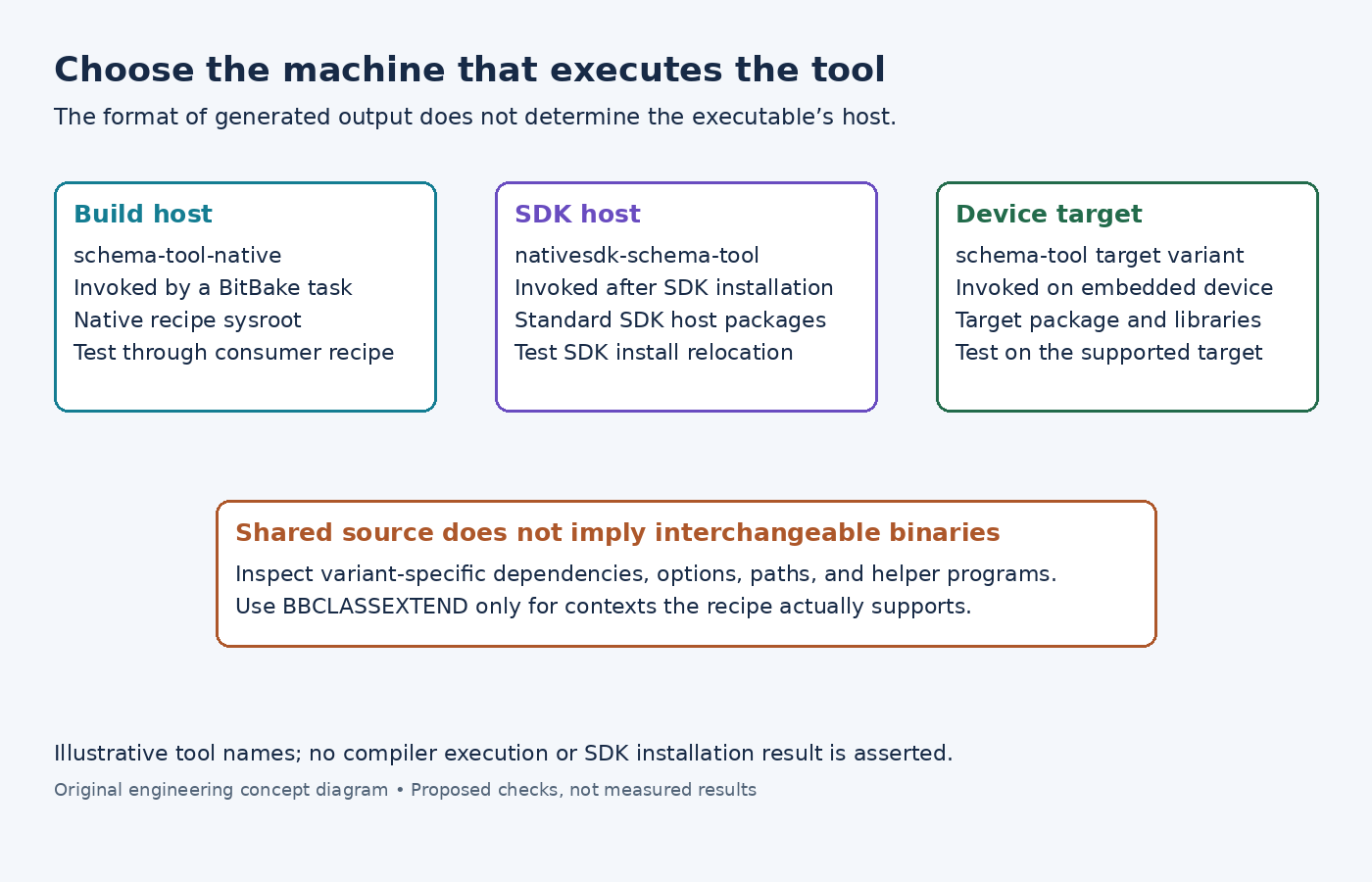
List each use of the tool separately. A generator invoked by a BitBake compile task runs on the build host. A generator delivered to an application developer as part of an installed SDK runs on the SDK host. A diagnostic executable installed on the embedded device runs on the target.
The output of a generator does not determine the generator's execution host. A program that produces target source code can still be a build-host executable. Conversely, an executable linked into the target application belongs to the target context even when its source repository also contains host utilities.
Write a small interface description for each use: input format, output format, execution host, required runtime libraries, and installation location. This exposes cases where one source tree needs multiple builds rather than one binary being copied between incompatible environments.
Use the variant mechanism deliberately
The native class reference describes tools built to run on the build host. It supports a dedicated recipe with the -native naming convention or a native variant through BBCLASSEXTEND. The nativesdk class reference describes tools for the SDK machine, with the nativesdk- naming convention and an equivalent variant mechanism.
For a source recipe that genuinely supports all three contexts, BBCLASSEXTEND = "native nativesdk" is an illustrative starting point. It is not a guarantee that the upstream build is suitable for every context. Inspect build-system options, dependency selection, installed data paths, and any commands that execute newly built programs.
Use the documented :class-native, :class-nativesdk, and :class-target overrides for differences that are truly context-specific. Keep common source and patch information shared where possible. Avoid copying whole recipes merely to change one option, but do not force unsupported target-only functionality into a host-tool variant.
Supply the build task with a native dependency
If an application recipe executes the generator during its build, make its dependency on schema-tool-native explicit, using the actual recipe name in a real product. Then inspect the consumer's generated task and log to confirm which executable path it invokes.
The recipe sysroot guide distinguishes the target recipe sysroot from the native recipe sysroot. Recipes install into their own staging area, and the build system populates sysroots through the supported tasks. Do not repair a missing generator by manually copying it into another recipe's sysroot.
Check both the selected executable and its dependencies. A correctly named native tool can still invoke an unexpected helper from the host environment if the recipe does not declare or locate that helper correctly. Inspect the task-level command sequence, not only an interactive shell's command lookup.
When the build host and target share a CPU architecture, the mistake can be less obvious. A binary may start locally while relying on the wrong libraries or paths. Treat successful execution on one development machine as a test observation, not proof that the context was selected correctly.
Add the SDK-host package to the correct SDK side
The standard SDK customization guide separates packages added through TOOLCHAIN_HOST_TASK from target-side SDK packages. For a standard SDK, an illustrative addition is TOOLCHAIN_HOST_TASK:append = " nativesdk-schema-tool", assuming that package actually exists.
Verify the package name produced by the nativesdk recipe. Recipe names and output package names need not be identical. Confirm the generated SDK includes the intended executable and supporting data files on its host side, rather than only placing target libraries in the target sysroot.
Do not transfer a binary from the native work directory into the SDK as a shortcut. The SDK is a deliverable with its own runtime and relocation expectations. Package it through the supported SDK mechanism and test the installed result independently of the original build tree.
This host-task variable example is scoped to the standard SDK. An extensible SDK has separate host-package controls documented for that SDK type; do not assume the same setting changes both deliverables.
Test each context at its real boundary
For the native variant, build a small consumer that invokes the generator through its declared dependency. Remove accidental reliance on a separately installed copy of the tool from the test environment. Retain the task log and generated output for review.
For the nativesdk variant, install the produced SDK in a clean test location, source its environment, and run the generator there. Repeat with another supported installation path to detect hard-coded build-directory references. Check required templates, plugins, or schemas as well as the main executable.
For the target variant, inspect the produced executable's architecture and test it on the supported target environment. If the target never needs the generator, verify that the image does not include it merely because the build used the native variant.
Accept the recipe when each required context has a clear dependency path and a successful context-specific test. The important result is not three similarly named packages. It is evidence that each consumer receives a tool built, installed, and exercised for the machine where that tool must execute.