Yocto PACKAGECONFIG: Trace a Feature from Recipe Option to Actual Dependency
Enabling one recipe feature adds a library to the build graph, but the feature remains unavailable on the device. In another configuration, disabling the feature leaves an unexpected runtime package installed. PACKAGECONFIG connects several different mechanisms, so tracing only the final feature list can miss the boundary that failed.
This article uses Yocto Project 5.0.12 documentation. It follows an imaginary telemetry option through configuration arguments, build dependencies, runtime package metadata, and the image. The option and package names are illustrative, not a tested recipe supplied by the project.
Read the feature definition as an ordered tuple
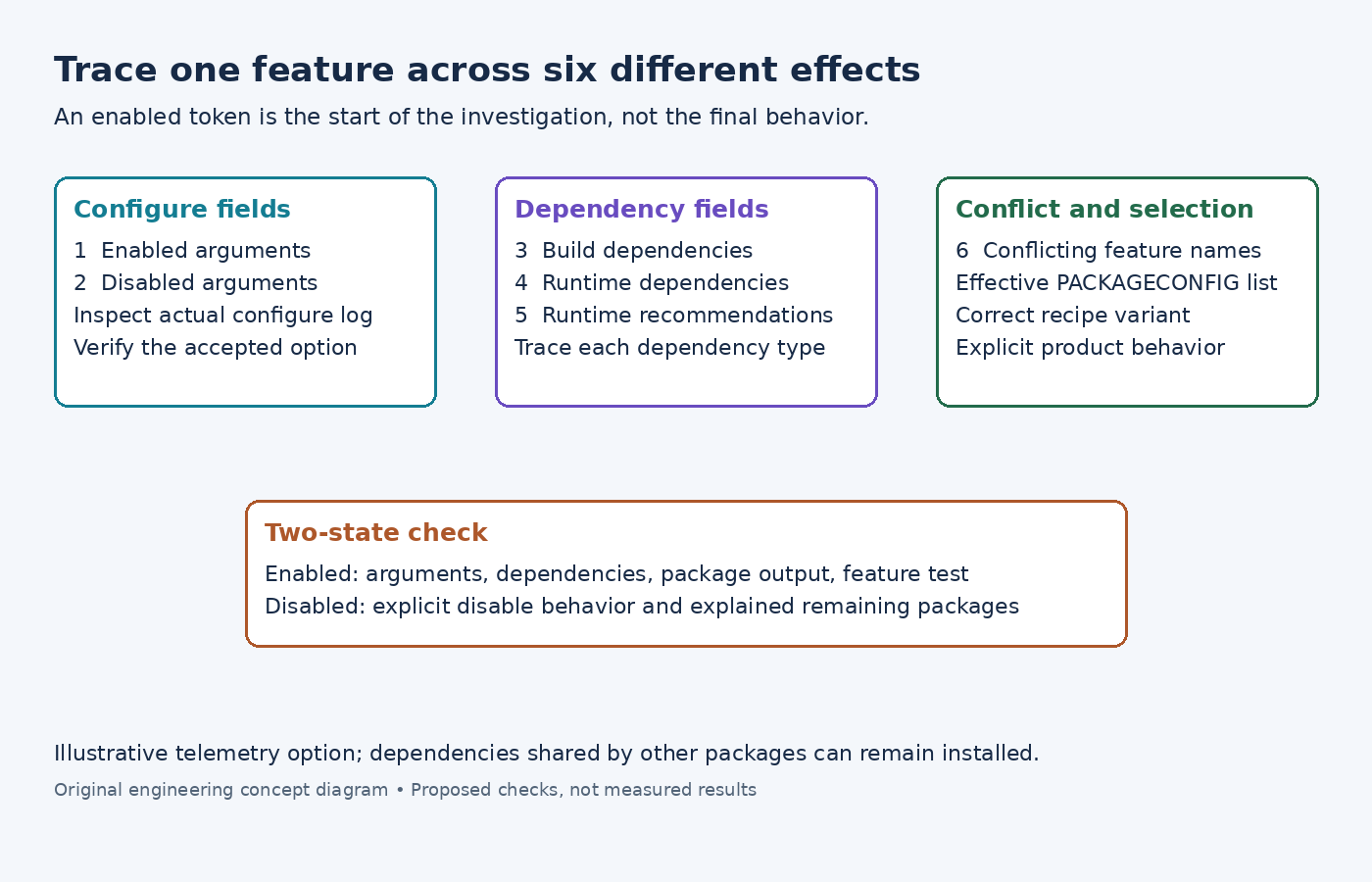
The PACKAGECONFIG reference defines up to six comma-separated fields: arguments for enabled and disabled states, build dependencies, runtime dependencies, runtime recommendations, and conflicting features. Empty fields still need their separating commas.
Imagine a recipe defines PACKAGECONFIG[telemetry] = "--enable-telemetry,--disable-telemetry,libmetrics,metrics-runtime,,offline". This assumes the imaginary project's configure script accepts those switches and the named recipes and packages exist. It shows why the feature definition must be read positionally: libmetrics is a build dependency, while metrics-runtime is a runtime package dependency.
Check the real definition before enabling the name. A feature token without a corresponding reviewed definition does not establish the intended behavior. Also examine the disabled argument. Leaving that field empty may allow the upstream build system's own defaults or detection rules to determine behavior.
Confirm the selected features in the recipe context
Inspect bitbake -e telemetry-agent, replacing the imaginary recipe name. Save the effective PACKAGECONFIG list and its assignment history. The Yocto variable-inspection guide explains how that output identifies metadata that contributed to a value.
Check whether the feature is enabled for the intended recipe variant and machine. A setting that changes the target recipe may not express the desired policy for a native tool built from the same source. Conversely, a global assignment can affect more recipes than the one being investigated.
Review conflicts deliberately. If the feature definition identifies another mutually exclusive option, decide which product behavior is intended rather than deleting the conflict declaration to make the configuration proceed. Preserve the rationale with the feature selection so a later dependency change does not reopen the same ambiguity.
Follow the generated arguments into the actual configure task
The PACKAGECONFIG_CONFARGS reference describes the generated argument list. Classes such as Autotools and CMake consume it; a custom configure task must handle it appropriately. A populated argument variable alone does not prove that a custom task passed the option upstream.
Read log.do_configure and the corresponding task implementation. Confirm the exact enabled or disabled switch appears where expected, and inspect the upstream configuration summary or generated configuration header. An ignored or misspelled option can leave the dependency graph looking plausible while the compiled feature is absent.
For a custom build system, document how the recipe translates the feature into its supported interface. Do not append an Autotools-style switch to a command that expects a CMake definition or a project-specific environment variable. The feature tuple is metadata; the actual build-system contract still has to be respected.
Inspect build dependencies separately from runtime dependencies
Generate a dependency graph for the consumer and locate the recipe supplying the feature's build dependency. The recipe dependency guide describes the task graph and recipe list. Use them to check that the needed headers, libraries, or generators are available at the correct build stage.
Then inspect the output package metadata. Build dependency names and runtime package names play different roles. A library recipe can produce several packages, and a feature's runtime requirement must name the appropriate package interface rather than assuming the recipe name is always sufficient.
Treat recommendations separately from hard dependencies. Whether a recommended package reaches the image depends on image policy and packaging behavior. If the feature cannot function without that package, review whether a recommendation accurately expresses the requirement. Do not claim that the sixth tuple field or a build dependency automatically installs every runtime component.
Explain why a disabled feature can leave packages behind
Disabling the telemetry option removes only the contributions associated with that feature definition. Another package can still depend on the same runtime component, or the image can install it explicitly. Inspect the remaining dependency path before concluding that the feature switch was ignored.
Likewise, a library already present in a sysroot can influence an upstream project's automatic feature detection if the recipe does not explicitly disable the feature. Compare the configure arguments and upstream summary in both states. A clean two-configuration experiment helps distinguish deliberate selection from opportunistic discovery.
For the experiment, change only the feature policy while keeping source revisions and other configuration inputs fixed. Record the resulting configure summary, dependency changes, package contents, and image manifest. These are proposed observations to collect, not fabricated output from a build run.
Verify behavior at the feature boundary
Choose a small functional test that exercises the option directly. For the imaginary telemetry feature, that might be a documented local status operation showing whether telemetry support was compiled in, followed by a controlled integration test of its required runtime component. Avoid interpreting general application startup as proof of this specific feature.
Test the disabled state too. Confirm that the application behaves as specified without the optional component and that the image's remaining packages have an explained reason to exist. Retain any unavoidable shared dependency as an explicit result rather than forcing its removal to make a package-count comparison look cleaner.
The completed trace should connect the selected token, ordered tuple, configure command, dependency graph, package metadata, and functional observation. Each link answers a different question, allowing a failed feature to be corrected at the right layer of the build process.