Yocto CVE Reports: Preserve Package Version and Patch Evidence for Triage
A Yocto CVE report lists an issue against a component whose upstream version looks old. The product may contain a backported fix, the report may have matched the wrong product, or the vulnerable code may be present and require action. None of those conclusions follows safely from the version string alone.
This article uses Yocto Project 5.0.12 documentation to organize a defensive triage record. It does not assess a particular live CVE, claim that a product is secure, or report exploit testing. The purpose is to connect the checker's result to the source and artifacts that require review.
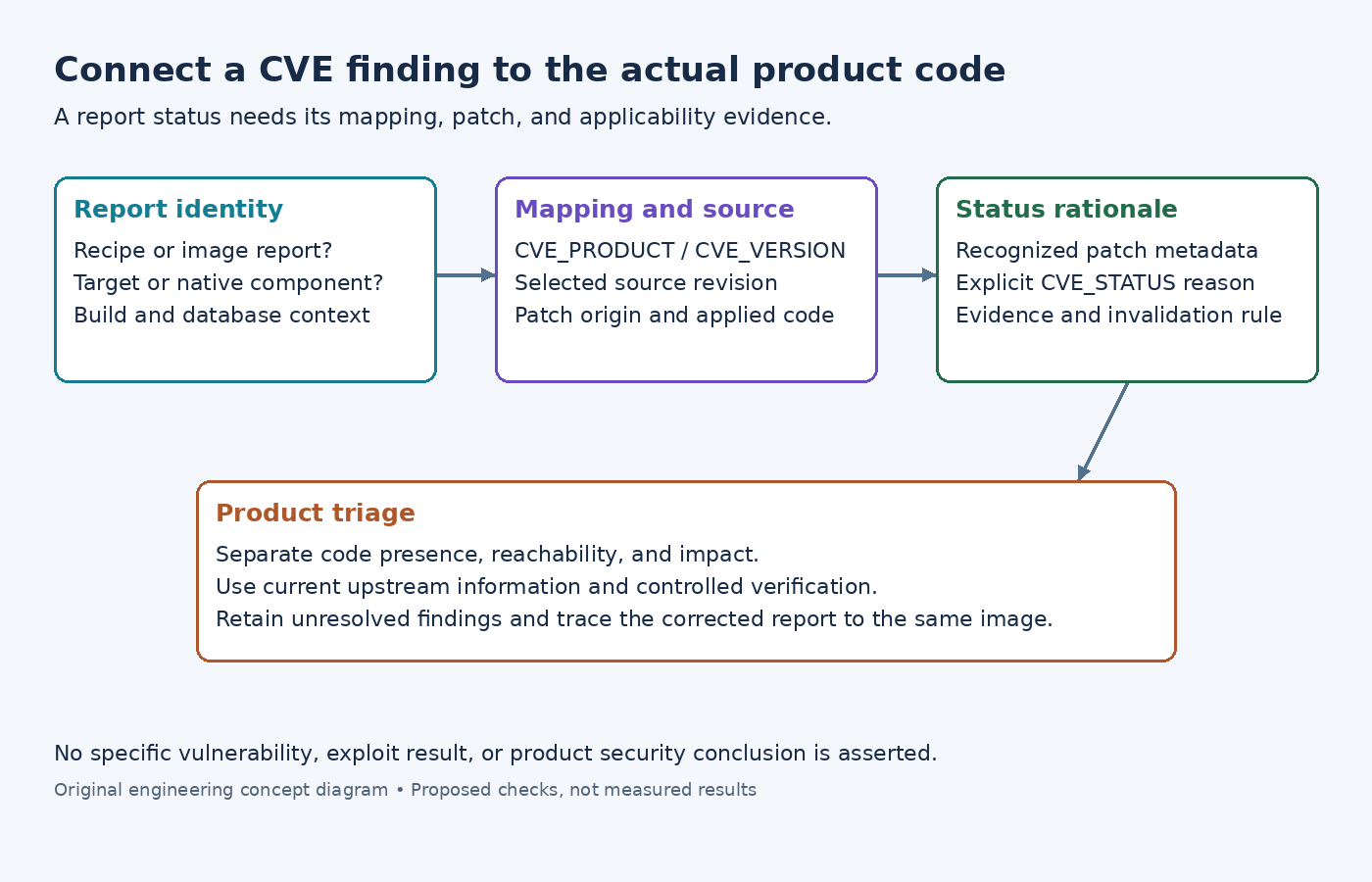
Identify the report's build and component scope
The build-time vulnerability-check guide documents enabling cve-check and generating recipe-level reports plus image summaries. Preserve the report with its image identity, layer revisions, configuration, and the vulnerability-database update context.
Separate target components from native build tools. A report for a tool used during compilation does not automatically mean the executable is installed on the device. It can still matter to build-system security, but that is a different exposure boundary from a target service processing external input.
For an image finding, connect the reported recipe to the installed package or other delivered artifact. Record the recipe version, source revision, and package identity. If the component is absent from the image under review, determine why it appeared in the collected report set instead of simply deleting the finding.
Verify the product and version mapping first
The mapping guidance describes CVE_PRODUCT and CVE_VERSION for cases where recipe naming or versioning does not match the vulnerability database. A familiar short product name can refer to unrelated software, so inspect vendor and product identity before interpreting a match.
Keep the original report and mapping together. If the mapping is wrong, document the upstream identity that should be used and review the metadata correction. Do not set an arbitrary version merely because it falls outside the affected range. The corrected value should represent the component actually being built.
Review both false-positive and false-negative consequences. A narrower mapping that removes one irrelevant issue can also hide relevant issues if it excludes a legitimate upstream product name. Compare the corrected mapping with the component's release and source history, not just the current count of findings.
Treat patch recognition as evidence to inspect
The cve-check class reference describes recognition through CVE identifiers in patch filenames and local patch headers. It also documents a limitation: header metadata in remote patches is not scanned in the same way as patches supplied through BitBake’s local-file fetcher. Preserve how the checker reached its status instead of treating the label as a complete code review.
For a claimed backport, locate the patch in the recipe's effective source list and identify its upstream origin. Inspect whether the patch applies to the selected source revision and whether the relevant change is present after patching. A filename containing a CVE number cannot by itself prove that the complete fix reached the compiled source.
Review prerequisites and follow-up changes where the upstream fix depends on them. A backport can require adaptation to an older code structure. Keep the adaptation rationale and targeted regression test with the patch, and avoid equating a clean patch application with verified functional correctness.
Preserve the reason behind an explicit status
The CVE_STATUS reference uses a reason and optional description, with reason mapping determining the reported state. An explicit status should summarize a reviewed conclusion, not replace the evidence needed to reach it.
If an issue does not apply because of platform or configuration, name the relevant platform condition or disabled code path and link the supporting evidence in the triage record. State what change would invalidate that conclusion. Enabling a feature in a later release can make an old nonapplicability decision stale.
If the status is patched, retain the source or version evidence and verification performed. If the status remains unresolved, say so. Avoid converting uncertainty into an ignored status just to reduce warning noise or satisfy a numeric release target.
Assess product exposure after establishing the code identity
Read the current upstream advisory and fix description for the actual issue. Determine which inputs, privileges, features, or deployment conditions the affected code requires. Compare those conditions with the product configuration and the path by which the component is used.
Keep code presence, reachability, and impact as separate findings. A disabled interface may reduce exposure while leaving vulnerable code in the shipped binary. Conversely, a component can be reachable through an indirect application path even when it does not run as a standalone network service.
Use safe, authorized tests appropriate to the issue, preferably upstream regression tests or a controlled reproduction in an isolated environment. Record the exact version and configuration tested. This article provides no exploit procedure and makes no claim that a successful smoke test proves a vulnerability absent.
After a mapping or patch change, regenerate the relevant report and inspect why the entry changed. A corrected match and a software fix are different outcomes. Keep the component identity, applicability condition, and unresolved action together so a later feature change cannot silently inherit an obsolete conclusion.