Yocto Serial Console Images: Locate Login Policy in Image and Distribution Configuration
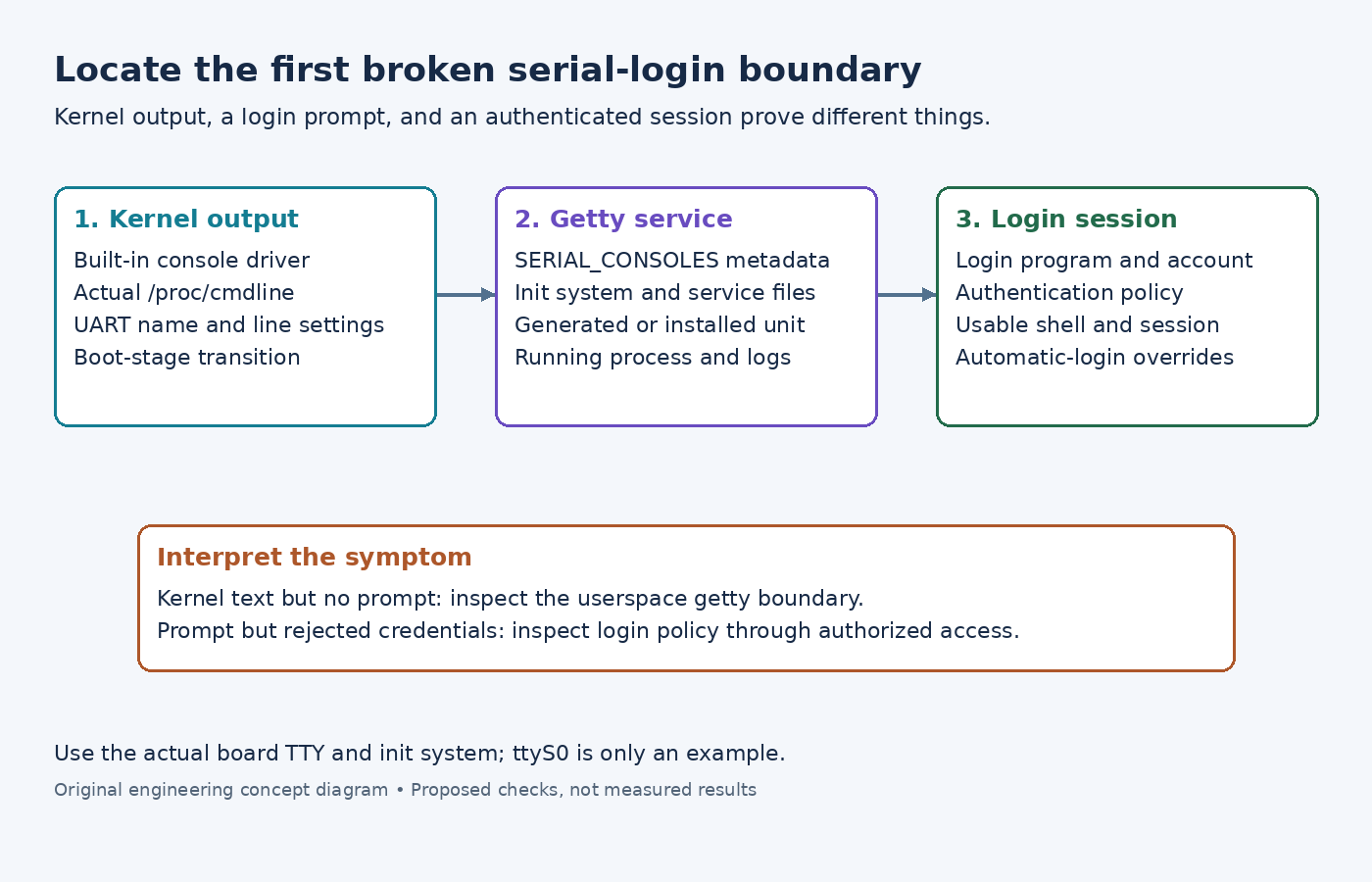
Two Yocto images boot on the same board. Both print kernel messages over the serial cable, but only one presents a login prompt. Changing a password cannot repair a missing getty, and changing getty configuration cannot repair a kernel that never routes output to that UART. Diagnose the first boundary at which the observations diverge.
The Yocto settings below follow the 5.0.12 documentation. Linux console behavior is referenced to 6.6; the systemd examples apply only when the image actually uses systemd and includes the named service template.
First distinguish boot output from an interactive terminal
Record whether the port shows bootloader output, kernel output, a username prompt, or a shell. Those observations prove different things. Readable bootloader text proves neither that Linux selected the same UART nor that userspace started a login service.
The Linux serial-console guide describes the console=device,options kernel argument and the need for built-in serial-console support. For a board exposing ttyS0, console=ttyS0,115200n8 is an illustrative argument, not a universal board setting. Device names and supported drivers differ across BSPs.
When another authorized access path exists, inspect /proc/cmdline on the running image and compare it with the boot configuration you intended to deploy. Check the actual console device and kernel driver. Multiple console= arguments have ordering and device-type interactions; do not infer the active console from one matching substring alone.
A quiet port after early boot can indicate the transition from an early console to the normal driver. Investigate that boundary before editing account policy. Also verify terminal baud rate and flow control, especially when output is readable at one boot stage but becomes corrupted later.
Then find the userspace getty that owns the port
Yocto's SERIAL_CONSOLES reference specifies baud-rate and TTY pairs separated by a semicolon. For example, SERIAL_CONSOLES = "115200;ttyS0" describes getty enablement. It is not the same syntax or responsibility as the kernel's console= argument.
Compare the effective setting for both images and inspect the packages and configuration that consume it. A machine setting can be shared while image composition or distribution choices select different init systems. Identify the running init implementation before applying a systemd-specific command.
On a systemd image, inspect systemctl status serial-getty@ttyS0.service and systemctl cat serial-getty@ttyS0.service, substituting the actual TTY. The systemctl reference explains that cat shows unit files and drop-ins on disk; it may differ from the manager's loaded configuration after un-reloaded edits. Use status and the unit's journal to distinguish an absent unit, a masked unit, and a process that starts but exits.
The getty-generator reference explains another path: systemd can instantiate serial-getty for suitable kernel consoles. Thus, absence of a persistent enablement link is not conclusive evidence that no getty should run. Inspect generated and installed configuration. These current upstream references describe the basic mechanism; check the deployed systemd version before using additional options introduced in newer releases.
For a SysVinit image, inspect its actual inittab entry and getty command instead. Do not transplant a systemd drop-in into that image and expect it to take effect.
A prompt moves the investigation to authentication
Once a stable username prompt accepts input, the terminal and getty path are functioning far enough to reach login. Compare the login program, account existence, account-lock state, shell, and any PAM configuration used by that image. Review authentication logs through an already authorized administrative path. Never copy password hashes into a diagnostic report.
A rejected login and an immediate session exit are different symptoms. The latter can indicate a missing or unsuitable shell or a session-startup failure after authentication. An immediate shell with no prompt requires inspecting the getty invocation and overrides for automatic-login behavior; it does not establish that a password check succeeded.
Make the smallest change in the layer that generated the differing configuration, then rebuild and repeat the specific failed observation. Keep kernel routing, service startup, and authentication as separate test results. This turns “serial login is broken” into a precise fault location without weakening account policy merely to obtain a prompt.