Linux Pressure Stall Information: Tell Resource Waiting from Simple High Utilization
Use pressure stall information to ask how much time workloads lose to resource contention, then compare that loss with the application’s latency. A busy CPU can be doing useful work. A machine with apparently modest utilization can still have a particular workload stalled on memory or I/O. Utilization alone cannot distinguish those cases.
This article uses upstream Linux v6.12 PSI interfaces. It covers interpretation and a bounded comparison procedure, rather than OOM victim selection or a universal resource-sizing threshold. No host pressure files were sampled, no resource limit was changed and no load generator was run. Numeric examples below are synthetic.
Verify availability and scope
Check CONFIG_PSI in the final kernel configuration. The v6.12 configuration also defines CONFIG_PSI_DEFAULT_DISABLED, which can require the psi=1 boot parameter to enable tracking. Missing or unavailable pressure data is an instrumentation finding, not proof that the system has no resource contention.
The PSI documentation describes system files under /proc/pressure for cpu, memory and io. With appropriate cgroup support and cgroup v2, pressure files also describe grouped tasks. Identify the application’s actual cgroup and keep its membership stable for a comparison.
Record the scope beside every sample: system, specific cgroup, or another explicitly identified group. Do not substitute system-wide pressure for the experience of a latency-sensitive service. Conversely, a constrained group may suffer pressure while unrelated work remains productive elsewhere.
Read some and full as stall states
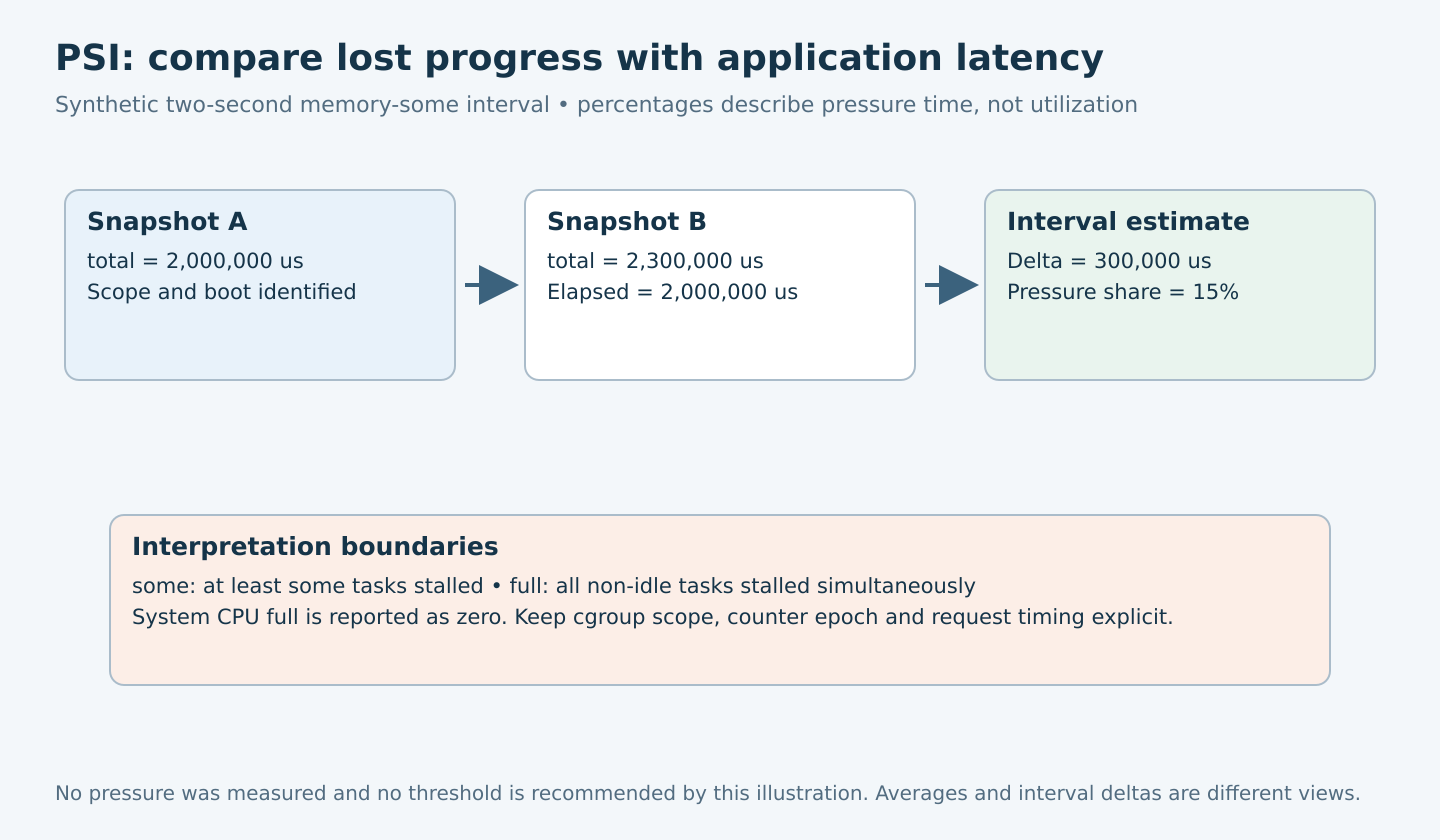
The some line describes time in which at least some tasks in the selected scope are stalled on that resource. The full line describes time in which all non-idle tasks in scope are simultaneously stalled on it. Full is a narrower condition, not a second independent amount to add to some.
There is a crucial CPU exception. At system scope, CPU full is undefined and v6.12 reports zero for compatibility. The implementation explicitly handles that case. A zero system CPU-full value therefore cannot establish that every workload obtained CPU service promptly. Cgroup-level CPU pressure has a different scope and can be meaningful.
Each line includes avg10, avg60 and avg300 percentage trends, plus total accumulated stall time in microseconds. The averages describe smoothed recent behavior over different horizons; they are not interchangeable with an exact percentage calculated between two arbitrary snapshots.
Do not interpret total as memory bytes, outstanding I/O requests, CPU utilization or a sum of every task’s waiting duration. It is accumulated pressure-state time for the selected metric and scope. Multiple stalled tasks do not justify multiplying the value by task count.
Build a short-interval comparison
For a synthetic memory-some example, suppose total changes from 2,000,000 to 2,300,000 microseconds over a measured two-second interval. The delta is 300,000 microseconds, yielding an interval estimate of 15 percent: 300,000 divided by 2,000,000, multiplied by 100. This illustrates arithmetic only, not a recommended alarm threshold.
Use the actual monotonic elapsed time between observations rather than assuming that a requested sleep lasted exactly its nominal duration. Save the raw samples and timestamps. Sequential reads of multiple files are not perfectly simultaneous, so avoid claiming sub-read precision when comparing closely spaced events.
Discard an interval if the counter moves backward, the machine reboots, the cgroup is recreated or the measured scope changes. A reset must not become a negative pressure percentage. Keep interval length, sample cadence and application request window explicit.
Correlate pressure with service behavior
- Choose one user-visible symptom, such as a bounded request-latency regression under a specified workload.
- Collect the relevant system and workload-group pressure metrics alongside request timing and ordinary resource statistics.
- Compare a healthy interval with a symptomatic interval using the same scope and sampling method.
- Identify which pressure state rises with the symptom, then collect the subsystem evidence needed to explain it.
- Change one reviewed workload or resource constraint in a recoverable test, and check both pressure and service behavior again.
CPU some rising with delayed requests supports investigation of runnable competition, affinity and group scheduling constraints. Memory pressure suggests examining reclaim and the workload’s memory behavior. I/O pressure directs attention toward blocked I/O progress and its dependencies. These are investigation branches, not automatic diagnoses of a defective CPU, insufficient RAM or failing disk.
A high utilization interval with low observed pressure may be productive, but it still needs the application’s latency and throughput evidence. Low measured pressure does not exclude a mutex bottleneck, network dependency or a stall outside the metric’s coverage. PSI is one observation layer, not a complete waiting-state classifier.
Use triggers when periodic averages hide spikes
PSI supports polling-based triggers defined by stall amount and window, both in microseconds. A monitor keeps an open descriptor for its registered trigger and waits for notification. A trigger is removed when that descriptor closes; a one-shot shell write that immediately closes the file is not a persistent monitoring service.
For v6.12, the documentation describes windows from 500 milliseconds to ten seconds, but the implementation does not enforce that 500-millisecond minimum for a privileged opener. psi_trigger_create() rejects a zero window or one above ten seconds; the threshold must be positive and no greater than the window. Privilege is checked from the opening file credentials. An unprivileged opener additionally needs a window that is a multiple of two seconds. This doc/code difference is not a recommendation to create extremely frequent monitors. Each trigger needs its own opened descriptor, and notifications are rate-limited to one per tracking window. Verify the deployed implementation and error returns.
Choose a threshold from the service’s tolerance and measured baseline. A notification means the configured pressure condition occurred; it does not identify the responsible task or authorize killing a workload. This article does not install a monitor or propose automatic remediation.
Make the decision with explicit limits
If pressure and request latency improve together after one controlled change, the result supports that resource-waiting hypothesis for the tested conditions. Preserve alternative explanations, including workload variation and changed group membership. If pressure falls but the symptom remains, continue the dependency investigation rather than declaring success from the metric alone.
Do not add overlapping system and cgroup values, or parent and child group values, as though they were disjoint populations. Keep cpu, memory and io interpretations separate as well; a workload can move between dependent resource waits during one operation.
The deliverable is a time-aligned evidence sheet containing raw totals, valid interval deltas, scope, configuration and application outcomes. Its value is a defensible next diagnostic step. PSI can reveal lost progress that utilization hides, but it cannot by itself supply a root cause or a safe capacity purchase decision.