Adding CAN FD to a Classical CAN Product: Check Every Node Before Enabling FD Frames
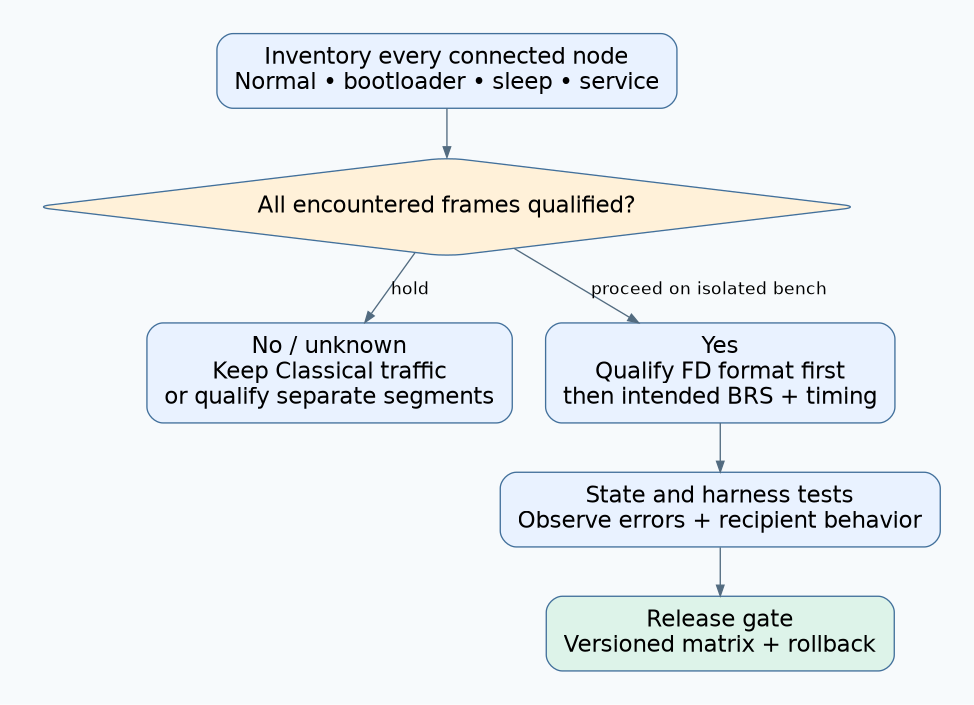
Do not enable CAN FD frames on an existing segment until every connected node is qualified for the frames it will encounter, or isolated by a verified architecture. Upgrading one controller and setting a faster data bitrate does not establish network compatibility. The inventory must include normal firmware, bootloaders, service adapters, sleeping nodes, and replacement hardware.
This is a rollout and acceptance procedure for Classical CAN products considering CAN FD, with Linux SocketCAN examples where relevant. It is not a conformance test or an electrical timing design. The SocketCAN reference was checked on 14 October 2026; deployed kernel, driver, controller revision, and userspace tools must be recorded separately. Exact transceiver claims below apply only to the cited part documentation.
1. Separate frame compatibility from bitrate capability
Kvaser’s CAN FD overview identifies legacy Classical CAN controllers as a migration obstacle and discusses separating Classical and FD segments. Do not assume an old controller will harmlessly ignore an unfamiliar frame. A receive-ID filter is not sufficient evidence that the node tolerates the frame format at the protocol level.
CAN FD format and bit-rate switching are separate choices. The Kvaser SDK migration guide describes FD-frame selection independently from the optional BRS flag. Therefore, disabling BRS does not turn an FD frame into a Classical CAN frame. Similarly, an FD-capable controller can still transmit Classical frames during a staged migration.
Make the first decision about which formats may exist on each physical segment. Only then choose nominal and data-phase timing. Keeping the original nominal bitrate is useful for continuity, but it cannot repair a format incompatibility.
2. Build a node-by-node compatibility sheet
For every physically connected node, record the exact controller, silicon revision, transceiver ordering code, firmware build, and operating states. Assign an owner to each unknown. “CAN FD supported” in a product brochure is too broad to close all of these rows:
| Qualification row | Required evidence | Hold condition |
|---|---|---|
| Controller frame handling | Manual and controlled test of Classical and intended FD frames | Any active node’s FD behavior is unknown |
| FD protocol variant | Matched ISO or legacy non-ISO configuration where applicable | Unresolved variant mismatch |
| Transceiver and physical network | Exact-part limits, timing review, and representative harness tests | Family-name claim replaces exact-part evidence |
| Application and diagnostic software | Length, frame-type, timestamp, and error-handling tests | Silent truncation or misclassification |
| Bootloader and recovery mode | Documented format policy during update and recovery | A reboot reintroduces an incompatible active node |
| Sleep and wake transitions | State-specific transceiver/controller behavior | Sleep-only tolerance is assumed to apply when awake |
Include temporary equipment. A service laptop’s adapter, an older replacement sensor, or a factory programming fixture can join the network after the initial installation. Decide how unsupported equipment is recognized before traffic changes, and how the product prevents an unqualified mixture.
3. Read transceiver claims at the correct boundary
A transceiver rating does not upgrade the attached controller’s frame decoder. As a concrete documentation example, the TI TCAN1042 family datasheet, revision D, distinguishes devices intended for CAN FD up to 2 Mbps from G-suffix variants intended for up to 5 Mbps. Those are component claims, not approved data rates for an arbitrary installed harness.
Review propagation delay, oscillator assumptions, sample-point design, wiring topology, loading, connectors, and the conditions behind the component specifications. Qualification should include the longest approved harness, intended node population, supply and temperature corners, and relevant operating modes. Define acceptable error behavior before running the comparison. No universal cable length or data bitrate follows from the word “FD.”
Be particularly careful with “FD passive.” TI’s selective-wake application note SLLA521B describes an FD-passive function for partial-networking transceivers and states that it operates in sleep mode. It prevents FD traffic from producing unwanted decode-error wakeups in that context. It is not blanket evidence that an awake legacy controller can coexist with FD traffic. Qualify the transition into normal operation separately.
4. Verify SocketCAN capability and application handling separately
The SocketCAN documentation distinguishes device FD enablement from the CAN_RAW_FD_FRAMES socket option, which is disabled by default. An application must check the option result and distinguish Classical-sized from FD-sized reads. The documented device MTUs are 16 bytes for CAN_MTU and 72 for CANFD_MTU; these are software-structure sizes, not payload lengths on the wire.
The same reference documents nominal and data timing, controller-state statistics, and ISO versus non-ISO FD modes. Inspect the actual interface before a test:
ip -details -statistics link show can0Execution status: this read-only command is illustrative and was not executed against CAN hardware for this article. Substitute the verified interface name. Save its output before and after each phase, including restart counts where available. A configured interface does not verify every remote node.
Test the application’s receive path with both frame types, expected payload sizes, malformed application content, and error notifications. Check downstream recording and forwarding formats too. A larger driver buffer is insufficient if a serializer or analytics tool still assumes Classical payload limits. Verify behavior at the intended recipient rather than relying solely on the sender’s success indication.
5. Run a staged, reversible acceptance sequence
- Baseline: retain Classical traffic with the proposed new hardware. Capture error counters, application deadlines, and receiver completeness using the approved workload.
- Isolated FD segment: connect only qualified nodes on a bench network. Confirm format handling without introducing a faster data phase initially.
- Data-phase qualification: enable the intended BRS behavior and timing on that isolated segment. Compare electrical observations and application outcomes under representative loading.
- State transitions: exercise cold start, reset, sleep/wake, firmware update, recovery, and power sequencing. Verify that the traffic policy remains valid in every state.
- Deployment gate: confirm the installed inventory, configuration, rollback image, and service-tool requirements before enabling FD traffic.
Stop on unexplained error growth, missing intended recipients, unexpected wakeups, or a node entering an unqualified state. Restore the defined baseline rather than allowing automatic restart behavior to conceal the failing phase. Keep application-level readiness separate from bus communication recovery.
6. A hypothetical mixed-generation machine
Suppose a machine has a new FD-capable gateway, upgraded actuator controllers, and an older maintenance sensor that must remain supported. Its controller documentation does not establish FD tolerance. The rollout remains Classical on that shared segment, even if all new devices pass FD tests in isolation.
The engineering choices are to replace the sensor, maintain Classical traffic, or introduce a separately qualified segment and gateway boundary. If separation is chosen, define message translation, queue limits, failure behavior, and update sequencing. Do not simply forward an FD frame to the legacy side and call the network segmented.
7. Release the compatibility matrix with the product
The useful release artifact is a versioned matrix of allowed nodes, frame formats, timing settings, harness conditions, operating states, and service tools. Attach the observed results and unresolved exceptions. A clean bench trace is necessary evidence for that tested setup; it is not permission to enable FD on every installed product bearing the same model name.