Zephyr OS Board Revisions: Prevent a Default Revision from Selecting the Wrong Hardware
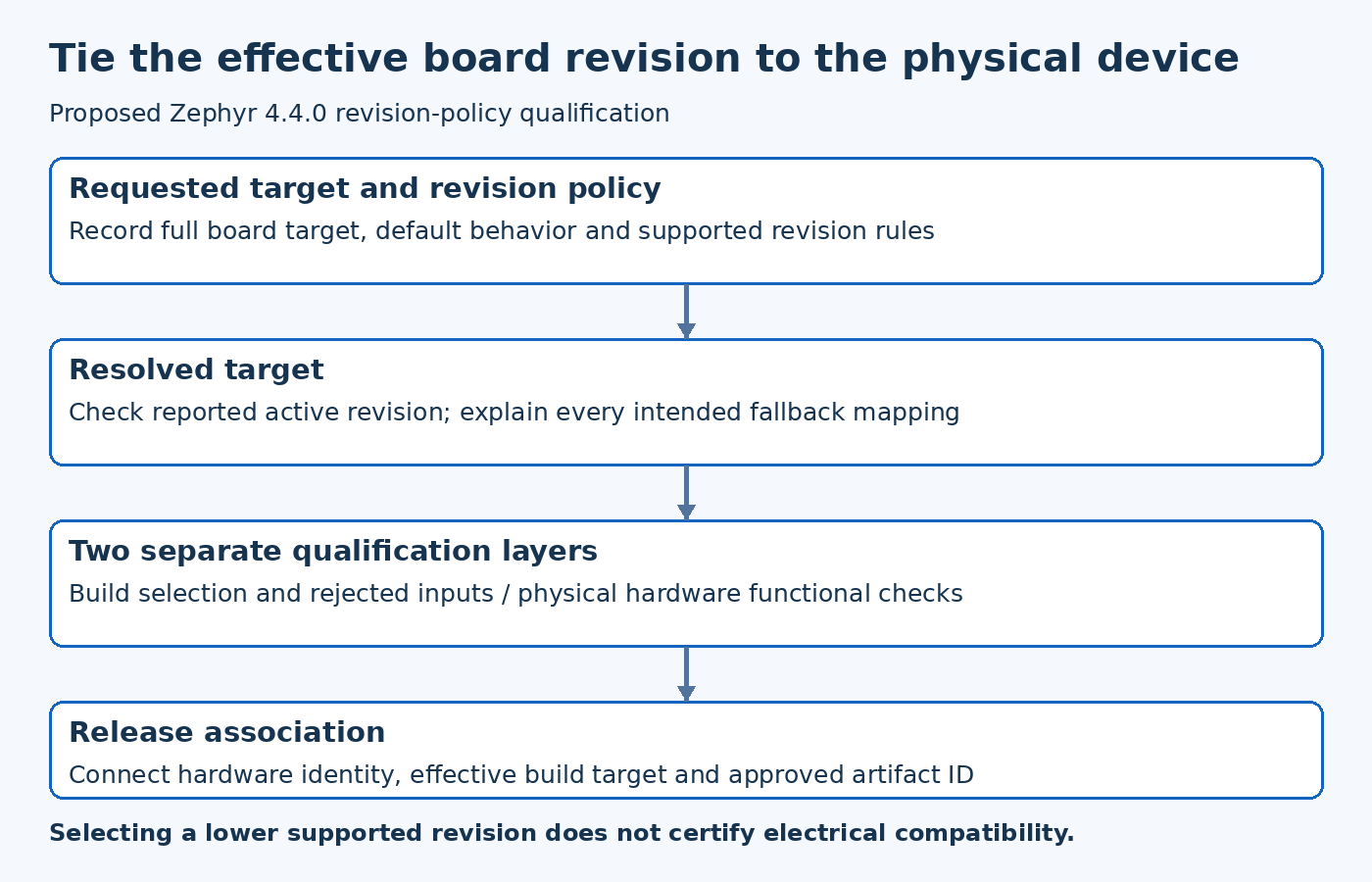
A successful build for a board family does not prove that it targets the physical revision on the bench. Zephyr board revision selection needs an explicit product policy, especially when a default or a compatible lower revision can be selected. Record both the requested revision and the effective hardware description before programming devices.
This article examines the Zephyr 4.4.0 board-selection implementation. It proposes a qualification checklist for a product with multiple board revisions. It does not establish compatibility between any actual revisions or claim that a generated image has been tested on hardware.
Separate the board name from its revision and qualifiers
A board family can include a revision and qualifiers describing the target configuration. Treat the complete target as a release input rather than shortening it to a friendly board name in build records.
The version-pinned Zephyr boards CMake module parses these components and reports the selected board information. Inspect that output and the board metadata for the release under investigation. Do not infer selection solely from the folder name used to store the resulting image.
Also review aliases and deprecated names when an old build command still works. A compatibility mapping can be intentional, but the resolved target should be visible to the engineer who approves the artifact. A convenient shorthand should not conceal a hardware change.
Define what omission of a revision means
Decide whether a product build must always name a revision or whether a documented default is acceptable. A default can simplify development, but it also creates a choice that may be overlooked when new hardware appears.
For production artifacts, consider recording an explicit revision even when it matches the default. That makes the build's intent easier to compare with manufacturing and service records. The decision belongs to the product's release policy rather than to the mere fact that the build system permits omission.
A hypothetical team might change its default from an early prototype to a later board. An unchanged short build command could then produce different hardware settings after a repository update. The remedy is to make that transition explicit and reviewable, not to assume that every old command continues to mean the same physical board.
Understand exact matching and fallback selection
The Zephyr 4.4.0 revision-checking implementation distinguishes exact matching from selection of a supported lower revision when the applicable policy permits it. That behavior is a software selection rule, not an electrical compatibility certificate.
Read the board's actual revision configuration before relying on fallback. Custom revision handling may impose its own rules. Record the effective revision reported by the build whenever it differs from the requested revision.
If a product requires strict separation because pin assignments, power sequencing or connected components changed, require the corresponding selection policy and tests. Do not label an untested board compatible merely because the revision helper found a lower entry that it could select.
Test the rejected inputs as well as the accepted ones
A board-revision policy should include negative cases. Try a malformed revision, an unsupported gap and a newer revision outside the supported range in a controlled configuration test. Record whether each case fails or resolves according to the intended policy.
The expected result depends on the board implementation. A compatible-range design and an exact-match design should not share the same acceptance table. Explain which inputs are intentionally accepted, which are mapped and which must be rejected.
These tests can run without programming hardware because they examine build selection. They still do not replace functional tests on every hardware revision claimed by the product. Keep the build-policy results and hardware qualification results separate rather than treating either as a substitute for the other.
Inspect the effective hardware description
After selection, inspect the generated configuration and devicetree portions relevant to the revision difference. A correct revision label with an incorrect peripheral description is not sufficient. Check the features that motivated the revision split, such as an interface instance, an enable signal or a changed device variant.
For a hypothetical replacement sensor, the review might verify the selected compatible description and bus location. The subsequent hardware test would verify actual communication and required behavior. No amount of target-name checking alone proves that the assembled board contains the expected component.
Use distinct output directories or otherwise controlled build practices when comparing revisions. A reused build directory can introduce unrelated cache confusion. Preserve the resolved target and generated evidence for each comparison so differences can be attributed to the intended revision change.
Connect the artifact to the device being programmed
Manufacturing and service workflows need a reliable way to identify physical revision and choose the corresponding approved image. A handwritten filename convention is weaker than an explicit record connecting hardware identity, build target and artifact identifier.
Define how operators handle unknown, unreadable or conflicting revision evidence. Guessing the closest available firmware is not a safe default when compatibility has not been established. Escalate the mismatch through the product's documented process rather than silently selecting an older target.
Where runtime hardware detection exists, document its relationship to build-time selection. It may reduce the number of images needed, but it does not automatically eliminate board-specific assumptions in startup code or configuration.
Retain a revision compatibility record
Keep the supported revision list, mapping policy, selected target evidence and actual qualification results with the release. When adding a new revision, review the default and fallback behavior as part of the change rather than only adding another file.
The desired outcome is precise: a named image has an explainable relationship to a named hardware revision, with rejected combinations behaving predictably. Zephyr provides the selection mechanisms. The product team must supply the compatibility decision and evidence that make those mechanisms trustworthy in deployment.