Yocto Recipe Sysroots: Fix Missing Headers Without Confusing Build and Runtime Dependencies
An application is selected for an image, its runtime library is
present in the package list, and compilation still fails because a
header cannot be found. Adding more packages to the image can leave that
failure unchanged. The useful question is narrower: which producer
supplies the missing build input, and why should that input appear in
this consumer recipe’s sysroot before configuration starts?
This walkthrough uses the Yocto Project 5.0.12 Scarthgap
documentation. The recipe names below are invented examples. They
describe an inspection procedure; no example build or performance
measurement is claimed.
Describe the input
before changing metadata
Suppose sensor-viewer includes a header provided by a
recipe called libsample. Separately, its build invokes a
generator called schema-tool. Write down two requirements:
the compiler needs target-side development files, while the generator
must execute on the build host. A single phrase such as “dependency
missing” hides this distinction.
Also identify the failing task and exact command. A missing header
during configuration, a missing executable during generation, and a
target library failing at runtime need different evidence. Preserve the
first failure before modifying the recipe. Later errors can be
consequences of that first missing input.
The DEPENDS
reference describes build dependencies using recipe provider names.
A development-package name such as libsample-dev is not the
appropriate substitute. A host-side generator normally requires the
producer’s native variant, when that variant exists. Adding a build
dependency does not, by itself, declare every required runtime package
relationship.
Trace the
producer-to-consumer path
Look for the missing file at successive boundaries. Did the producer
install it? Was it admitted to sysroot staging? Was the relevant
component made available in the consumer’s recipe-specific sysroot?
Finally, did the build command search the intended location?
The task
reference distinguishes do_install, which populates the
recipe’s installation area, from do_populate_sysroot, which
stages a selected subset. do_prepare_recipe_sysroot then
prepares the consumer’s recipe-sysroot and
recipe-sysroot-native from its dependencies. A file’s
presence in an installation area is therefore only one checkpoint.
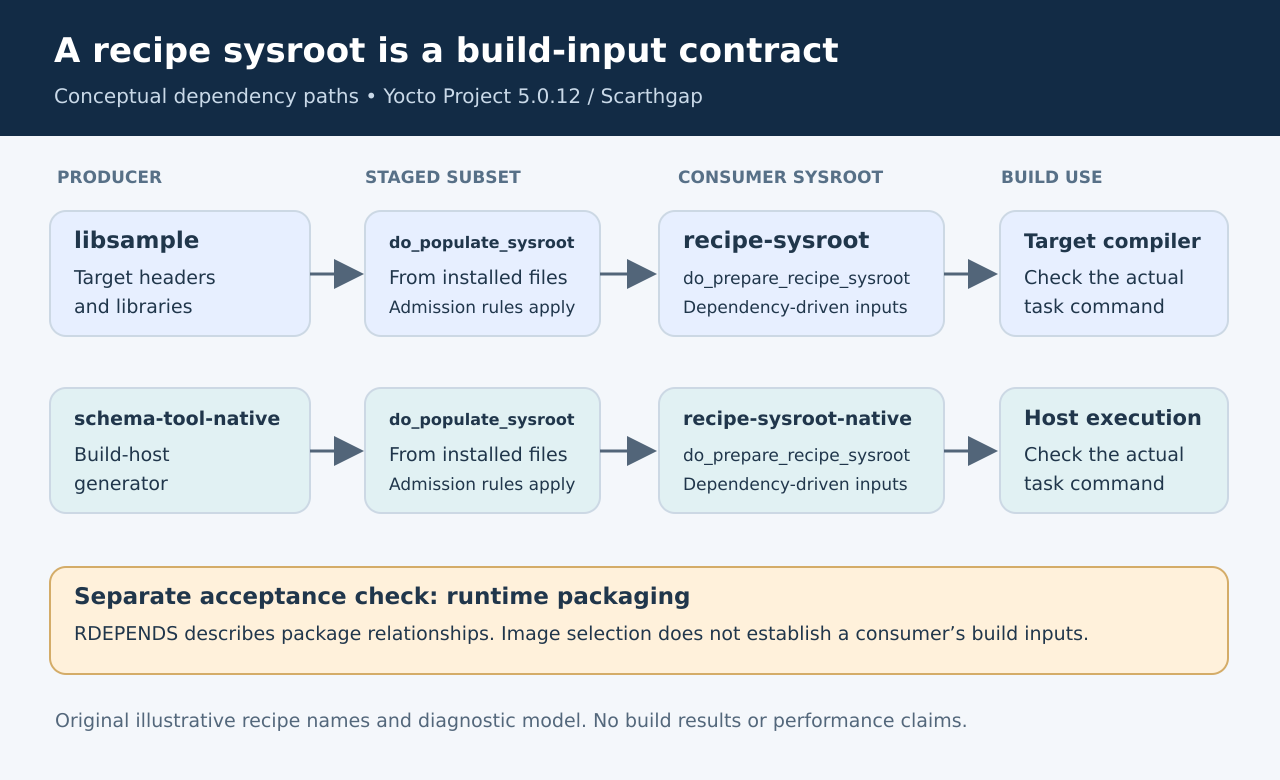
Do not repair the last checkpoint with a manual copy. That creates an
input outside the metadata relationship being reviewed. It may make one
work directory compile while leaving a clean build unable to reproduce
the result. Instead, identify the earliest boundary where the expected
file disappears.
For example, if the producer never installs its public header, adding
dependencies cannot manufacture that header. If the header reaches the
consumer but the compiler ignores the sysroot, inspect the build-system
integration and generated command line. Those cases call for different
changes even though the compiler’s final message looks similar.
Keep runtime packaging
on its own branch
A runtime relationship answers which packages must accompany an
installed package. It does not express the same task boundary as a build
dependency. RDEPENDS uses package names and
package-specific overrides, whereas DEPENDS uses provider
names. The runtime
dependency reference explains that distinction and its
package-writing task dependencies.
Use it to review two separate acceptance criteria. First, the
consumer must compile from declared inputs. Second, the installed
package must have its required runtime companions. Automatic dependency
generation can cover some library relationships, but that is not a
reason to ignore an application that invokes another program or loads an
optional component in a product-specific way.
In the illustrative project, do not assume that the schema generator
belongs on the device merely because the build needs it. Conversely, do
not remove a real runtime helper merely because compilation succeeds
without executing it. Identify the phase in which each dependency is
used.
Inspect the
parsed recipe rather than one file
A recipe’s final values can be affected by included metadata and
append files. Save bitbake -e sensor-viewer output and
inspect the effective dependency list, relevant paths and the assignment
history. Then generate the task graph with
bitbake -g sensor-viewer. The official
debugging guide documents these inspection tools and the task log
locations.
Treat the output as evidence, not as a substitute for interpretation.
Find the consumer task and the expected producer task in the graph.
Compare that relationship with the file that actually went missing. If
the producer is correct but the dependency resolves differently under
another configuration, preserve both parsed environments and identify
the deciding override.
Inspect the recorded task command rather than a hand-entered
approximation. An interactive shell can have extra host tools or search
paths that the BitBake task did not have. Record which executable was
invoked, which target it produces, and which sysroot arguments were
supplied.
Verify the
correction without hiding the cause
Use a disposable build configuration for the verification campaign.
Change one metadata cause at a time and preserve the before-and-after
dependency evidence. The following checks are proposed acceptance tests,
not reported results:
- Confirm that the producer installs the required file and that the
consumer receives it through staging. - Build the consumer without relying on manual files left in its work
directory. - Exercise both a fresh work area and the project’s normal
shared-state reuse path. - Inspect the resulting runtime package relationships independently of
the successful compile. - Repeat for a relevant machine or feature configuration that changes
the dependency.
The staging
class description explains the two-stage transfer and its path
adjustments. This is why a useful review preserves the provenance of an
input rather than merely proving that a file exists somewhere under the
build tree.
Close the issue with a short explanation: the missing input, its
producer, the task boundary that was absent or incorrect, and the
evidence that now connects them. “Added a package and it builds” is too
ambiguous. A reproducible fix tells the next engineer why the consumer
can see its build inputs while keeping target packaging a separately
verified responsibility.