Yocto Kernel Fragments: Confirm a Requested Option Survives Configuration Resolution
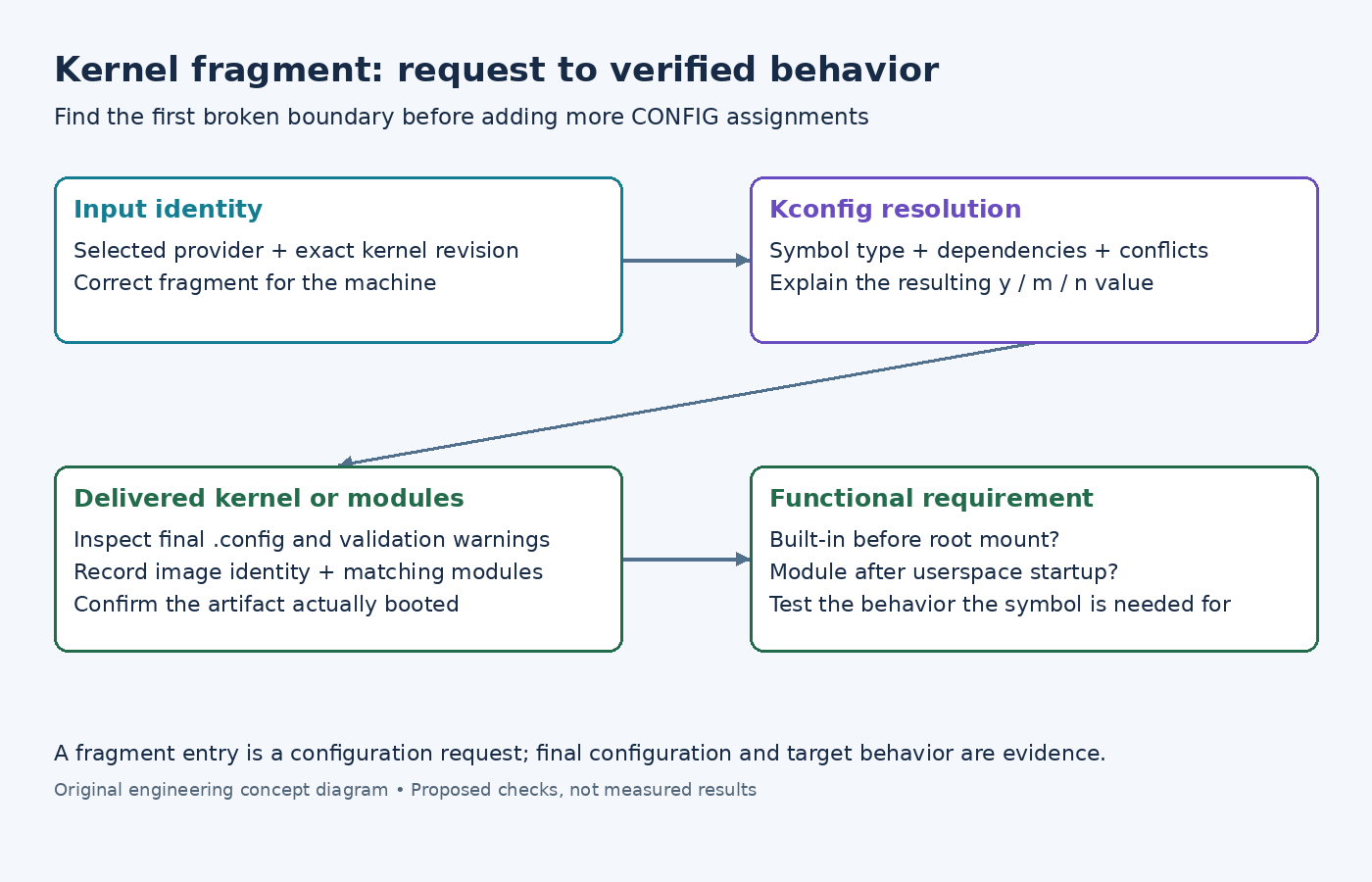
A kernel fragment requests a driver as built-in, yet the final image behaves as if the driver is missing. The fragment can be present in the layer and still fail to establish the requested configuration. Diagnose the chain from selected kernel provider through fragment inclusion and Kconfig resolution before changing the runtime application.
This article uses Yocto Project 5.0.12 kernel documentation and Linux 6.6 Kconfig documentation. The Yocto task examples apply to recipes supporting the documented kernel workflow; vendor kernel recipes can implement a different configuration process. No kernel build or hardware test is claimed.
Confirm which recipe and source are being configured
Record the selected machine, kernel provider, kernel source revision, and relevant append files. A fragment attached to one recipe will not help if the product selects another provider. Likewise, a symbol from a newer kernel cannot be assumed to exist in the source revision actually being configured.
Choose one requested symbol and state the desired result: built-in, module, or disabled. Also state the product reason. A driver needed to mount the root filesystem has a different startup requirement from an optional module used after userspace starts. The configuration value should follow that requirement rather than a copied fragment from another board.
Save the existing final configuration before editing metadata. This gives the investigation a concrete baseline and helps separate a fragment that was never consumed from one whose request was changed during resolution.
Verify inclusion before investigating dependencies
The Yocto configuration-fragment guide describes fragments as configuration assignments supplied to the kernel workflow, applied after the base configuration. Check the effective source list and the actual fragment selected for this machine. A similarly named file elsewhere in the layer is not evidence that the intended file was used.
Inspect the task logs for the configuration process. Confirm that the recipe recognizes the fragment format and invokes the expected merge and configuration steps. If a vendor recipe simply copies a complete configuration, first understand that recipe's contract rather than assuming the linux-yocto tasks are interchangeable with it.
When inclusion is missing, repair the file reference, append match, or machine scope. Do not add unrelated dependency symbols to a fragment that the build never reads. That changes the proposed configuration without addressing the earliest broken boundary.
Treat the request as input to Kconfig
Read the symbol definition in the exact kernel source and inspect its dependencies, type, and surrounding conditions. The Kconfig language reference explains dependency constraints and the special behavior of reverse dependencies. A text assignment cannot be treated as permission to ignore the configuration model.
For a missing driver, inspect the parent subsystem, bus support, architecture conditions, and any required helper options. The correct fix may be to enable a legitimate prerequisite. It may instead be that the symbol is unavailable on this architecture or was renamed in the selected kernel. Avoid forcing a value through a new select statement merely to make the visible result match the fragment.
Also inspect competing requests. Another fragment or configuration policy can deliberately choose a different value. Record which input expressed each request and why. A final built-in value may be wrong for a product that intended a module, just as a disabled value may be wrong for one that requires built-in support.
Compare the final configuration and validation output
For the supported linux-yocto workflow, the configuration-validation section documents bitbake linux-yocto -c kernel_configcheck -f. It reports requested settings missing from the final configuration and certain policy conflicts. Use the actual compatible kernel recipe and retain the warning details rather than reporting only the command's exit status.
Inspect the final .config produced for the selected build. Compare the exact symbol value with the requirement and review the related warnings. If the value now matches, continue to the generated artifacts. A correct configuration file does not prove that the device booted the newly built kernel.
Keep configuration identity linked to the kernel image and module set. Record which deployment artifact was installed and how the running kernel was identified. Where the product exposes its running configuration, compare it as an additional checkpoint, while recognizing that this facility is not enabled in every build.
Test the requirement behind the symbol
Define a test that exercises the required behavior. If a driver must be available before the root filesystem is mounted, a later userspace module-load test is insufficient. If the requirement is an optional module, confirm the module is delivered and can load with the matching kernel, then exercise the device path it implements.
- Verify the intended provider and source revision.
- Confirm the exact fragment is included for the selected machine.
- Explain any mismatch using Kconfig definitions and competing metadata.
- Inspect the final configuration and relevant generated kernel or module artifacts.
- Boot the identified artifact and exercise the original functional requirement.
Repeat the check for another supported machine if the fragment is shared. A prerequisite that exists on one board may not exist on another, so a globally reused fragment should have an explicit compatibility boundary.
The issue is resolved when the requested setting survives resolution for a documented reason and the delivered kernel satisfies the associated behavior. Preserve the fragment, the relevant dependency explanation, and the verification result together. That record is more durable than a list of configuration assignments that once appeared to make the board work.