EEZ Studio LVGL Include Errors: Fix the Generator Setting and Compiler Search Path Together
An EEZ Studio export fails on lvgl/lvgl.h. Changing that line to lvgl.h makes the firmware compile, but the next export restores the error. The quick edit repaired an output file while leaving the generator's input unchanged.
There are two settings to reconcile: the include spelling emitted by EEZ Studio and the directory roots searched by the compiler. Flow-enabled projects can add a third check because EEZ framework headers also include LVGL. Solve all three against one intended LVGL checkout.
Read the missing path literally
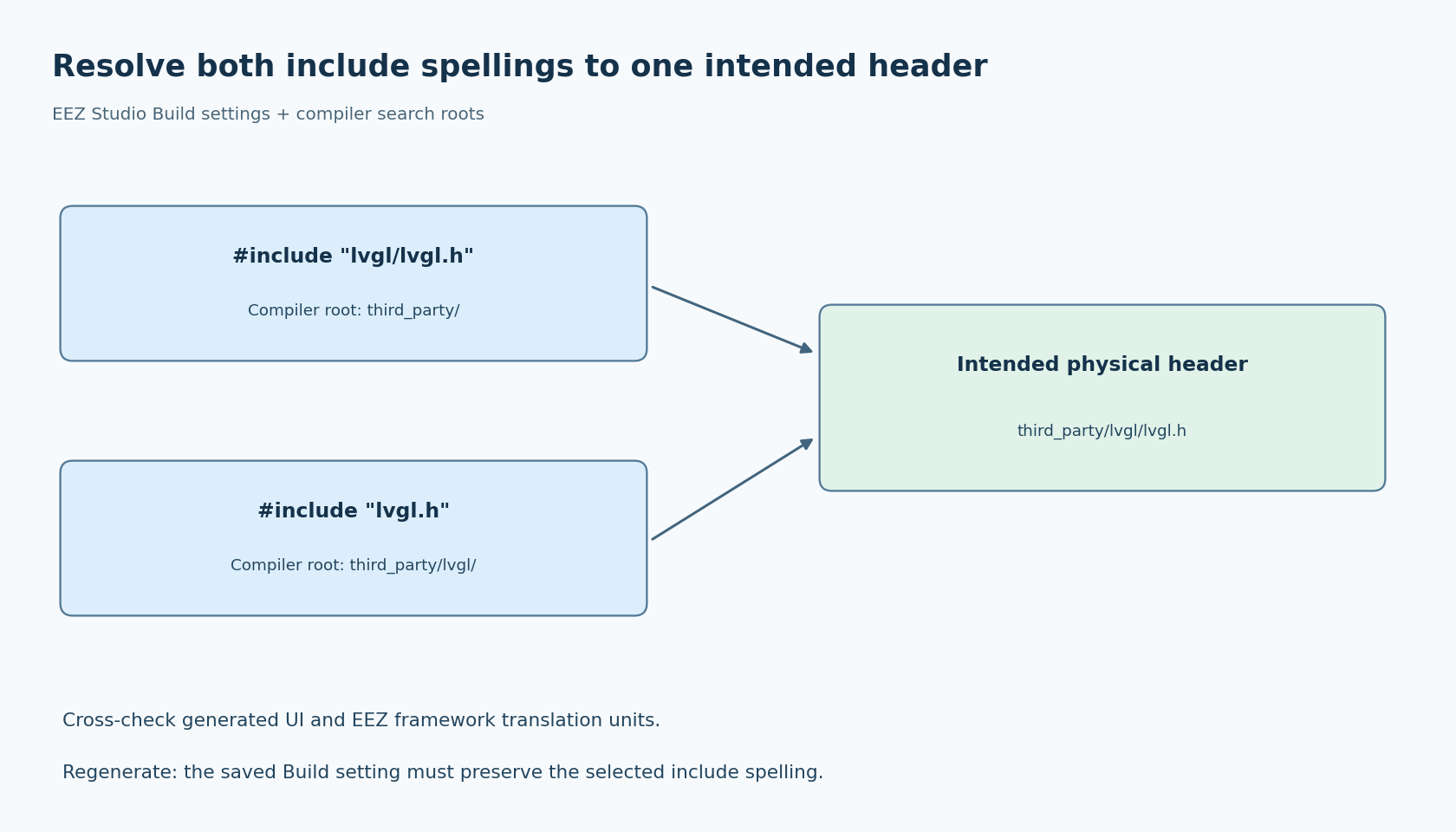
An include of lvgl/lvgl.h asks the compiler to find that relative path beneath an applicable search root. An include of lvgl.h asks for a different relative path. The names can refer to the same physical file when different roots are configured, but they are not interchangeable without those roots.
Draw the relevant directory tree from the actual build machine. Suppose the intended file is third_party/lvgl/lvgl.h. A search root of third_party can satisfy lvgl/lvgl.h; a search root of third_party/lvgl can satisfy lvgl.h. This is an illustrative layout, not a required EEZ directory structure.
Check the failing translation unit's compiler command rather than the IDE's global include list. Build targets can have different include directories. A path that makes handwritten application code compile may not be attached to the generated UI target.
Change the setting that owns the output
EEZ's Build settings documentation exposes the LVGL include path. Set it to the spelling appropriate for the selected build arrangement, save the project and regenerate. Inspect a generated header or source file to confirm the change was emitted.
The EEZ FAQ discusses the same lvgl/lvgl.h versus lvgl.h distinction. It also mentions LV_LVGL_H_INCLUDE_SIMPLE, which matters for code that selects its own include spelling through that definition.
Do not assume changing the generator field modifies every compiler target or every library's preprocessor configuration. It controls the relevant generated text. The native build still needs to supply directories and definitions consistently.
If a customized file template hardcodes a different include, inspect that template too. A project can contain both a general setting and a manually edited integration file. The exported text is the concrete evidence of what the generator used.
Audit the framework side separately
In a Flow-enabled integration, inspect the EEZ framework include path as well. The official LVGL API header, as read for this review, uses LV_LVGL_H_INCLUDE_SIMPLE to choose its LVGL include form. It also contains version-dependent private-header handling.
This is why a generated ui.c can compile while a framework source file still fails. The two translation units may receive different definitions, or their include roots may select different copies of LVGL. A local edit to the first file does not resolve the second path.
Use your compiler's include-trace or preprocessed-output facility on one generated UI source and one representative framework source. Record the resolved main LVGL header and configuration header for both. Their paths should match the intended integration, not merely end with the same filename.
Do not “fix” a missing private header by copying an unrelated header from another LVGL release into the search path. That replaces a clear missing-file error with a potentially subtler version mismatch. Select a compatible framework/library combination and inspect its documented layout.
Remove accidental success from the test
A developer's machine can make the wrong configuration appear correct. An SDK include path, an old checkout or a global environment setting may provide a second lvgl.h. The compiler stops at the first applicable match; the build does not explain your intended ownership for you.
Search the build's configured roots for duplicate LVGL checkouts. Then use a clean build directory and a controlled environment that contains only the intended dependencies. Keep the working source tree intact so the test remains reversible.
Inspect the version macros from the resolved header if a release mismatch is suspected. A successful compile against the wrong version is not a passing include-path test. Archive the resolved path together with the dependency revision so a later package update cannot silently change the interpretation.
For a multi-target project, repeat this check for each relevant target. A desktop harness and an embedded firmware image may legitimately have different root paths, but both should resolve the intended release and project configuration.
Close the regeneration loop
After the include failure is fixed, make a harmless EEZ UI change and generate again. Confirm the emitted include spelling remains correct, then compile from a clean build directory. This establishes that the repair lives in a saved setting or template rather than in an output patch.
Review the project diff and native build diff together. The former explains what source text EEZ emits; the latter explains how the compiler resolves it. Avoid checking in a collection of extra include directories without documenting which one is supposed to satisfy the LVGL header.
The proposed acceptance check is small: generated UI and framework sources resolve the intended LVGL header, use the intended configuration, compile together, and continue doing so after regeneration. No hardware test is required to establish that path relationship, although runtime behavior still needs its own validation. A disappearing include error is useful only when the file it found is the one the project meant to use.