Yocto Wic Images: Reconcile Partition Definitions with Bootloader Expectations
A root filesystem builds successfully, but the assembled SD-card image stops before mounting it. Rebuilding application packages may not change the result because the failure lies between the partition layout, boot files, and the root-device reference handed to the kernel. Inspect the Wic artifact as an assembled disk, not simply as a container for a known-good root filesystem.
This article uses Yocto Project 5.0.12 Wic documentation. Board-specific boot-ROM offsets and loader behavior must come from the product's board support documentation. The procedure below does not assert a universal bootable layout or claim that a hardware boot test was performed.
Establish which artifact set Wic consumed
The Wic guide distinguishes raw mode, where artifact paths are explicit, from cooked mode, where the image name and current machine locate build artifacts. Capture the actual invocation and resolved root filesystem, kernel, boot-file, and native-tool locations.
Check the effective WKS_FILE and archive the file actually used. If a template generates the kickstart file, preserve its resolved contents as well as the template. A similarly named file in another layer is not evidence of the layout used for this image.
For each consumed artifact, record its hash and originating build. This is particularly important when using raw mode to combine a kernel from one location with a root filesystem from another. Make the intended combination explicit before diagnosing an incompatibility inside the assembled disk.
Translate the layout into a boot contract
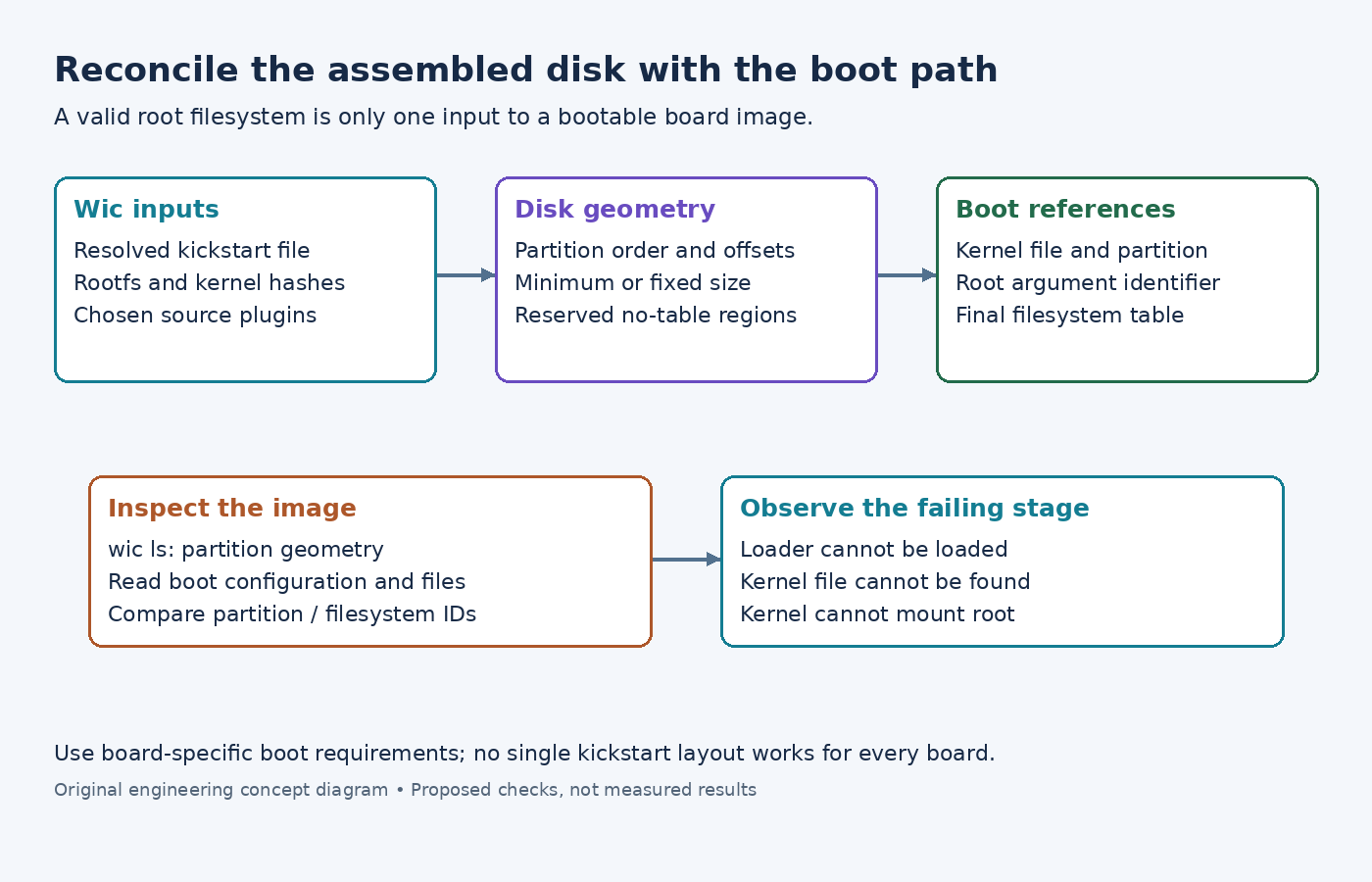
For every partition, record its order, start offset, size policy, filesystem, content source, and identifiers. Add any region reserved for a bootloader outside ordinary filesystem partitions. Then write beside each entry the boot stage that consumes it.
The kickstart partition reference distinguishes a minimum --size from an exact --fixed-size. It also distinguishes alignment from an exact offset, and explains that --no-table reserves and populates space without adding a partition-table entry. These choices are not interchangeable ways to make a disk larger.
Use the board's requirements to justify each exact offset and reserved region. Do not copy a raw bootloader placement from an unrelated board because the processor family looks similar. Partition-table tools may not display every populated region when a layout deliberately uses space outside the table.
Keep partition identity separate from filesystem identity
The same reference distinguishes --uuid, which specifies a partition UUID, from --fsuuid, which specifies a filesystem UUID. --use-uuid lets Wic generate a partition identifier for root selection in bootloader configuration. Check which type of identifier the generated configuration actually uses.
Compare the root-device argument in the boot configuration with the identifier present in the assembled image. Do not substitute a filesystem label, a filesystem UUID, and a partition UUID as if they were equivalent strings. Also inspect the final filesystem table rather than assuming it is unchanged from the input rootfs tree.
A useful failure record contains three observations: the bootloader's selected partition or path, the kernel command line it supplies, and the root filesystem's actual identity. When these disagree, fix the producer of the incorrect reference. Editing a copied file on one test card can confirm a hypothesis, but it is not a reproducible build correction.
Inspect the source plugin's responsibility
The Wic plugin guide explains how a partition's --source value selects the code that prepares its contents. Inspect the chosen plugin and its parameters in the product checkout. A boot partition's contents can depend on more than the files visible in the root filesystem directory.
Identify which component creates the loader configuration and which one selects the kernel filename. If the layout supplies a custom configuration file, verify that the plugin actually consumes it and that its references match the files placed in the partition. Do not assume every plugin interprets every bootloader option identically.
Check the plugin's declared build dependencies when it invokes extra tools or consumes bootloader artifacts. A local tool left on one developer's machine should not become an invisible requirement of image assembly. Keep any custom plugin with the layer revisions used for the release.
Examine the disk before writing test media
Use wic ls product-image.wic to inspect the partition list, replacing the example filename with the generated artifact. The Wic inspection example also shows partition-content inspection such as wic ls product-image.wic:1; support depends on the filesystem and available tools.
Compare the observed starts and sizes with the layout contract. Inspect the boot files and configuration through a read-only image-analysis workflow appropriate for the filesystem. Confirm that the expected kernel and root filesystem came from the recorded inputs. If the image is compressed, inspect a verified decompressed copy while retaining the original release-file hash.
Avoid repair commands against a host disk during diagnosis. Work on copies of the image and use designated disposable media for boot tests. Before any media write, verify the target device independently so a correct image investigation does not overwrite unrelated data.
Locate the failing boot boundary
Capture the earliest available console output from the designated test board. Separate a failure to load the bootloader, a failure to locate the kernel, and a kernel failure to locate or mount root. These symptoms point to different portions of the Wic contract.
Change one relevant layout or artifact input at a time, regenerate the image, and repeat the inspection before booting. Retain both failing and corrected image identities with the diagnostic logs. A successful filesystem build establishes only one input; the assembled layout and its boot references need their own evidence.