systemd Coredumps: Storage=none Can Still Use Temporary Disk Space
A device configured with Storage=none can still use disk space while systemd processes a userspace core dump. In systemd v257, that setting controls permanent retention. Extracting diagnostic information can require a temporary core file first, even if no retained core remains afterward.
Read the setting in its own subsystem. This review uses the tagged v257 coredump.conf manual, not similarly named pstore or journal options. No crash was induced, no core was collected, and no diagnostic policy was changed.
Draw processing and retention as separate stages
A useful investigation separates four questions: whether a process core is generated and delivered to this handler, whether the handler processes it, whether the core is retained, and what metadata are logged. An answer at one stage does not establish the others.
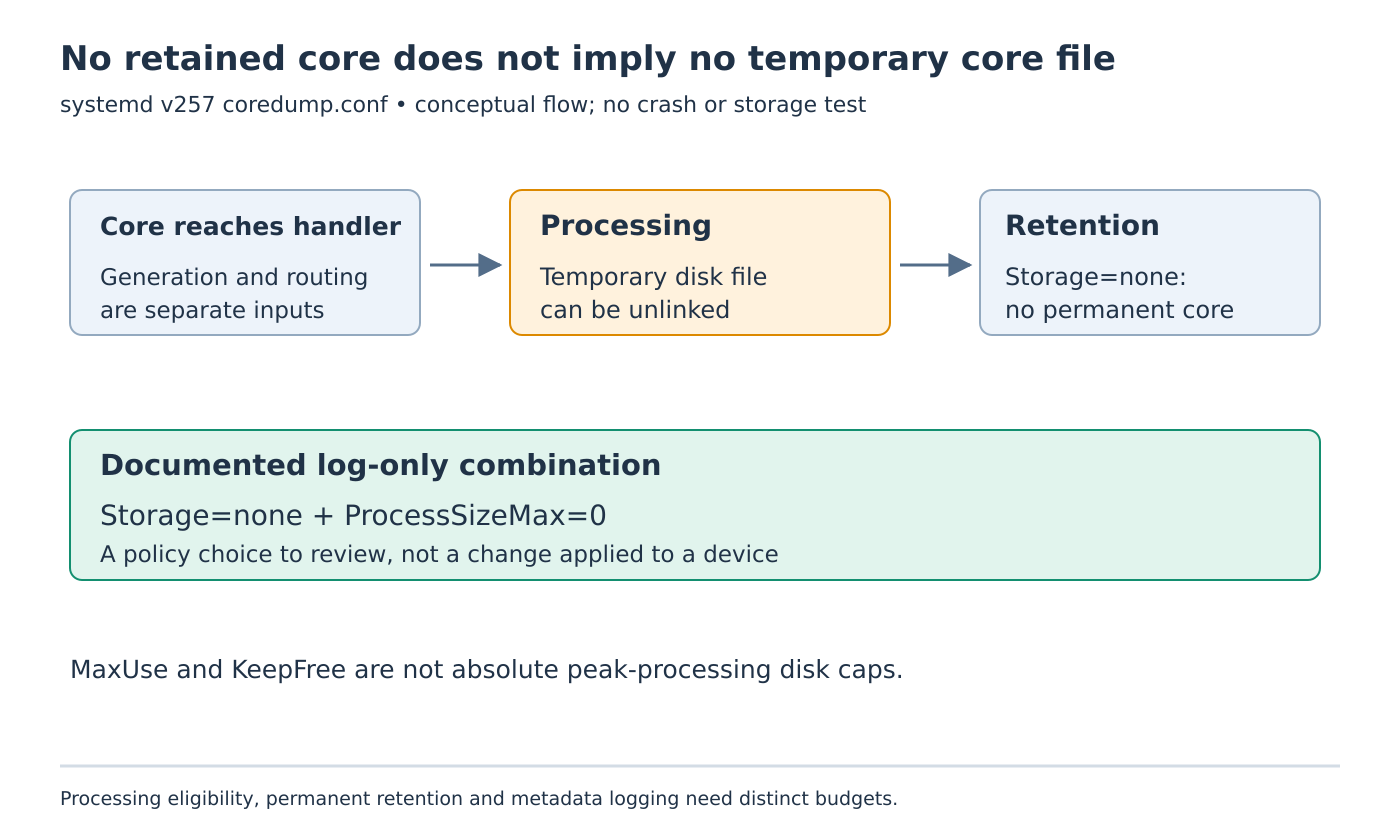
For the fictional appliance, assume systemd-coredump is the configured handler and the core is eligible for the intended processing. With Storage=none, permanent core retention is disabled, but backtrace processing may still occur. The manual says processing requires first writing the core to disk, potentially under a temporary name or in an unlinked file.
That explains why a directory listing after processing can be empty while disk activity occurred earlier. Absence of a retained pathname does not prove that no temporary storage was used. It also does not prove that the processing stage succeeded; retain its actual outcome separately.
Compare three policies without deploying them
Consider these design cases, assuming the handler receives the core and ordinary eligibility checks permit the relevant stage:
Storage=externalwith a positiveProcessSizeMax=allows processing and external retention within their separate size policies.Storage=nonewith a positiveProcessSizeMax=can still require temporary disk storage for processing, while leaving no permanently retained core.Storage=nonetogether withProcessSizeMax=0is the documented combination that disables core handling except for a log entry.
The last combination is an explanation of the manual, not an instruction to disable diagnostics on a device. A product may need stack traces or retained cores to investigate intermittent failures. Losing that evidence can have a larger operational cost than the space it saves.
Changing only a retention setting should therefore follow a written decision about the diagnostic evidence the product needs. Do not assume that “no permanent file” also means “no processing,” “no logging,” or “no transient space requirement.”
Keep the size limits attached to their stages
ProcessSizeMax= limits which core sizes are processed for a stack trace. ExternalSizeMax= and JournalSizeMax= concern saved cores in their respective destinations. A core exceeding the processing threshold may still be stored under the storage policy, so these controls are not interchangeable.
For a synthetic review worksheet, give each crash case a core size, processing eligibility, chosen storage destination and retention eligibility. Mark unknown values as unknown. Do not infer an exact core size from the executable file size; the requested budget concerns process-state evidence, not just the program binary.
The worksheet can reveal contradictory expectations. For example, a team may want no retained cores while still requiring backtraces. That combination is meaningful, but its capacity review must include temporary processing demand rather than budgeting only the retained archive.
Do not use retention limits as a peak-disk guarantee
MaxUse= and KeepFree= govern space used by externally stored cores. The manual explicitly allows temporary excess while cores are processed. Treating either as an absolute maximum for every instant creates a false guarantee on a small writable partition.
Separate steady retained usage from transient processing demand and unrelated filesystem consumers. If application data, updates and crash processing share storage, their simultaneous demands need a product-level capacity policy. Directory separation alone does not establish capacity isolation.
A burst of several crashing processes is a different workload from one isolated event. Any quantitative peak claim needs the actual handler behavior, concurrency, filesystem and workload qualified. This article supplies no measured peak, flash-endurance result or universal reservation formula.
Protect diagnostic content as well as capacity
Core dumps can contain secrets and private process memory. Temporary or unlinked storage should not be treated as automatically harmless merely because it is absent from a later file listing. Review access, lifecycle and any export path as part of the diagnostic policy.
A future controlled test should use an owned synthetic process without credentials or customer data. Agree on retention and cleanup before creating the core, and preserve only the evidence needed for the test. No such test was performed here.
Ask for stage-specific evidence
For an unexpected storage event, collect the effective coredump configuration, handler selection, processing result, retained-file state and filesystem usage over the relevant interval. Keep those observations associated with one crash identity instead of comparing unrelated before-and-after snapshots.
The useful conclusion is precise: whether this policy retained a core, processed it through temporary storage, or only logged the event. That explanation is stronger than assuming Storage=none describes every stage of the core-dump lifecycle.