Yocto Overlayfs Data Paths: Connect Generated Mount Units to the Writable Backing Store
An application starts against a read-only directory even though its recipe inherits overlayfs. The class can generate the overlay's systemd units, but it does not invent the storage device, filesystem or application ordering that makes those units useful.
Trace a concrete path through the generated dependency chain. This separates a missing backing mount from a failed overlay mount and from an application that started too early.
Connect the machine's storage to the recipe's directory
The Yocto overlayfs reference assigns the backing mount point to machine configuration and the writable paths to individual recipes. An illustrative pairing is OVERLAYFS_MOUNT_POINT[data] = "/data" in machine configuration and OVERLAYFS_WRITABLE_PATHS[data] = "/usr/share/sensor" in the application recipe.
The shared data flag connects those declarations; it is not a block-device identifier. Supply the actual backing mount separately. The examined maintenance-branch class describes an installed fstab entry or corresponding systemd mount unit. It requires the systemd and overlayfs distro features.
Inspect the effective declarations and generated files before booting. A spelling mismatch between flags is a configuration problem, while a correct flag pointing at the wrong storage is a runtime storage problem. Moving the machine-level declaration into a recipe can also undermine the image-level QA described by the documentation.
Read the generated chain, not just the application unit
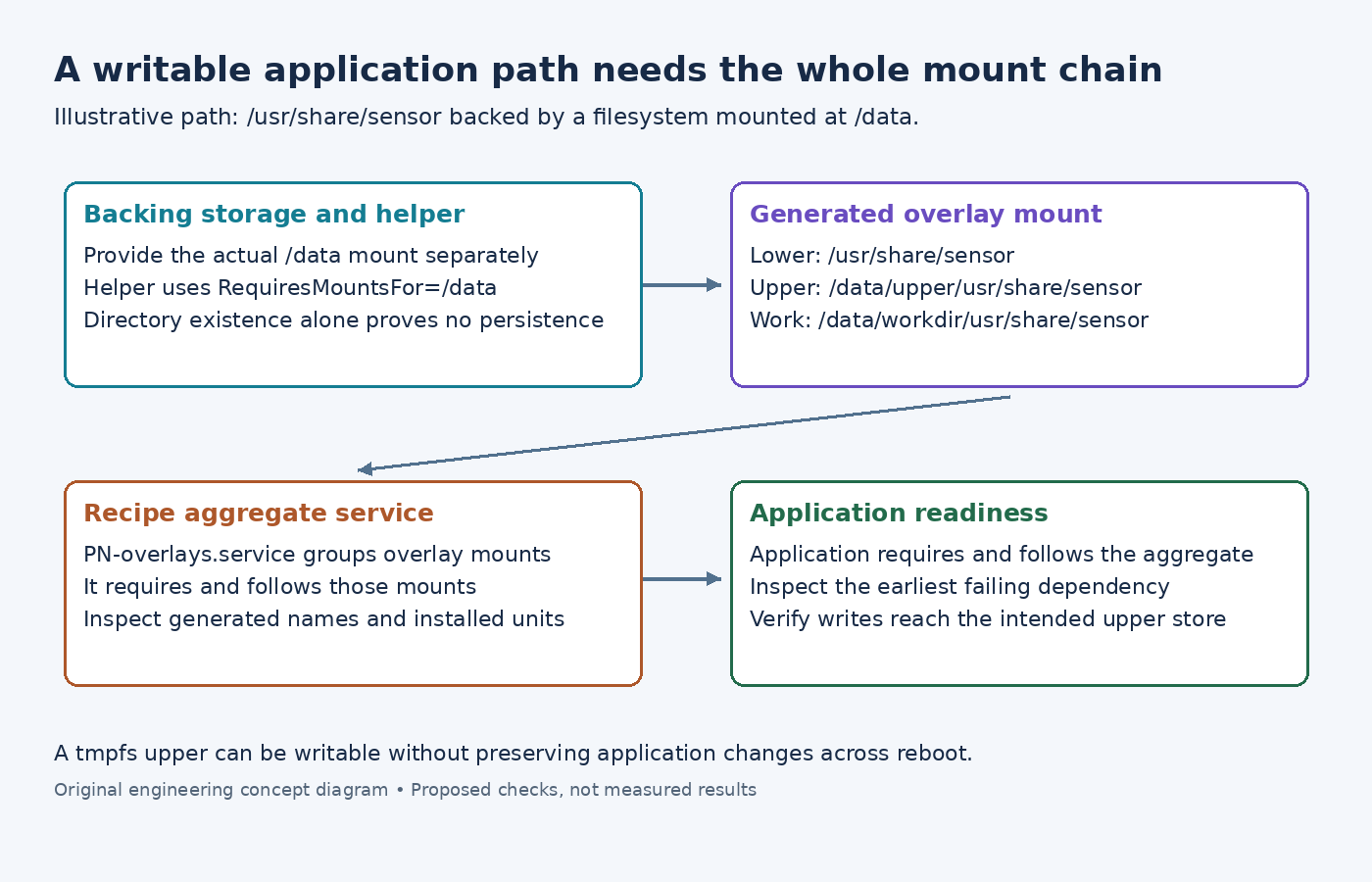
The mount-unit template makes the overlay require and follow its directory-creation helper. For the illustrative path, the overlay mounts at /usr/share/sensor, with its original contents as the lower directory, /data/upper/usr/share/sensor as the upper directory and /data/workdir/usr/share/sensor as the work directory.
The helper template contains RequiresMountsFor for the backing path. According to the systemd unit reference, this introduces requirement and ordering dependencies on mounts needed to access that path. It does not define a missing /data filesystem.
The aggregate-service template then requires and follows the recipe's generated overlay mounts. The application service should require and follow that aggregate service, named from the recipe's PN. For a PN of sensor-app, that means sensor-app-overlays.service.
Locate the first failed edge
On a designated test image, inspect the installed units with systemctl cat and their state with systemctl status. Use the generated names rather than guessing how punctuation was escaped. For this simple directory, the overlay unit is usr-share-sensor.mount.
Follow the evidence in this order:
- If the backing mount is missing or failed, inspect its device, filesystem and mount options. A directory named /data is not proof that the intended persistent storage is mounted there.
- If the helper fails, inspect its journal and the installed directory-creation executable. Determine whether it reached the intended backing filesystem.
- If the overlay mount fails, inspect the mount error and resolved lower, upper and work paths.
- If those units succeed but the application raced ahead, inspect the application's actual Requires and After relationships, including drop-ins.
The Linux 6.6 OverlayFS documentation requires the work directory to be on the same filesystem as the upper directory and describes the upper filesystem's capabilities. A normal directory creation success does not establish those requirements.
Verify persistence at the selected backing store
For a controlled test, write a disposable application file through the merged path, then inspect the corresponding upper location and mount information. After a normal reboot, check whether the same backing filesystem and upper directory were reused. A tmpfs-backed overlay can be writable while intentionally losing changes across reboot.
Do not use OVERLAYFS_QA_SKIP to treat a missing mount as configured. In the examined class, the mount-configured exemption is for arrangements such as custom early mounting; it supplies no storage itself.
Finally, keep /etc out of this ordinary application-unit design. The Yocto documentation reserves that directory for overlayfs-etc because the init system needs its configuration before normal service ordering can solve the problem.