Yocto do_install: Keep Target Paths Separate from the Staging Destination
An application compiles correctly but installs into the wrong directory, or its generated configuration contains the builder's temporary staging path. These failures often begin with the same confusion: the path a program should use on the target is different from the host directory where its package contents are assembled.
In Yocto embedded Linux development, do_install must preserve that distinction. The task's destination root is temporary; the paths encoded for the target must remain meaningful after packaging and deployment.
Give each path one job
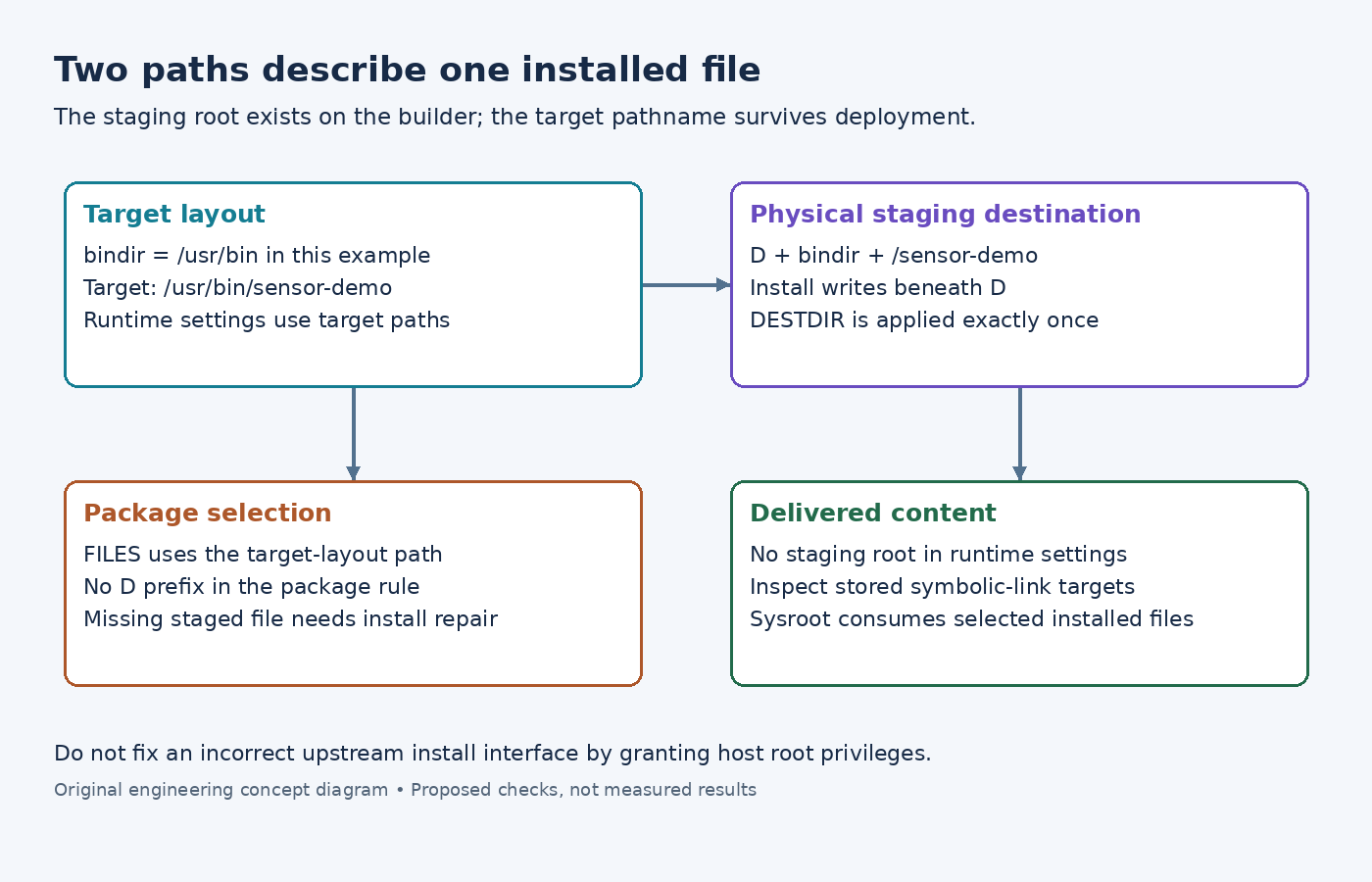
The Yocto 5.0.12 task reference defines do_install as copying files into ${D}, with ${B} as its working directory. Think of D as a container for a future filesystem layout, not as an installation prefix the application should remember.
For an illustrative command installed under ${bindir}, the physical staging destination is ${D}${bindir}/sensor-demo. If bindir is /usr/bin, the future target path is /usr/bin/sensor-demo. The temporary value of D is removed from that interpretation; it is not part of the device pathname.
Before changing the recipe, write down both paths for the failing file. If the file is absent beneath D, investigate installation. If it is present there but absent from the package, investigate package selection. If it is packaged correctly but refers to a temporary location at runtime, investigate generated content or configured paths.
Keep prefix and DESTDIR separate
The Autotools class passes ${D} as DESTDIR during installation. Its configure step still receives the target installation layout. Replacing the target prefix with ${D}/usr confuses these responsibilities and can bake the staging directory into generated files.
The CMake 3.28 DESTDIR reference describes the same UNIX packaging distinction: the staging root is prepended to the configured installation prefix. For example, a staging root plus /usr produces a physical staging path ending in /usr; it does not redefine /usr as a temporary host location.
For a custom Makefile, inspect its install rule before adding variables to the recipe. Does it honor DESTDIR? Does it use PREFIX, prefix, or another interface? Does it prepend the staging root exactly once? Passing an ignored variable can yield a successful command that writes somewhere unintended, while passing both a prefixed destination and another staging root can create a doubled path.
Prefer fixing that install interface over adding a post-install move that hides its error. Never run an installation with elevated host privileges to compensate for an attempt to write directly into the host's system directories.
Install small custom outputs explicitly
When no usable upstream installation rule exists, a recipe can create the destination directory with install -d "${D}${bindir}", then copy its built executable with install -m 0755 "${B}/sensor-demo" "${D}${bindir}/sensor-demo". These illustrative commands belong inside the recipe's do_install task; they are not host-shell commands to run with unexpanded BitBake variables.
For a configuration file, use the appropriate target path variable, such as ${sysconfdir}, when choosing its staging location. Inside that configuration, an application path should refer to the target layout. Do not write ${D} into a service command, runtime search path, or application data-directory setting.
Check symbolic-link targets too. A correctly located symlink can still be broken if its stored target names the builder's staging directory. Examine the link itself rather than following it and seeing an apparently valid host-side file.
Let packaging and sysroot staging consume the result
The FILES reference describes package file selection using target-layout paths, for example ${bindir}/sensor-demo, without adding ${D}. Adding a broader FILES pattern cannot repair a file that installation never placed into the staging tree.
Likewise, recipes should not install directly into a dependency sysroot. The sysroot task reference explains that a selected subset of installed files is staged there later. Keep installation responsible for the recipe's own tree, then inspect the package and sysroot outputs separately.
The useful final check is concrete: one expected target pathname, one corresponding file beneath D, and no staging prefix embedded where the delivered software expects a target path. That isolates the install-path contract without treating every later packaging or runtime failure as an installation problem.