Buildroot Git Submodules: Check Which Nested Sources Enter the Download Artifact
When a package builds in a developer's checkout but fails from a clean Buildroot download, inspect the source contents before changing compiler flags. The developer may have initialized nested Git repositories that the package recipe never requested. The top-level commit can be correct while the downloaded material lacks a required submodule.
The right question is not simply whether the upstream project uses Git. It is which repositories, revisions and generated files must be present for this particular package build. The checks below are proposed diagnostics, not results from a tested customer project.
Establish whether the missing file belongs to a submodule
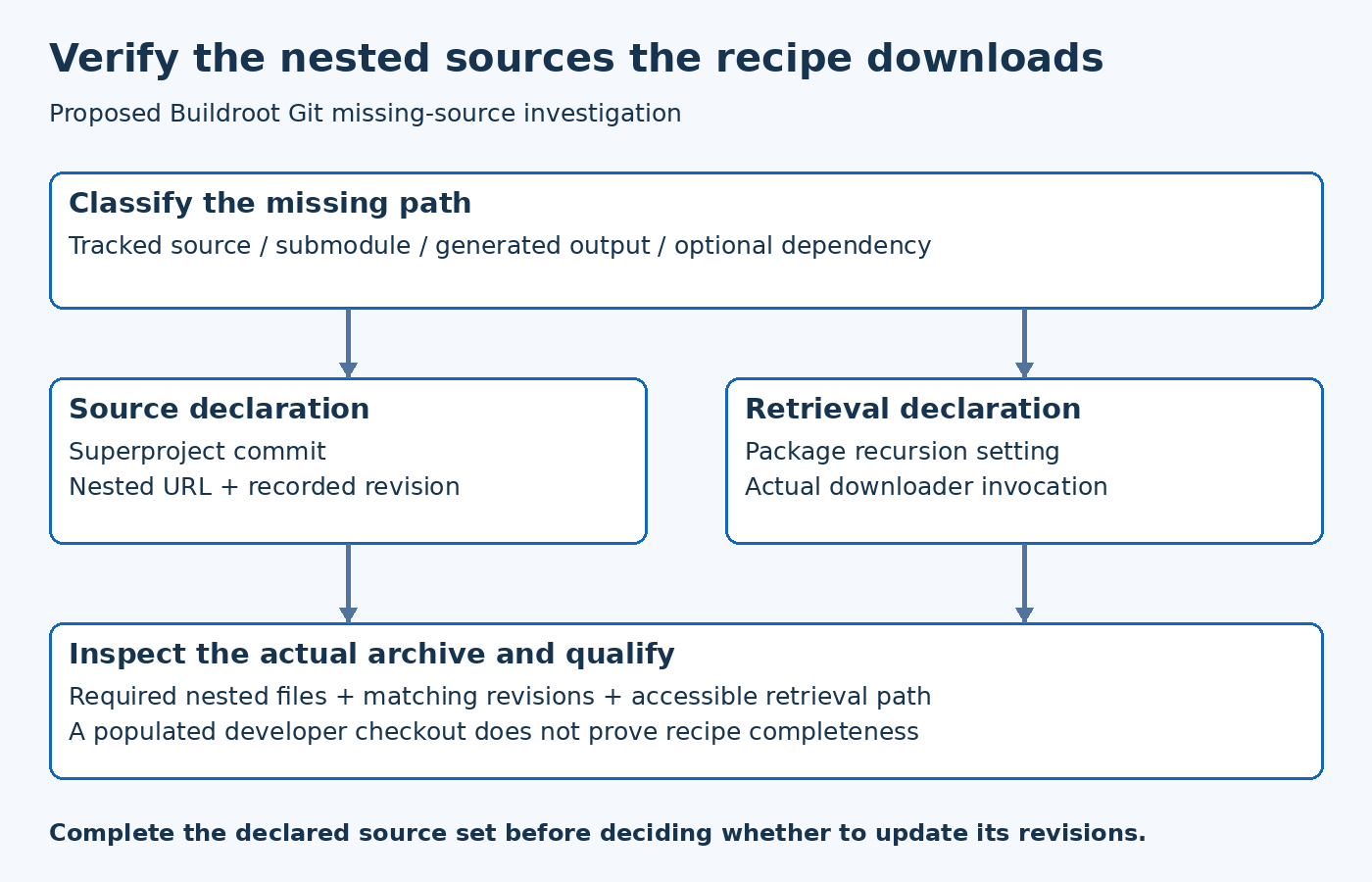
Start with the first meaningful missing-file error and trace that path in the selected upstream revision. Determine whether it is a normal tracked file, a submodule path, generated output or an optional dependency. These categories require different remedies. Enabling recursive fetching does not create a file that should have been generated by a separate build step.
Inspect the superproject's submodule definitions and recorded revisions. The Git submodule reference explains status inspection and the difference between following recorded commits and following remote branches. A populated local directory is not enough evidence: it may contain a different revision or local edits.
Create a small source map with the missing path, its owning repository, the expected commit and the step that makes it available. This map is an investigation aid. It should come from the selected source, not from a guess based on a familiar directory name such as vendor or third_party.
Check the package's recursive-fetch setting
In the Buildroot 2026.08 download helper, the package's GIT_SUBMODULES setting controls whether the recursive option is passed to the downloader. The versioned Git backend then performs recursive submodule initialization when that option is enabled.
Check the actual package variable after recipe evaluation, not only a similarly named value in an unused file. A host package and a target package may be configured through different metadata. Keep the package identity and build context in the investigation notes so the fix applies to the source retrieval that actually failed.
Do not treat the recursive option as a universal cure. Fetching unused nested repositories can increase the dependency set and infrastructure requirements. Confirm that the package really needs those sources for the enabled feature set before expanding the retrieval behavior.
Compare the archive, not just the live checkout
A developer checkout and the source archive supplied to Buildroot are different artifacts. Inspect the material actually downloaded for the failing build. Verify that the required nested paths are present and that their contents correspond to the intended submodule revisions. Preserve the archive identity with the failure record.
If a developer manually populated missing directories inside a build tree, that workaround may explain why a later build succeeds locally. It does not establish that the recipe is complete. The durable fix belongs in controlled source retrieval or a documented generation step, followed by a clean-input check.
Use a separate investigation location. Do not repair a managed download cache by hand and then distribute it as if it were reproducibly generated. That hides the distinction between what the recipe requests and what a person happened to add.
Audit nested URLs and access assumptions
A superproject may reference repositories with different hosting or access requirements. Relative URLs are interpreted in relation to the superproject's remote context, as documented by Git. Moving the top-level repository to an internal mirror can therefore change where a relative nested URL resolves.
Review each required nested repository, including deeper levels. Record whether a clean builder can obtain it through the approved retrieval path. An authenticated developer session can conceal an access dependency that a build worker does not have. Keep credentials out of logs and public bug reports; report the missing access requirement without publishing secrets.
Do not automatically rewrite URLs until the intended repository identity is confirmed. A reachable repository with the same project name may still contain different history. Match the required commit and provenance rather than accepting the first successful download.
Keep recorded revisions separate from development updates
For release reconstruction, the submodule revisions recorded by the selected superproject matter. Git's remote-update mode intentionally changes the source of the target revision. Using it during diagnosis can turn a missing-source problem into an unreviewed dependency update.
A hypothetical example makes the distinction clear. A product selects superproject revision A, which records library revision L1. A developer has locally advanced the library to L2 and the build passes. That does not prove the recipe for A is correct. First test the source set A actually specifies, then decide whether an intentional update to L2 is needed.
Keep the two decisions separate in the review: complete the declared source set, or change the declared source set. They have different evidence and qualification requirements.
Qualify the corrected source closure
A proposed acceptance check begins with a controlled fresh retrieval, inspects the resulting nested source contents and performs the relevant package build. Record the top-level revision, nested revisions, retrieval settings, archive checksum and observed result. If a nested repository is unavailable, record that limitation instead of calling the configuration validated.
The useful outcome is a recipe whose declared inputs match the material needed by the build. A clean machine should not need the original developer's already-populated submodule directories to discover what the project actually depends on.