Yocto SDK Package Lists: Put Development Inputs in the Correct SDK Sysroot
A library runs correctly in the device image, but an application developer's standard SDK lacks its headers. Adding a native build dependency to the library recipe does not directly select an SDK package. The missing input must be traced through the SDK's package lists, complementary-package selection and assembled target sysroot.
This investigation starts with a specific missing file, such as a hypothetical sensor API header. It does not require choosing between SDK products or revisiting installer relocation.
Identify the output package that owns the missing file
Inspect the library's split package contents or package data. Determine whether the header belongs to sensorlib-dev, a differently named development package, or no package at all. A runtime shared object and its development headers commonly travel in different outputs, so presence of the runtime library is insufficient evidence.
If the header was never installed or packaged, fix that producer first. An SDK package list cannot select a file absent from every package. If the development output exists, the question becomes why SDK construction did not install that package.
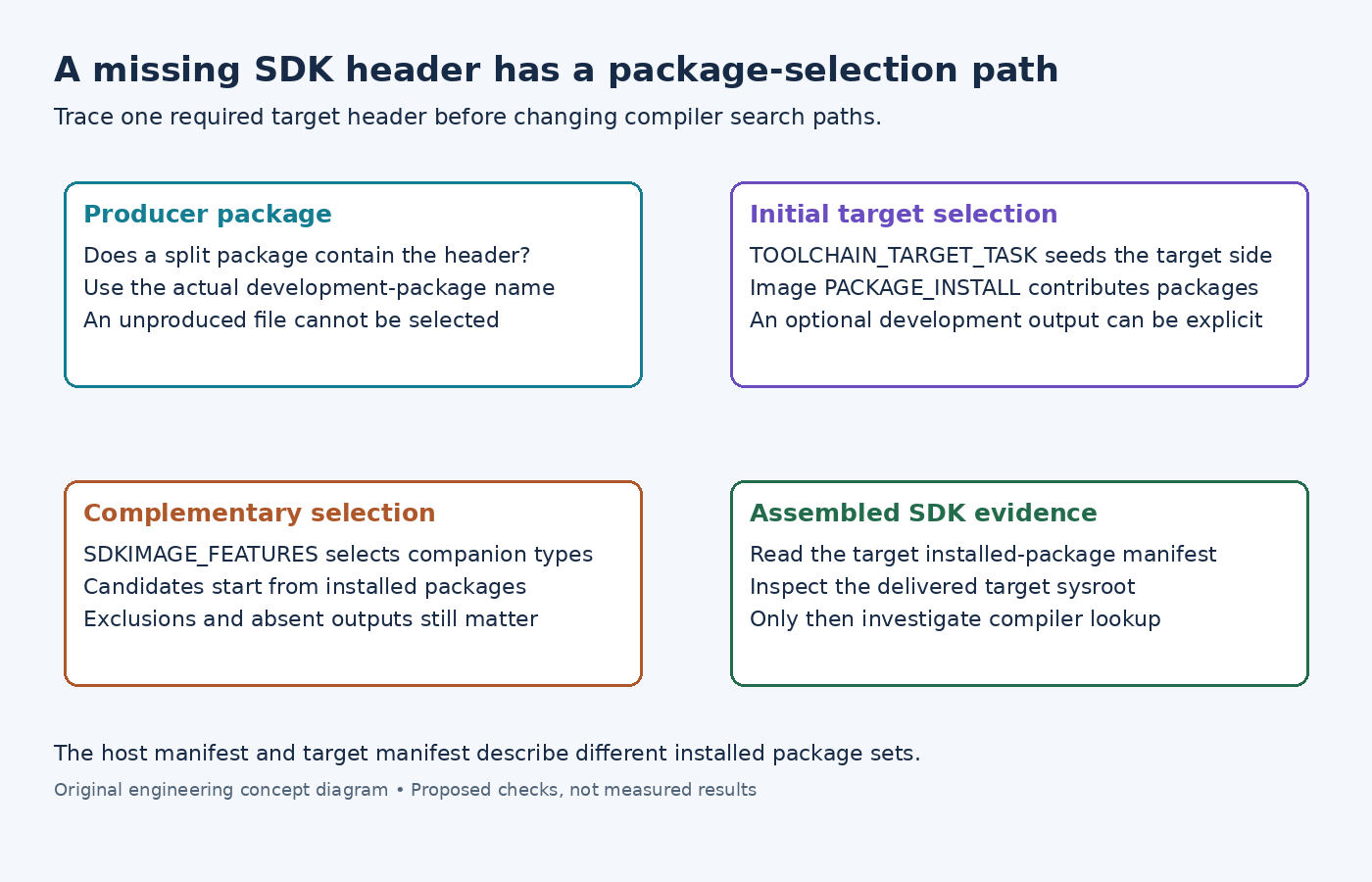
The standard SDK customization guide separates TOOLCHAIN_HOST_TASK and TOOLCHAIN_TARGET_TASK. The target-task reference identifies the target portion as including target libraries and headers.
For a required package that actually exists, an illustrative explicit addition is TOOLCHAIN_TARGET_TASK:append = " sensorlib-dev". Use the output package's metadata name. Do not substitute a build-only native recipe name or add the target library to the SDK-host list simply because the SDK itself is installed on a workstation.
Follow the seed list and its complementary outputs
The examined image class extends TOOLCHAIN_TARGET_TASK with PACKAGE_INSTALL. That connects an image's selected package set to its SDK, but it is not a promise to include every development package produced anywhere in the build.
The SDK base class converts SDKIMAGE_FEATURES into complementary-package patterns. In the examined implementation, dev-pkgs maps to development outputs, while staticdev-pkgs is a separate selection. Its default features include development, debug and source companions.
Read the final SDKIMAGE_FEATURES and SDKIMAGE_INSTALL_COMPLEMENTARY values. A configuration that replaces the feature list with one custom feature can unintentionally discard the development selection. Conversely, enabling staticdev-pkgs does not force upstream software to build static libraries that its recipe disabled.
Complementary selection starts from installed packages
The examined package-manager helper computes complementary packages from the currently installed package list and package data. It also applies PACKAGE_EXCLUDE_COMPLEMENTARY. This is not a request to install every matching development package in the repository.
A header-only component or an optional library absent from the SDK's initial package set deserves special attention. Instead of relying on a runtime package that may be empty or unselected, explicitly request the required development output when that is the intended SDK interface.
The IPK SDK backend illustrates the sequence: install target packages, install their requested complements, run target-side processing, then populate the host side separately. Other backends should be checked in their own implementation when diagnosing backend-specific behavior.
Use the populate_sdk log to find the initial target installation and complementary selection. If the missing package is excluded or never selected, changing compiler include flags cannot repair the SDK's contents.
Compare installed manifests before changing search paths
The SDK base class writes separate host and target manifests from installed-package queries. Read the target manifest associated with the newly generated installer, then inspect the installed SDK's target sysroot for the header itself.
If the package is absent from that manifest, return to package selection or installation. If it is present but the file is absent, inspect the package payload and SDK processing. If the file exists yet compilation cannot find it, the problem has moved to the application's selected environment and search paths.
Keep those outcomes separate. Copying headers from the workstation may hide the final symptom while introducing an interface unrelated to the device library. A correct repair makes the intended development package part of SDK construction and leaves the compiler consuming that delivered target interface.