Yocto testimage: Separate Image Startup, Test Selection and Target Test Failures
A testimage task fails, but the application test never starts. Rebuilding the application is unlikely to help if the harness could not load a test module, locate its image metadata or reach a usable target. Diagnose the earliest failing stage before treating the result as an application regression.
Yocto's testimage framework runs image-level Python tests, commonly issuing commands over SSH. It is separate from merely installing an application's ptest package.
Enable the harness before building the image
The runtime-testing manual documents IMAGE_CLASSES += "testimage" and a manual invocation such as bitbake -c testimage product-image. Build the intended image with the class enabled before invoking its tests. TESTIMAGE_AUTO can arrange testing after image creation when automatic execution is wanted.
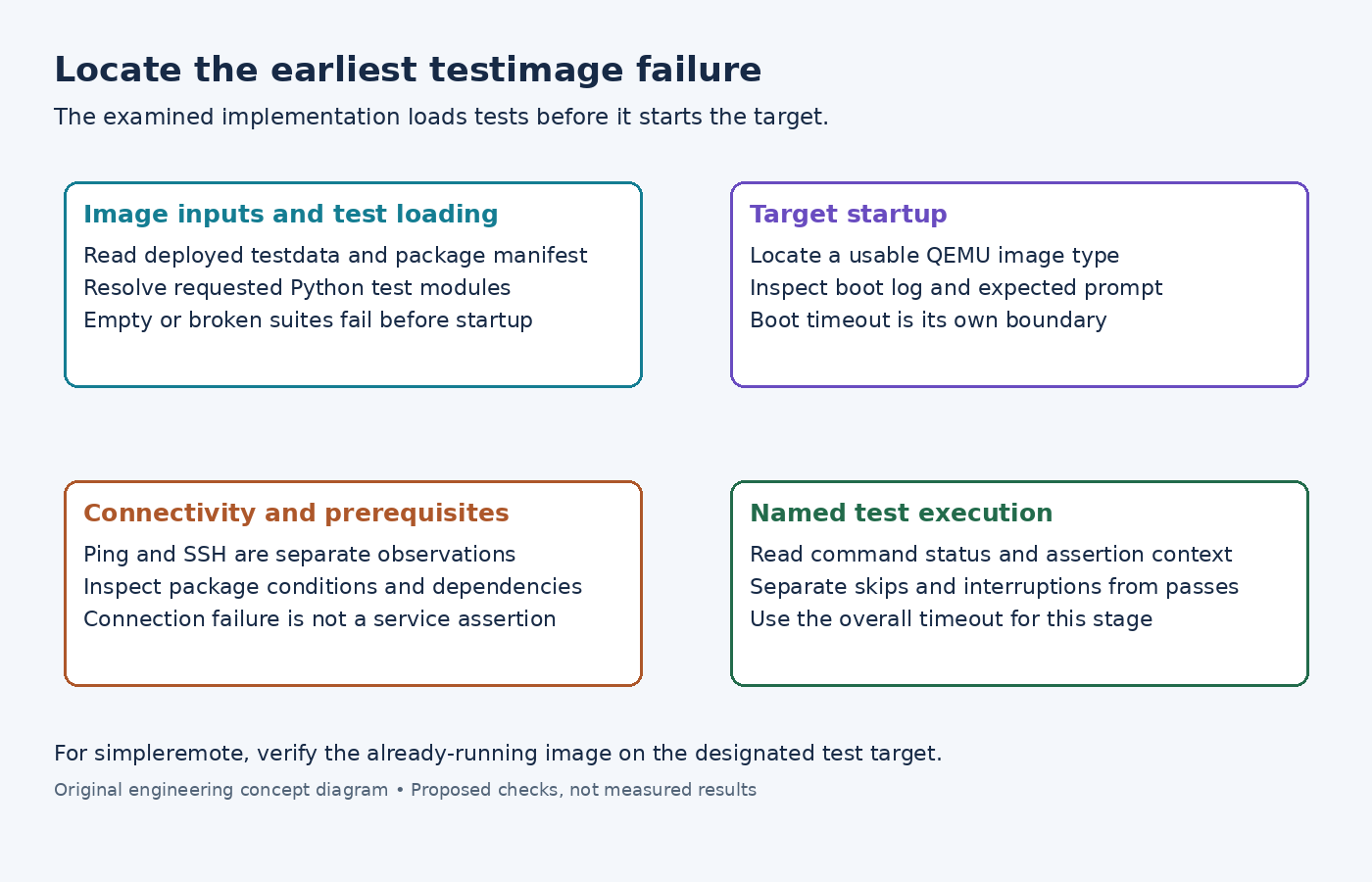
The examined testimage implementation reads the deployed image's testdata JSON and package manifest. A missing testdata file produces an early failure. It also validates usable QEMU image types before starting the target.
If that stage fails, inspect the resolved image name, deployed files and effective IMAGE_FSTYPES. Adding an SSH server cannot repair a missing host-side metadata file. Conversely, having the JSON file does not establish that the corresponding image is bootable.
Keep the test configuration attached to the image you actually built. Reusing metadata from a neighboring output because its filename looks similar can make test prerequisites describe a different package set.
Distinguish test loading from target startup
In the examined class, TEST_SUITES is read and tests are loaded before the target's start method is called. An empty configured or loaded suite is rejected. Layer test discovery searches lib/oeqa/runtime/cases directories in configured layers.
For a focused connectivity investigation, a small suite such as TEST_SUITES = "ping ssh" is more informative than an unexplained broad list. Check that the requested modules exist in the checkout and that custom names do not collide with existing modules. The manual describes the mapping between module names and suite entries.
An import error is a host-side test-loading problem. A missing prerequisite package can make a selected case inapplicable. Neither is equivalent to an assertion showing that the product's service returned the wrong result. Read the specific case and its decorators before changing the expected outcome.
Treat boot readiness and SSH execution as separate evidence
The class starts the target before running the loaded tests. TEST_QEMUBOOT_TIMEOUT controls the QEMU boot wait; TEST_OVERALL_TIMEOUT concerns the subsequent test run. Read their effective values rather than copying an old default from an example.
If the boot stage times out, inspect the QEMU boot log under TEST_LOG_DIR and the launch configuration. Determine whether the kernel stopped, userspace failed, or the expected prompt was never recognized. Raising the overall test timeout cannot fix a boot wait that failed before tests began.
A visible login prompt also does not prove SSH works. The examined SSH test declares a dependency on the ping test and a package condition involving dropbear or openssh-sshd. It runs uname remotely and handles connection-related failures separately from a failing command.
Use that distinction when reading diagnostics. A reachable address with a refused SSH connection points toward service readiness or access configuration. A remote command returning an unexpected status is a different observation. Do not weaken a functional assertion merely because the transport failed first.
Use the controller that matches the experiment
The hardware-testing section describes simpleremote for an already-running target. It does not promise to deploy and boot a new image for that mode. The examined class requires both TEST_TARGET_IP and TEST_SERVER_IP for simpleremote.
Before running against hardware, verify that the selected address belongs to the designated test device and that its running image matches the intended test. A successful connection to another board is still the wrong experiment.
Finally, read named case results and interruption messages alongside the task status. Report loading failures, startup failures, transport failures, skipped cases and functional assertions separately. This keeps the next action concrete: repair the harness input, restore target readiness or investigate the assertion that actually ran.