Yocto Rootfs Sizing: Calculate Overhead, Extra Space and Alignment Before the Limit
A rootfs-size check fails even though the installed files appear smaller than the configured limit. The check does not compare that raw content estimate directly with IMAGE_ROOTFS_MAXSIZE. It first applies overhead, a requested minimum, additional space and alignment. A small rounding step can be the final reason a boundary is crossed.
Reconstruct that calculation before removing packages or raising the limit. Otherwise, a change to the wrong input can leave the generated size unchanged.
Keep the four size inputs separate
The IMAGE_ROOTFS_MAXSIZE reference describes the calculation and states that this limit has no default value. Its comparison is independent of the final image type.
The inputs have different jobs. IMAGE_OVERHEAD_FACTOR scales the initial rootfs estimate. IMAGE_ROOTFS_SIZE supplies a requested minimum. IMAGE_ROOTFS_EXTRA_SPACE is added after choosing the larger of those two values. IMAGE_ROOTFS_ALIGNMENT rounds the result upward to a multiple of the configured alignment.
Use the effective image-recipe environment, not the defaults from an unrelated machine. Keep the units consistent: these size settings use kilobyte-sized units, and the examined implementation converts its byte estimate by dividing by 1024. A byte count copied directly into a setting would express a very different capacity.
Reproduce a boundary failure with explicit arithmetic
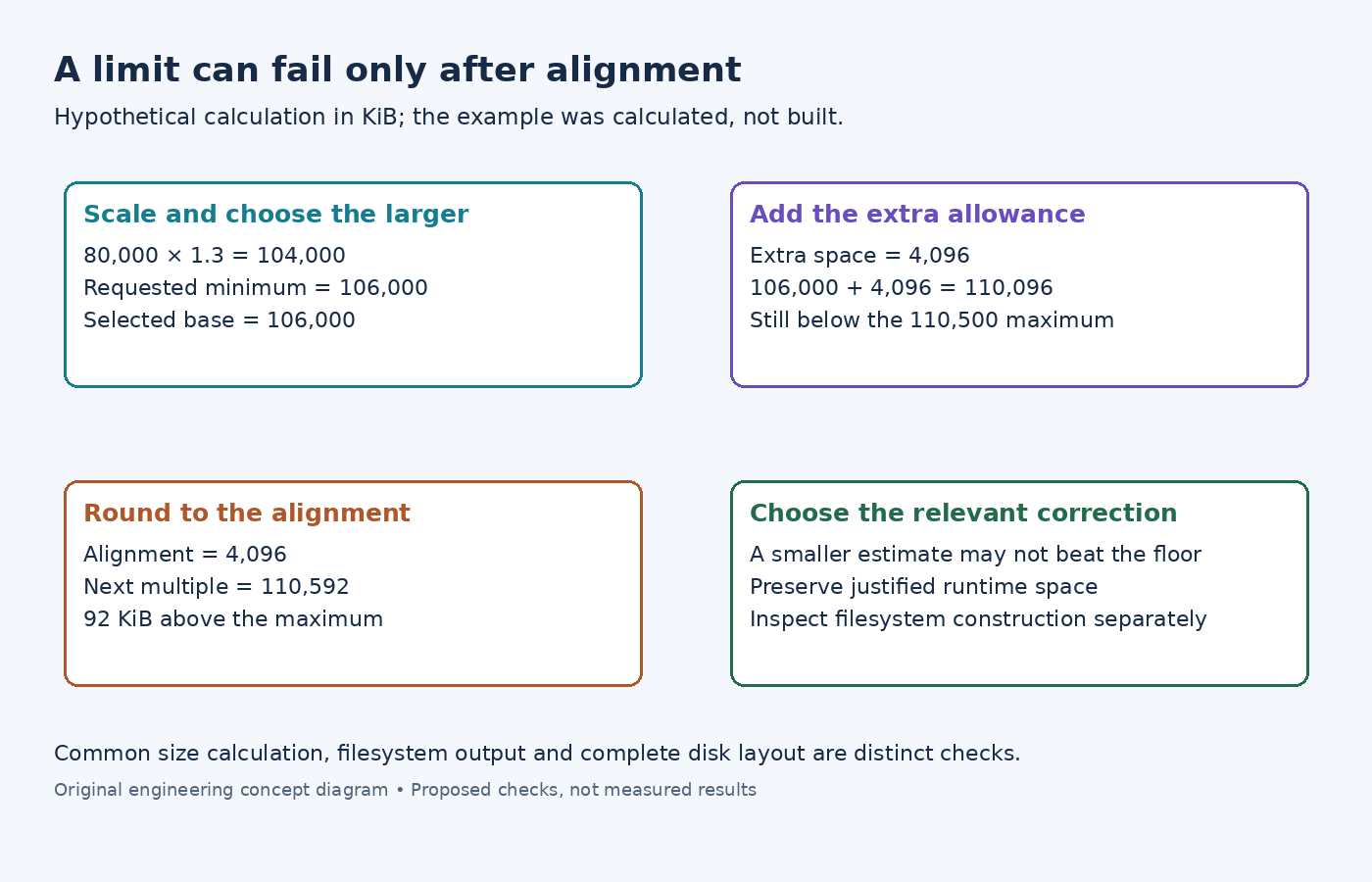
The examined image implementation computes the scaled estimate, selects the larger value against the minimum, adds extra space, rounds fractional results upward, aligns the integer and then checks the maximum.
Consider this hypothetical input set, in KiB except for the multiplier:
- Initial rootfs estimate: 80,000; overhead factor: 1.3.
- Requested minimum: 106,000; extra space: 4,096.
- Alignment: 4,096; maximum: 110,500.
Multiplication gives 104,000. The minimum wins, giving 106,000 before extra space. Adding 4,096 produces 110,096. Alignment raises that to 110,592, which exceeds the maximum by 92 KiB. The arithmetic was calculated for this example; it is not an observed image-build result.
Now reduce the initial estimate without changing the other settings. As long as the scaled estimate remains below 106,000, the minimum still wins. Removing a small package therefore does not reduce the computed size at all. This is a useful diagnostic prediction, not a reason to remove an arbitrary package repeatedly.
Check which initial estimate your checkout actually uses
The versioned variable documentation describes disk-usage input. The examined scarthgap maintenance implementation calls oe.utils.directory_size(IMAGE_ROOTFS), rather than invoking a du command for this calculation.
The current directory-size helper rounds entries to a default 4096-byte block size, accounts for already-seen inodes and uses lstat rather than following file symlinks. It is an estimate with specific rules, not simply the sum of file payload lengths or the result of every possible host du invocation.
If your independent total disagrees, inspect the helper in your exact checkout. Many tiny files, hard links and directory entries can explain differences from a naive sum. For example, one hundred separate one-byte files contribute differently under per-entry block rounding than one file containing one hundred bytes. Directory contributions must still be included.
Do not replace the build's estimate with a smaller convenient number. Determine whether the discrepancy comes from the counting method or from a genuinely different rootfs tree.
Separate the calculation from filesystem construction
The examined image-type commands illustrate another boundary: ext images allocate a backing image using ROOTFS_SIZE and then run the filesystem creation tool. Other formats have their own construction rules, including format-specific minimums.
Thus, passing the common size check does not prove that every filesystem command will fit all metadata or that the result fits a complete disk layout. A compressed download's byte length also does not explain this earlier rootfs calculation.
When correcting a failure, identify the controlling term first: content estimate, minimum, extra allowance or alignment. Retain deliberate runtime-space requirements while adjusting the relevant configuration or content. Then inspect the filesystem tool's result separately. The useful explanation is the exact term that crossed the limit, rather than a generic statement that the image was too large.