U-Boot fdt set: Check Property Bytes and Length, Not Just the Printed Number
A property that looks numeric at the U-Boot prompt can contain a
string, one byte, or a 32-bit cell. In U-Boot v2025.01,
fdt set chooses an encoding from the supplied value syntax.
It does not inspect the property’s binding and infer the intended
type.
That distinction matters when a driver ignores a runtime edit even
though the command succeeded. The relevant evidence is the resulting
byte sequence and property length, followed by the consumer’s binding
requirements.
Three spellings, three
representations
The command
parser treats a value beginning with < as an array
of 32-bit cells. Each numeric item is converted with base-zero parsing
and written in device-tree byte order. A value beginning with
[ is parsed as a hexadecimal byte stream. Other arguments
become NUL-terminated strings.
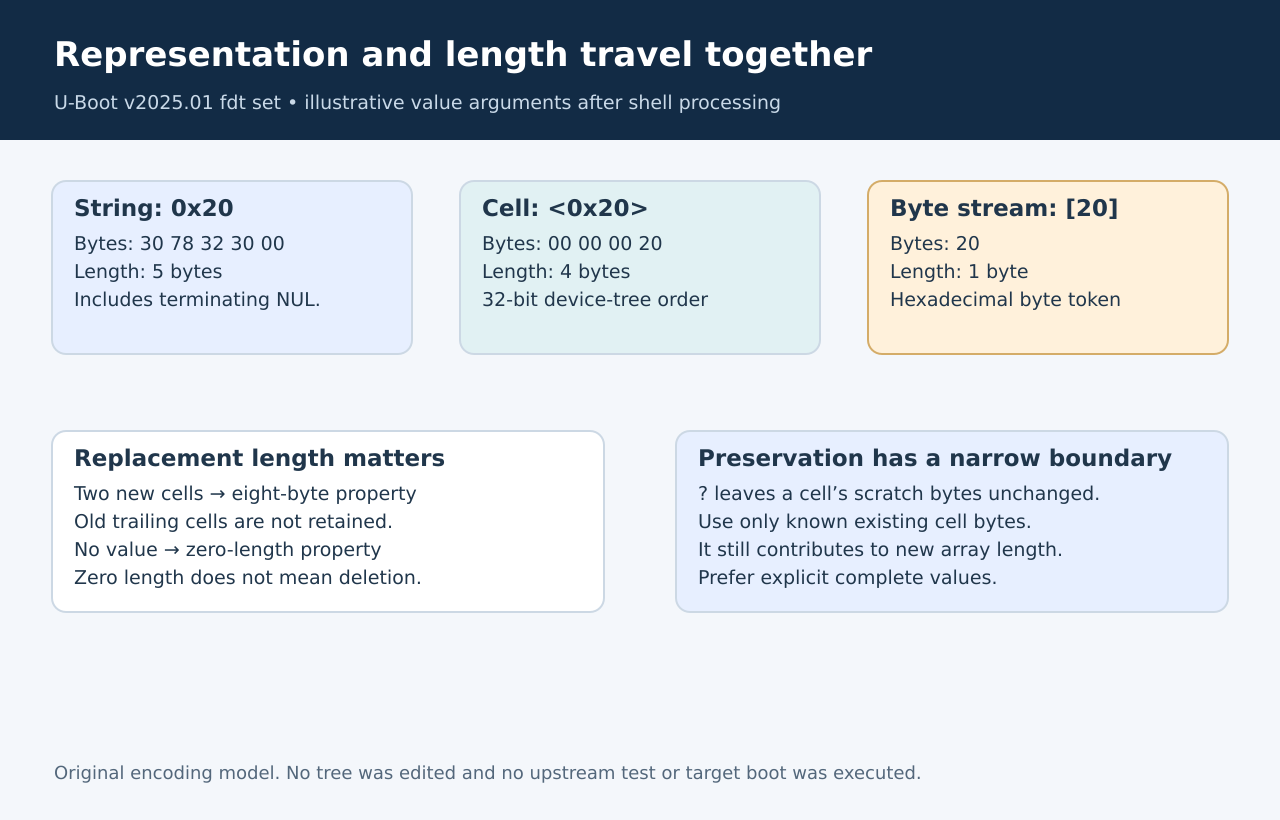
For an inert fixture property, the following input values illustrate
the difference after shell processing:
- Value argument
0x20: resulting bytes
30 78 32 30 00; length 5 bytes. - Value argument
<0x20>: resulting bytes
00 00 00 20; length 4 bytes. - Value argument
[20]: resulting byte20;
length 1 byte.
These are source-derived encodings, not captured target output.
Quoting must preserve the intended argument for the configured U-Boot
shell. A cell’s number is not parsed like an unprefixed byte-stream
token: the former uses base-zero conversion, while the latter is
hexadecimal.
A new value also
supplies a new length
The command starts with the existing property’s bytes in a scratch
buffer when that property exists. It then parses the new arguments and
passes the newly calculated length to fdt_setprop().
That initial copy does not turn a shorter value into a patch that
preserves every trailing element. Supplying two cells replaces the
property with an eight-byte value, even when the previous property held
three cells. Supplying no value at all creates or replaces it with a
zero-length property; it does not remove the property node entry.
The upstream
command tests, specifically fdt_test_set_single() and
fdt_test_set_multi(), cover empty, string and integer
values. The multi-element test deliberately writes a longer array before
a shorter one and checks that access beyond the new array fails. Reading
those tests corroborates the intended replacement-length behavior; no
tests were executed for this article.
Treat preservation syntax
narrowly
Within a cell array, the parser recognizes ? as a cell
whose scratch-buffer bytes should be left unchanged while advancing the
output length by four. That can preserve a known cell copied from an
existing property. It is not a general merge operation, and it does not
preserve cells beyond the newly supplied array length.
Avoid using it to invent missing data in a new property or to extend
past the old property’s initialized bytes. The command uses a static
scratch buffer, so unchanged scratch bytes outside the copied property
are not evidence of the intended binding value. Explicitly supplying the
complete intended value is easier to audit.
Validate a harmless tree
copy first
Use a separate, adequately sized working-tree copy and an inert test
node when qualifying a script. Record the exact argument vector,
expected bytes and expected length. Check a numeric-looking string, a
cell, a byte array, a zero-length property and a shortened array as
separate cases.
Then compare the intended real property with its binding: a
multi-cell address is not interchangeable with one integer, and a string
list is not one string containing spaces. The parser only encodes what
it was given. Driver interpretation, tree selection and later boot-time
fixups remain separate questions.
A successful edit therefore establishes that libfdt accepted a
replacement. Establishing that the consumer will understand it requires
the correct representation and length together.