Greengrass Platform Manifests: Put Specific Matches Before the Fallback
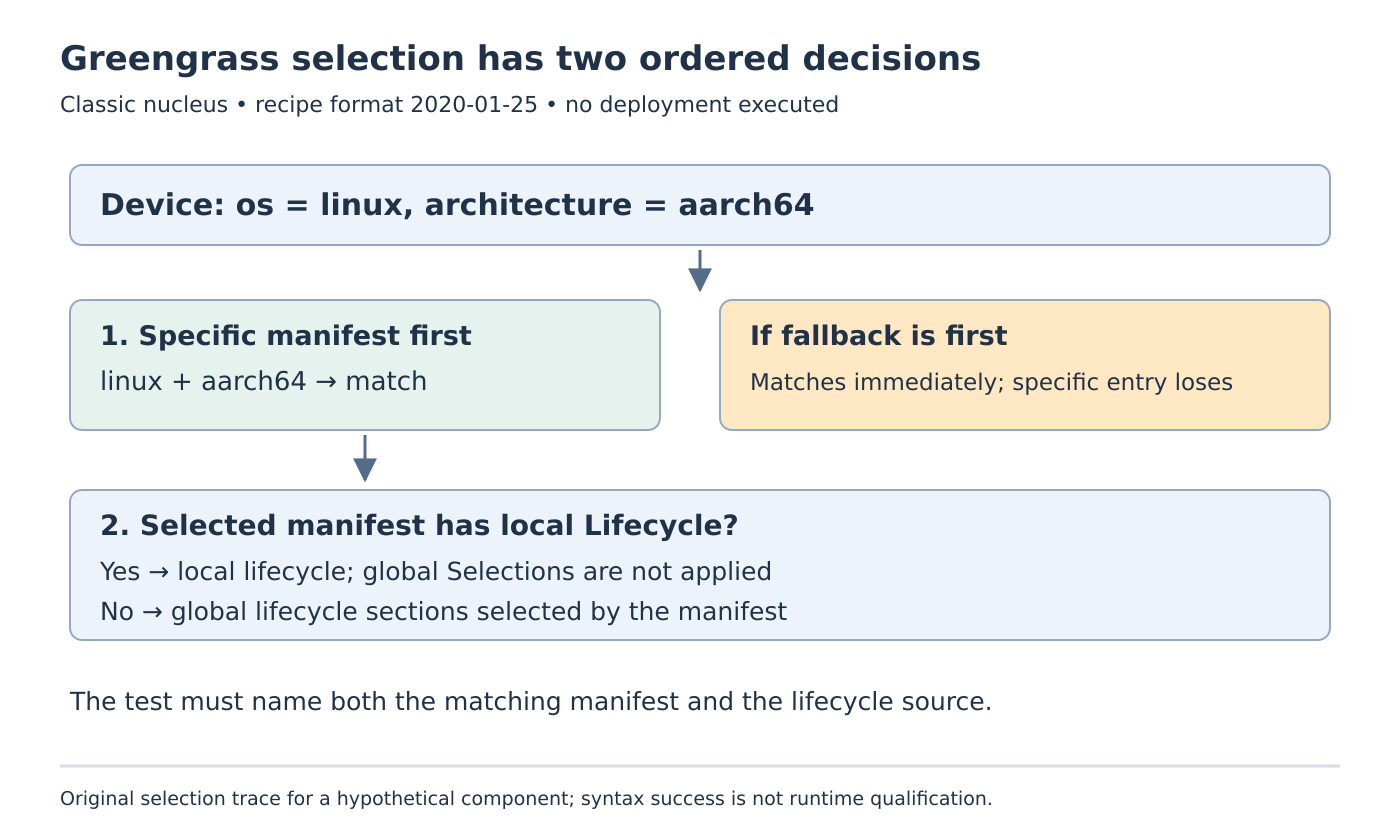
A Greengrass component can select its fallback on an ARM64 Linux gateway even when its recipe contains a more specific ARM64 manifest. Manifest order determines the first match. A broad entry placed first prevents the later specific entry from being considered.
There is a second decision after the match: a lifecycle defined inside that manifest takes precedence over the global lifecycle. Fixing the list order while assuming global steps are automatically added can still produce the wrong command path.
The scope is Greengrass V2 with the classic nucleus and recipe format 2020-01-25. The official recipe reference, read on 19 October 2026, defines these rules. The following recipe is a synthetic selection exercise. It was not created, published or deployed as an AWS component.
Make the intended choice visible
Consider a component whose ARM64 Linux implementation differs from its portable fallback. Use explicit platform values os: linux and architecture: aarch64; do not substitute a marketing label such as “64-bit ARM.” For this classic-nucleus example, omit the platform runtime field.
The minimal illustrative recipe uses harmless output commands so the selected path is easy to distinguish:
RecipeFormatVersion: '2020-01-25'
ComponentName: com.example.ManifestProbe
ComponentVersion: '1.0.0'
Lifecycle:
  arm64:
    Run: echo selected-global-arm64
Manifests:
  - Name: linux-arm64
    Platform:
      os: linux
      architecture: aarch64
    Selections:
      - arm64
    Lifecycle:
      Run: echo selected-local-arm64
  - Name: fallback
    Lifecycle:
      Run: echo selected-fallback
On the stated Linux/aarch64 platform, the first manifest matches. Because it defines its own Lifecycle, the intended diagnostic marker is selected-local-arm64. Its Selections entry does not add the global selected-global-arm64 command.
A gateway outside that specific platform reaches the second manifest, which omits Platform and therefore matches generally. The fallback marker is only an illustration of selection. Real fallback artifacts and commands must be compatible with every platform the product actually admits.
Introduce one failure at a time
First move the fallback entry above the Linux/aarch64 entry without changing anything else. A Linux/aarch64 device now matches the fallback immediately. The presence of a later exact match does not make the resolver choose it as a “better” match.
Return to the original order. Next remove only the local Lifecycle from the specific manifest, retaining Selections: [arm64]. The selected manifest now uses the matching global lifecycle section, so the expected marker becomes selected-global-arm64.
These variants distinguish two causes that can look identical in a log containing only “component started.” One selects the wrong manifest; the other selects the intended manifest but obtains its lifecycle from a different location.
Do not repair either by duplicating commands blindly into every manifest. That can leave several copies of installation logic whose behavior diverges during later maintenance. Decide whether a platform owns a complete local lifecycle or deliberately selects global sections, then make the recipe follow that decision.
Record the selection trace before testing execution
For each supported platform, prepare a small review record containing the platform attributes, first matching manifest name, artifact set, lifecycle source and expected diagnostic marker. Add a negative platform case rather than testing only the development gateway.
If the component has no meaningful implementation for other platforms, a catch-all fallback may be the wrong policy. With no matching manifest, Greengrass rejects installation. Keeping that incompatibility explicit can be more useful than launching a generic script that later fails against the wrong binary.
In the hypothetical probe, check three expected paths: the original Linux/aarch64 match, the reordered fallback match, and the global-lifecycle variant. These are proposed tests, not observed runtime results. No component is installed by reading or reviewing the YAML.
Keep syntax and executable compatibility separate
A recipe validation success establishes neither that the intended branch was selected nor that its executable supports the target’s architecture and operating environment. Review the final selected artifacts, required libraries and actual platform attributes before a controlled deployment test.
The completed selection review should explain each command through an ordered manifest decision and an explicit lifecycle source. That makes a later architecture-specific failure traceable without confusing it with dependency version resolution or service readiness after launch.