Rust Embedded Graphics Monochrome Ports: Preserve Alarm Meaning Across Color Conversion
A color dashboard can compile for a monochrome target and still lose its most important alarm. The conversion can be numerically correct while mapping a red warning to the same output value as its black background. Porting the color type requires a separate review of the information that the colors were carrying.
This article uses embedded-graphics 0.8.2 with embedded-graphics-core 0.4.1. It examines the built-in conversion boundary and proposes a semantic palette for product UI elements. The numerical examples follow the published source; no Rust build, display measurement or accessibility certification was performed.
Inspect what the adapter actually converts
The ColorConverted implementation converts each incoming color using Into<T::Color> and forwards it to the parent target. It retains the parent’s error type and bounding box. Its implementations of contiguous fill, solid fill and clear also forward converted colors rather than defining a new scene model.
That makes the adapter useful for connecting compatible typed representations. It does not know whether a pixel means alarm, selection, disabled control or background. Nor does its pointwise conversion inspect neighboring pixels to invent a warning outline or a dither pattern.
Write down which conversion is selected at the boundary. An RGB-to-RGB565 conversion and an RGB-to-binary conversion preserve different amounts of information. Sharing the same scene geometry does not guarantee that all its states remain distinguishable after either conversion.
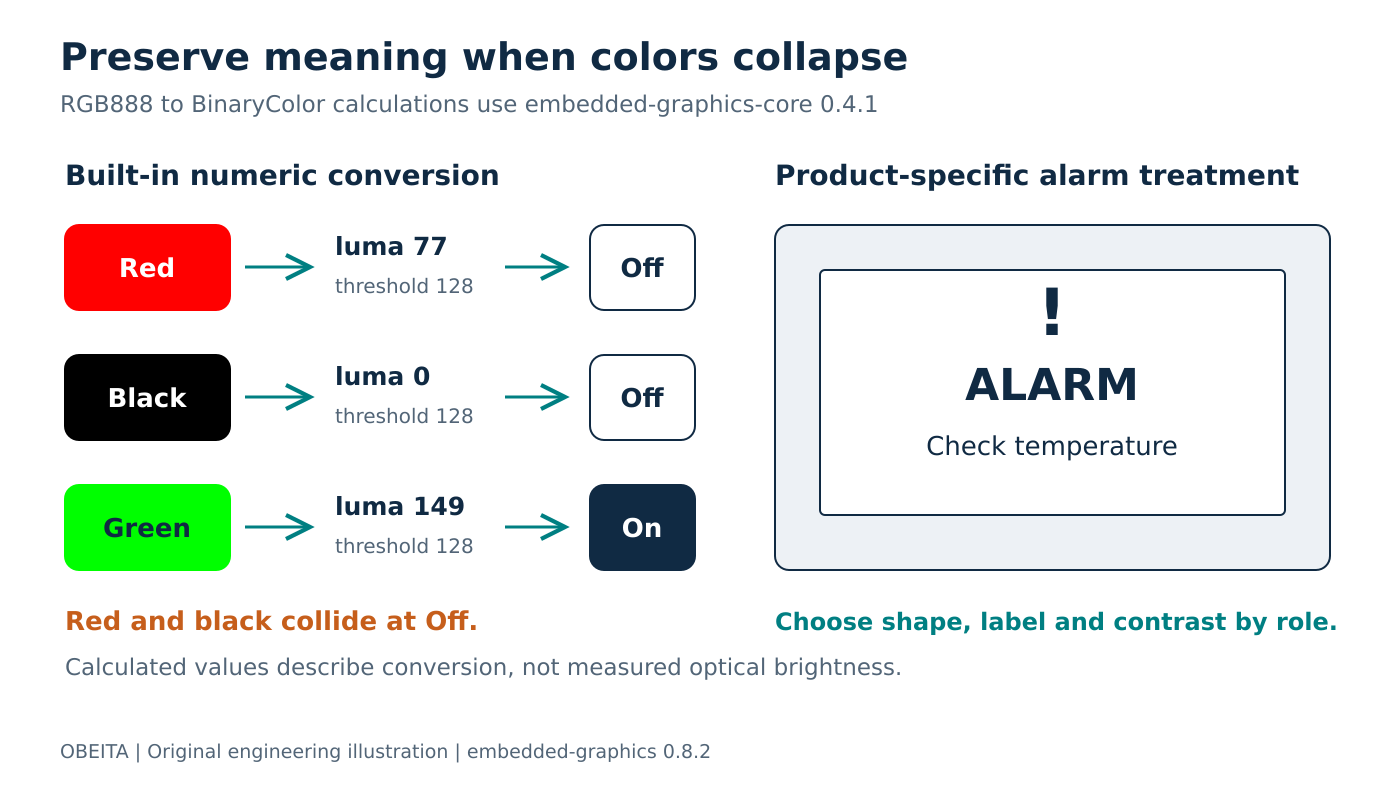
Original semantic-conversion diagram. The luma values are calculated from pinned source, not measured panel brightness.
Calculate the dangerous collisions
The 0.4.1 conversion source computes an integer luma from RGB888 channel values and converts RGB to BinaryColor using a threshold of 128. The implemented luma calculation is:
luma = (77 × red + 150 × green + 29 × blue + 128) / 256The division is integer division. For full-intensity RGB888 primaries, the calculated values are 77 for red, 149 for green and 29 for blue. Red and blue therefore convert to Off; green converts to On. Black is also Off, while white is On.
A red alarm icon drawn on black can disappear at this boundary without any driver error. Two different RGB values are allowed to produce the same binary value. This is a representational collision, not evidence of a broken SPI connection or an incorrect coordinate transform.
Treat those calculations as a way to select test cases, not as a physical luminance prediction. The panel’s optical behavior, inversion configuration and viewing conditions still require hardware review. Also avoid equating Off universally with a specific physical appearance before checking the selected driver and panel.
Choose colors from roles before drawing
For application controls, retain a role such as Alarm, Normal, Selected or Background until the renderer chooses the target-specific treatment. A color display may use red for the alarm role. A monochrome display may use a strong outline, an exclamation mark and a text label, with foreground and background values chosen to remain distinct.
Do not recover the role later by testing whether an arbitrary pixel happens to be red. Antialiased artwork, alternate themes and future palette changes make that fragile. Preserve semantic information while it is still available in the application state.
Keep this role-based path separate from photographic or decorative image conversion. Those assets may legitimately need a continuous tone reduction or a purpose-built dither process. Applying a control palette to every pixel of a photograph answers a different problem and can destroy the image.
Test distinctions rather than only individual swatches
Build a small matrix of adjacent roles: alarm against background, selected item against ordinary item, disabled against enabled, and warning text against its containing field. For each pair, record the required distinction. Some pairs need opposite binary values; others can use different shapes, borders or labels.
Include the actual transition between states. A selected row becoming unselected may need its previous background replaced, but that cleanup is a composition concern distinct from color conversion. The conversion review should establish what the new state means before the scene’s update policy decides how to paint it.
Use the DrawTargetExt color-conversion API where its built-in typed conversion is the intended behavior. When the product needs a different palette or spatial treatment, make that policy explicit rather than describing the built-in adapter as configurable dithering.
Approve a target-specific visual contract
Record the source roles, target treatments and collision cases in the UI test specification. Keep the crate versions beside the numerical expectations so an implementation change triggers a deliberate recheck.
A successful port should demonstrate that the operator can still identify the alarm, selection and unavailable actions in the supported viewing conditions. Compilation and faithful mathematical conversion are necessary interface checks, but the release decision belongs to the preserved meaning of the screen.