LVGL Alpha Edges: Diagnose Premultiplied-Color Mismatches Around Transparent Assets
Diagnose an alpha halo by tracking what RGB means at each stage. Straight RGB stores the unattenuated color; premultiplied RGB already includes multiplication by alpha. A consumer using the wrong interpretation can darken an edge twice or add too much color. Compare known pixels over at least two backgrounds before adjusting the artwork.
Applicability: this article pins LVGL v9.3.0 and the simple, untransformed software image path into an ARGB8888 target, with normal blending, full object opacity, no recolor and no masks. Enable the required software-format support in the tested build. Other renderers and operations need their own qualification. The vectors are mathematical illustrations and proposed tests, not captured LVGL output.
1. Use an explicit compositing reference
For an opaque background B, straight source color C and source alpha a, the ideal source-over result is aC + (1 − a)B. With premultiplied source c = aC, the equivalent result is c + (1 − a)B. The W3C Compositing and Blending Level 1 Candidate Recommendation Draft of 21 March 2024 describes this representation distinction and source-over arithmetic.
Use normalized components in one consistent compositing space for the worksheet. Do not silently compare linear-light arithmetic with gamma-encoded screenshot samples. The equations explain representation; they do not promise bit-identical output from LVGL’s integer paths, rounding rules or an accelerated backend.
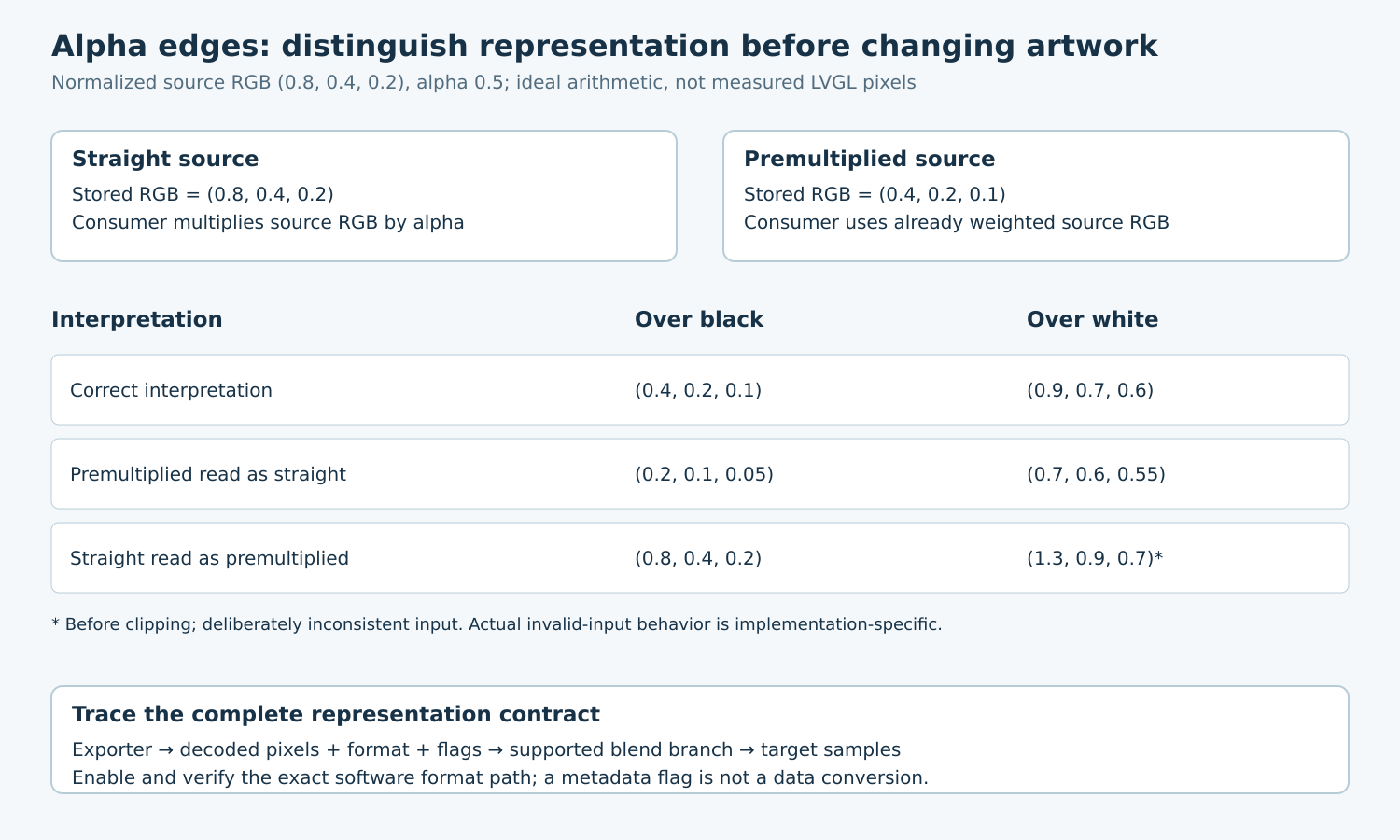
Take a hypothetical source with straight RGB (0.8, 0.4, 0.2) and alpha 0.5. Its premultiplied RGB is (0.4, 0.2, 0.1). Correct composition over black yields (0.4, 0.2, 0.1); over white it yields (0.9, 0.7, 0.6). Both representations should describe the same intended appearance when interpreted correctly.
2. Construct the mismatch matrix
| Stored components | Consumer interpretation | Ideal result over black | Ideal result over white |
|---|---|---|---|
| Straight | Straight | (0.4, 0.2, 0.1) | (0.9, 0.7, 0.6) |
| Premultiplied | Premultiplied | (0.4, 0.2, 0.1) | (0.9, 0.7, 0.6) |
| Premultiplied | Straight | (0.2, 0.1, 0.05) | (0.7, 0.6, 0.55) |
| Straight | Premultiplied | (0.8, 0.4, 0.2) | (1.3, 0.9, 0.7) before clipping |
The last row describes invalid premultiplied input for the stated source. Its red component exceeds alpha. It is a diagnostic mathematical mismatch, not a prediction that every implementation will clamp or overflow identically. Restrict malformed-input experiments to an isolated development fixture.
A dark halo is consistent with the third row, but appearance alone is not proof. An exported matte color, incorrect filtering, a channel swap or an unintended extra opacity can also alter edges. The matrix gives hypotheses that can be checked against stored components and the selected render path.
3. Inspect data and metadata separately
The tagged image descriptor contains LV_IMAGE_FLAGS_PREMULTIPLIED, which describes premultiplied RGB or an indexed palette. Treat that flag as a statement about bytes, not as a command that magically converts incorrectly encoded data.
Capture a small manifest at each boundary: exporter settings, source hash, declared format and flags, decoder output format and flags, actual test-pixel components, target format and enabled draw unit. For compressed inputs, inspect decoded pixels too. A correct source file does not prove that later conversion metadata remains correct.
In the selected v9.3.0 software image path, the decoded header’s color format is forwarded into blending. The ARGB8888 target blend dispatcher has distinct source cases for ARGB8888 and ARGB8888_PREMULTIPLIED, with premultiplied support controlled by LV_DRAW_SW_SUPPORT_ARGB8888_PREMULTIPLIED. Verify the actual decoded format and enabled branch rather than assuming an asset flag selects it.
4. Assign conversion to exactly one stage
Choose whether the asset exporter, decoder or another controlled preparation stage owns premultiplication. Document the representation before and after that stage. Reapplying multiplication to already premultiplied RGB darkens semitransparent pixels even when the alpha byte stays unchanged.
The tagged draw-buffer premultiply helper requires modifiable storage and rejects a buffer already marked premultiplied. It changes component data and sets the flag. Those checks help only when the incoming metadata is truthful; they cannot discover every mislabeled external image.
Do not repair the pipeline by toggling a flag until the screenshot looks acceptable on one background. Determine whether data conversion, format selection or metadata propagation is wrong, then fix that boundary. Preserve the original asset and its manifest so repeated build processing cannot silently multiply it again.
5. Build a small two-background regression
- Create a tiny reference asset with opaque, transparent and intermediate-alpha patches, plus an antialiased edge. Use unequal RGB components and record their intended representation.
- Render it without scaling, rotation, masks, recolor or extra object opacity over opaque black and opaque white. Record the decoded test pixels and destination samples.
- Compare correct straight and correctly prepared premultiplied variants through their supported paths. Derive tolerances from the exact integer implementation rather than demanding equality to the normalized worksheet.
- In the isolated fixture, introduce one deliberate metadata mismatch. Confirm that the diagnostic detects the wrong representation, not merely a different-looking image.
- Restore the valid asset, then add the production transformations and opacity settings one at a time. Record where a discrepancy first appears.
For alpha zero, check the pipeline’s expectations for hidden RGB values and filtering. For alpha one, straight and premultiplied representations coincide, so opaque-only test images cannot expose this class of mismatch. Include several intermediate alpha levels and sample the edge, not only the center of the icon.
6. Interpret differences at the right layer
If the untransformed case is correct but scaling introduces a halo, investigate resampling and the representation used during filtering. If one backend differs from another, compare supported format/operation combinations and actual selected draw units. If every background shows a channel permutation, return to channel encoding before changing alpha.
Retain the source/decoded manifests, renderer configuration, sampled pixels and two-background images. Acceptance requires a consistent representation through the whole selected path. A visually pleasing result on the original background is insufficient when the same asset must work over alarms, dialogs or a different theme.