EEZ Studio Tabulator Options: Trace Which Configuration Layer Overrides the Inspector
An EEZ Studio Tabulator option can be correct in the inspector and still lose when the widget assembles its final configuration. The relevant question is which layer supplies the winning property, not whether the editor saved the basic setting.
The Tabulator widget reference explicitly says Advanced options override Basic options and can change through an expression at runtime. The pinned widget implementation shows the composition order in EEZ Studio v0.29.0, commit 3000161d09d40a5c1dc2477ddc30b38037b3a612.
This is a Dashboard configuration analysis. It does not describe LVGL style inheritance or SquareLine component overrides, even though the visible symptom of an ignored setting can look similar.
Read the final Object.assign order
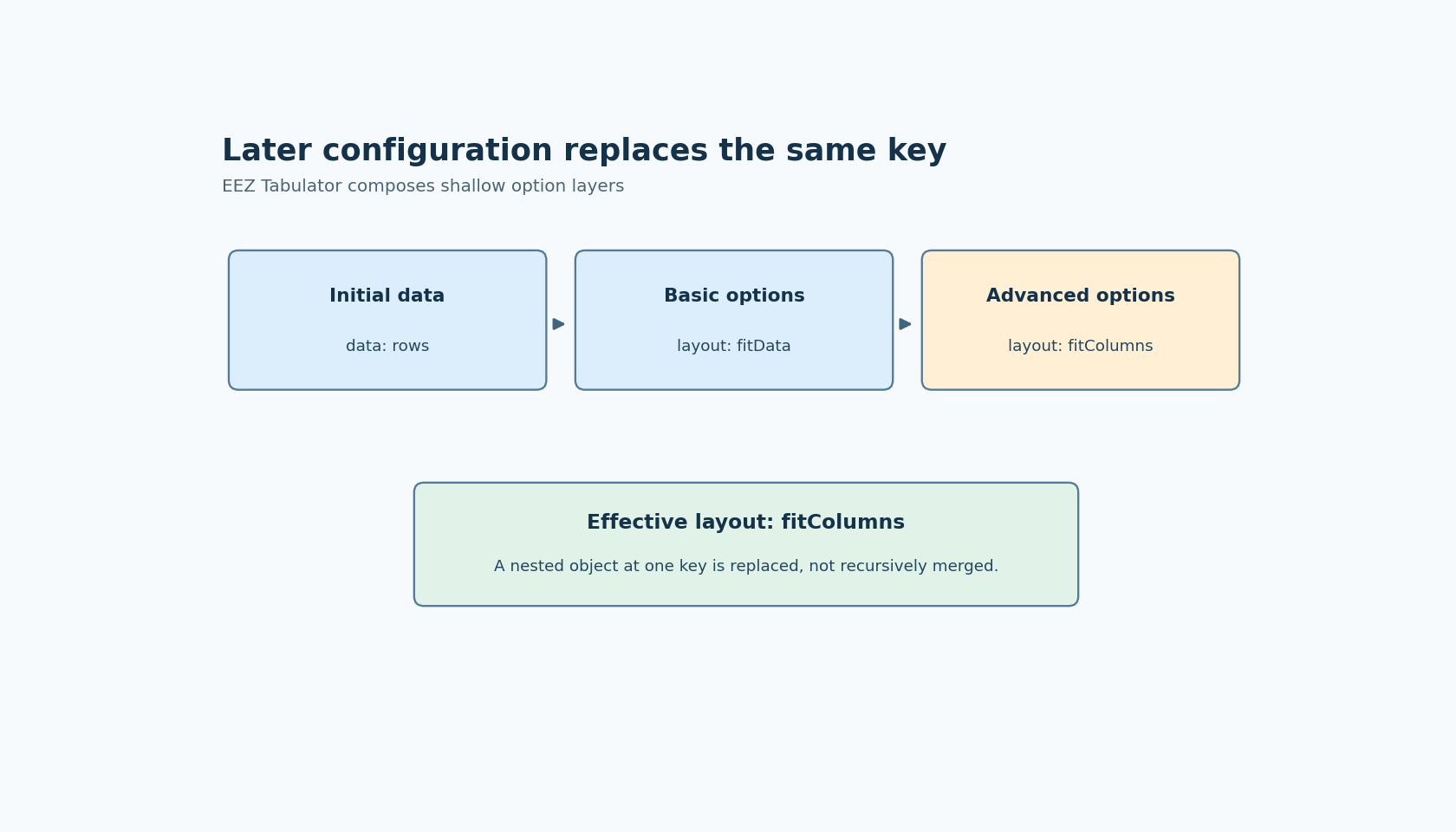
The options getter starts with an object containing the table data. It then assigns widgetOptions, derived from the basic configuration, and finally the evaluated runtime configuration. Later sources replace earlier properties with the same key.
A simple diagnostic uses two conflicting layout values. Choose one supported layout in Basic options and another in Advanced options. The inspected order predicts that the advanced value wins. Remove the advanced layout key and the basic setting becomes relevant again.
This is more informative than repeatedly changing the basic option while leaving the conflicting advanced property untouched. That experiment only demonstrates that the losing layer remains the losing layer.
The same composition order can affect keys beyond the setting currently being investigated. Review the actual advanced object, including configuration supplied by a variable, rather than assuming the visible expression is the complete object. An expression that selects different objects according to state can make an override appear intermittent.
A nested object is replaced, not recursively reconciled
Object.assign performs a shallow property assignment. If an advanced property supplies an object for a key already present in the basic options, that top-level assignment replaces the property's previous value. It does not merge every nested member from both objects.
For a proposed fixture, use a supported object-valued option with two distinct members. Put both in the first layer and only one in the later layer. Inspect the final object before interpreting the renderer's response. The missing member should not be assumed to survive merely because it was configured elsewhere.
This distinction becomes especially important with arrays such as columns. A later columns property is not an instruction to patch one column by name; it is a replacement value at that key. If partial customization is required, construct the intended complete value explicitly using the APIs and expression capabilities supported by the project.
Do not use an undocumented option merely to demonstrate merging. The fixture should isolate JavaScript composition while keeping the option itself valid for the installed Tabulator version.
Column definitions have their own override boundary
The pinned TabulatorColumn.getColumnDefinition method assembles named properties such as title, field, formatter, editor and headerFilter. It parses parameter fields into objects. It also applies the column's Advanced JSON, including a final Object.assign after those named parameter assignments.
Consequently, a parameter value in that final advanced object can replace a value entered in the dedicated formatter or editor parameter field. Table-level Advanced options and column-level Advanced JSON are different scopes, but each can explain why an inspector field is not the effective value.
The source catches JSON parsing exceptions while assembling these definitions, and the editor also has checks for invalid JSON. Keep a configuration parsing failure separate from a valid override. A missing effect from malformed JSON does not establish that a property has lower precedence.
Diagnose the winning value before the visual result
Capture the evaluated runtime configuration, the basic widget options and the final composed options for one small table. Change one conflicting key at a time. Then remove the later key rather than setting it to another value, so the test actually exposes the earlier layer.
For a column-specific problem, repeat at the column-definition boundary and inspect its final parameters. Avoid using only the rendered table as evidence: two different configurations can look identical with a small dataset.
No editor or table was executed here. The source-backed result is the ownership map for configuration keys. Once the winning value is known, a remaining visual difference belongs to the table library or data, rather than to an assumed failure of the inspector to save its setting.