SquareLine Studio Optimized Image Formats: Review the Emitted Descriptor After an Exporter Upgrade
Turning on an image optimization option looks like a packaging change. In a generated embedded UI, it can also change the representation that the native application consumes. The safe question is therefore not just “did the image get smaller?” but “what representation did this export actually emit, and does this target accept it?”
SquareLine's File export settings describe Optimize Image Formats specifically for C-source export. The 1.6.2 changelog introduces suitable LVGL format selection for images. Neither statement provides a complete selection algorithm. Do not predict a particular descriptor from the artwork's appearance, and do not extend the documented option to every binary export mode.
Begin at the generated descriptor
Suppose a project contains an opaque logo, a partly transparent status symbol and a large background. The three images can have different representation needs even when all arrived as PNG files. Their source extension describes an input container; it does not determine the LVGL image format selected during C generation.
Inspect the descriptor that accompanies each generated data array. Record the declared format, dimensions and payload size using the fields emitted for the selected LVGL version. Do not copy field names from an unrelated LVGL major release into a review script. The goal is to inventory the actual output contract, not to force it into an older descriptor schema.
Then identify any application code that assumes a particular representation. Examples include code calculating byte offsets, reading a pixel buffer directly, copying a fixed number of bytes or passing the generated data to a separate graphics routine. These uses deserve more attention than a widget that simply consumes the generated descriptor through its expected API.
Use an off/on experiment with three representative assets
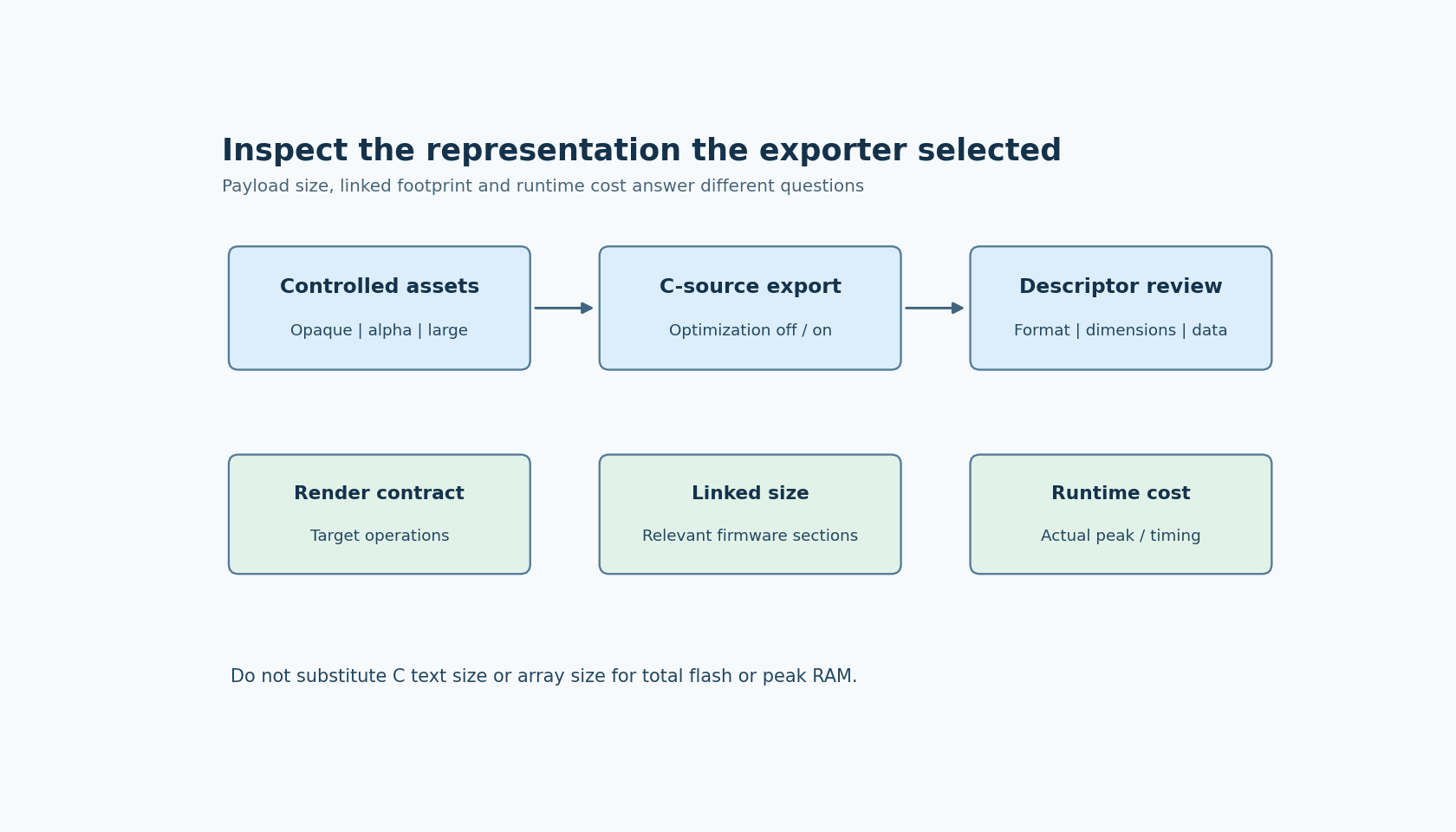
Keep the source artwork and LVGL target selection fixed. Export once with optimization disabled and once with it enabled. For each asset, compare the descriptor and its associated array. If an asset's output stays identical, that is a valid result for that asset; it is not proof that the setting is ineffective everywhere.
Use a representative set rather than only the smallest icon:
- An opaque image tests the ordinary color path.
- An image with transparency tests composition against more than one background.
- A large image makes differences in payload size easier to inspect.
The documentation does not promise which representation each case will select. Treat the experiment as discovery. Keep the resulting inventory beside the target's image configuration so that a later exporter upgrade can be reviewed against concrete previous output.
If the descriptor changes, inspect the target integration before accepting the visual result. A successful compile establishes that declarations were acceptable to the compiler. It does not by itself prove that every enabled image path can draw the new representation correctly.
Separate four different size questions
Source-text size, image payload size, linked firmware size and peak runtime memory are different measurements. A C file can become shorter because of formatting changes without reducing its compiled array. An array can shrink while another linked dependency changes the total firmware result. Runtime working memory can depend on how a selected representation is processed.
Report these quantities under their own names. “The generated payload changed from X to Y bytes” is a narrower, more useful statement than “the UI uses less memory.” If the product decision depends on flash capacity, compare the relevant linked sections. If it depends on available RAM during screen construction, observe that operation on the actual integration.
This article supplies no percentage savings. The official option describes an exporter capability, not a benchmark for a particular asset set, compiler or display pipeline.
Test the representation where assumptions are exposed
Draw the transparent symbol on both a light and a dark panel. Scale or transform an image only if the product actually uses that operation. Exercise any custom access path identified during the descriptor inventory. These are targeted checks of the integration contract, rather than a generic screenshot of the whole screen.
If the ordinary widget renders correctly but custom pixel access fails, the likely investigation is the custom representation assumption. If compilation fails after a format change, inspect the generated type and the chosen LVGL configuration. If only one visual operation is wrong, narrow the issue to that operation before disabling optimization for the entire project.
Keep the unoptimized export as a controlled comparison while diagnosing. It can help isolate whether the problem follows the representation change. It should not become a permanent second set of competing image definitions in the application.
Revisit the contract after exporter changes
A future release can legitimately improve format selection. That makes descriptor review valuable even when the original PNG is unchanged and the optimized option has been enabled for months. The accepted output representation is part of the native interface between the design tool and firmware.
The acceptance decision should state which emitted formats were observed, which target operations were checked, and which size metric justified the change. This approach preserves the benefit of automatic selection while keeping custom code, memory claims and target support tied to evidence. The proposed checks have not been executed here; they are a focused procedure for the project's selected SquareLine and LVGL combination.