Yocto Customer eSDK Delivery: Qualify Updates and Add-On Artifacts Beyond the Installer
A customer eSDK handover is incomplete if acceptance ends when the installer exits successfully. The supplier also needs a maintained update destination, matching prebuilt artifacts for advertised add-ons, and a recovery procedure for an interrupted update. Those interfaces can share one server, but each needs its own acceptance evidence.
Consider a hypothetical equipment supplier delivering a standalone extensible SDK. Its customer must compile an application, add one supported library without compiling that library from source, and move an existing SDK from release A to release B. This article defines that delivery contract using Yocto Project 5.0.12 documentation and Poky tag yocto-5.0.12, resolved to commit ec220ae083dba35c279192b2249ad03fe238446e. It is a source-based architecture and proposed qualification plan; no SDK was built, installed, published or updated here.
Define the supported customer operations
Start with the supported host, target tune, image configuration, layer revisions and add-on recipe list. Name the release pairs eligible for an update. A statement such as “the SDK is offline” is too broad: installing its initial contents, rebuilding a customer application, adding a library and updating metadata can require different inputs.
The following decisions belong in the release specification, before packaging:
| Delivery decision | Required supplier evidence | Customer consequence |
|---|---|---|
| Full standalone installer | Inventory of its selected artifacts and an installation qualification | Included scope is available; future add-ons are not automatically covered |
| Minimal standalone installer | Reachable matching shared-state mirror; explicit toolchain inclusion decision | Initial installation does not imply all development tools and libraries are present |
| Advertised prebuilt add-ons | Built recipes and matching task artifacts, verified from a fresh customer environment | Installation must pass without source-build permission |
| Supported update pair | Published release tree, artifact availability and completed preparation | A downloaded installer or changed version label is insufficient |
The defaults are SDK_EXT_TYPE = "full" and toolchain inclusion for a full SDK. Minimal changes the default toolchain decision; SDK_INCLUDE_TOOLCHAIN = "1" can explicitly include it. The full path collects a selected locked shared-state cache, rather than every possible recipe’s output. The pinned class also excludes sstate-cache when a minimal SDK is unpacked in publication mode. Inspect the actual release contents instead of inferring coverage from the installer label. Poky eSDK construction class.
Deliver three connected interfaces
Retain the installer as a versioned delivery and recovery artifact. Separately, generate the update tree with oe-publish-sdk from the intended installer. The publisher unpacks the installer in publication mode and establishes or updates the layers Git repository. Hosting the installer alone does not create this structure. Publisher implementation.
Set SDK_UPDATE_URL in the producer configuration before building the SDK, pointing to the published tree. The producer writes that value into conf/devtool.conf. For add-ons, build the advertised recipes and expose the corresponding shared-state artifacts. A source-download mirror cannot substitute for those prebuilt results. Recipe discovery proves metadata exists, not that the required artifacts are obtainable. Provider customization guide.
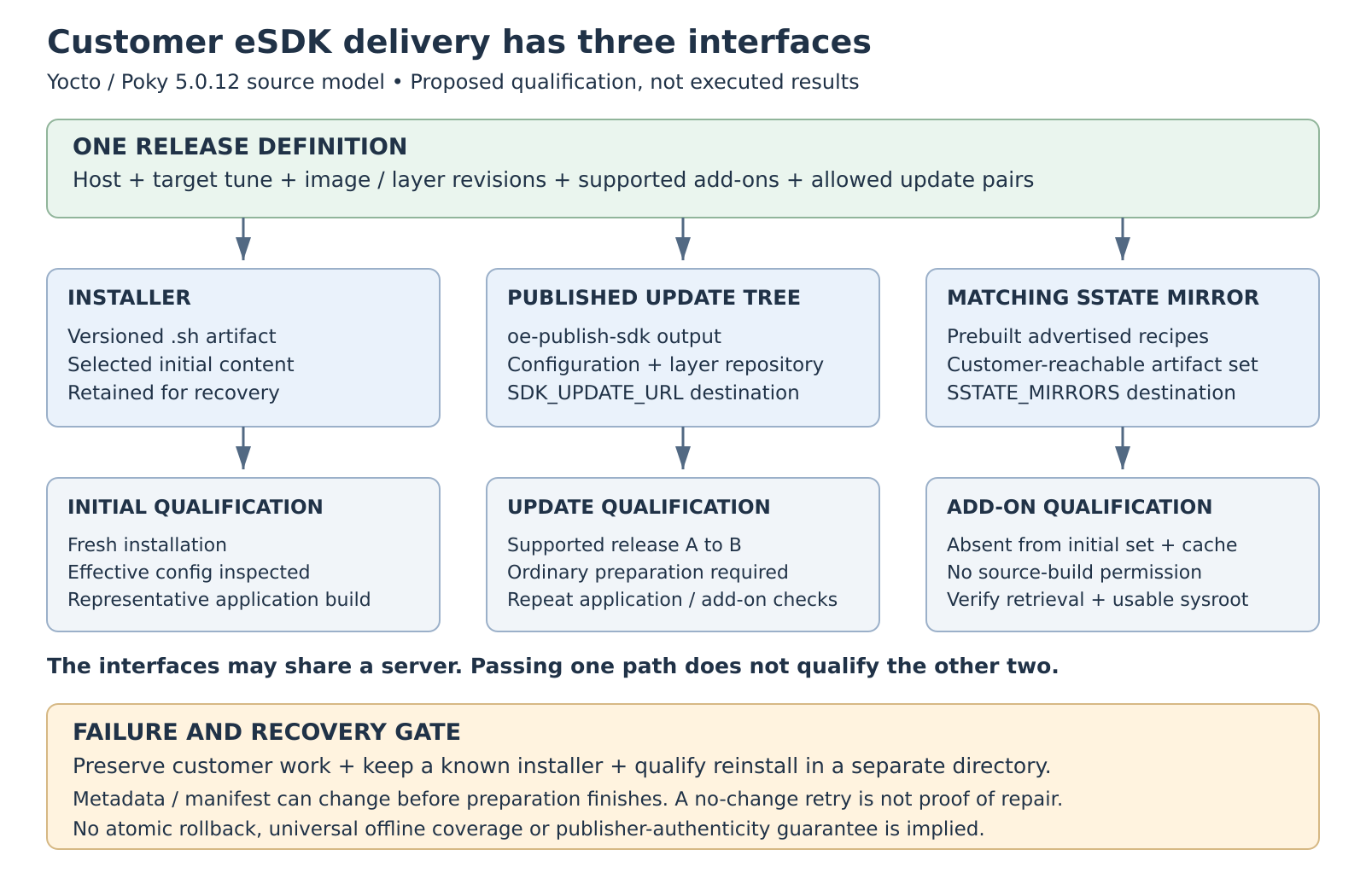
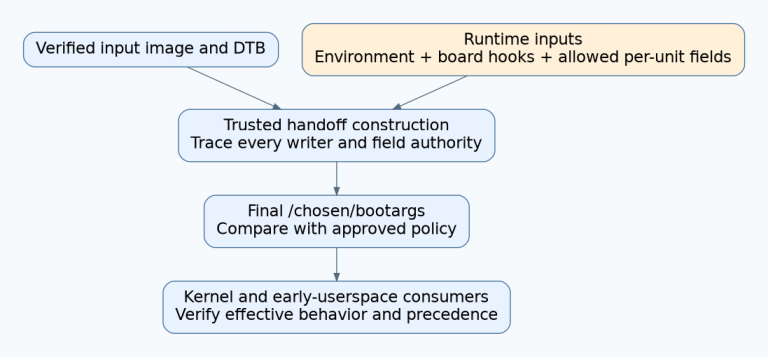
Original release-interface architecture. Arrows identify delivery and qualification paths; no SDK operation was executed.
Keep these interfaces aligned by release. Assign an owner to publish the tree, retain the referenced artifacts and investigate failures. Record endpoint access requirements from the customer’s network, rather than testing only from the build server. An engineering release record should connect the installer digest, metadata revision, effective configuration and supported artifact set. This is a proposed traceability practice, not a feature automatically supplied by the updater.
Verify the configuration that reaches the customer
The customization guide describes filtering producer configuration and recommends conf/sdk-extra.conf for SDK-specific mirror settings. There is a version-specific discrepancy worth preserving: the guide says ESDK_LOCALCONF_ALLOW overrides both filtering rules, but the examined class removes variables in ESDK_LOCALCONF_REMOVE independently of the allow-list. SSTATE_MIRRORS appears in that default remove-list. Therefore, an allow-list entry alone is not the qualification evidence for this release.
Use the documented extra-configuration route and inspect the generated conf/local.conf plus the effective mirror value. For example, this illustrative file belongs in the producer’s build directory; the URL is a placeholder, not a service:
# conf/sdk-extra.conf
SSTATE_MIRRORS = "file://.* https://sdk.example.com/product/sstate-cache/PATH"
The class reads this file and appends its contents without the earlier filtering. Keep the update URL in producer configuration as described above; merely appending an SDK-local setting is not evidence that conf/devtool.conf was generated with it. Verify both outputs. Configuration guidance, configuration generation source.
Exercise add-on installation and update completion separately
Use a fresh disposable customer installation with no producer cache mounted. Select a supported library absent from both the initial installed set and its bundled cache, so the mirror is actually exercised. Run its devtool sdk-install operation without -s, then build and link an application that actually uses its headers and library. Retain command output, artifact retrieval evidence and the application build result. If it works only with -s, the promised prebuilt-install case has failed: that option permits source builds. Standalone add-on behavior.
The implementation requests sysroot and package-data tasks, uses --setscene-only unless source builds are allowed, checks installation stamps, then assembles SDK sysroots. These details explain why a searchable recipe or a populated download directory is insufficient. They do not eliminate the need to exercise the delivered application environment. SDK client implementation.
Next, begin with the supported release A installation and apply B through the published URL. Require ordinary update preparation, then repeat the application and add-on checks. The update path prepares installed sysroot/package-data tasks from shared state and checks for unexecuted tasks. --skip-prepare is registered for debugging and cannot satisfy this acceptance case.
Make failure recovery part of the handover
Qualify missing artifacts, an unreachable update destination and interrupted preparation in disposable installations. For the missing-artifact case, require a visible failure without silently enabling source builds. An update can change existing layer metadata before later downloads finish; it also installs changed configuration and the new manifest before preparation completes. This is not an atomic rollback mechanism.
There is an additional retry boundary: the updater returns early when its manifest comparison finds no changes. Consequently, after a late preparation failure, an “already up-to-date” retry is not proof that preparation has succeeded. This conclusion follows from the source ordering, not an observed failure experiment. The manifest itself covers selected configuration files, not all SDK bytes or publisher authenticity. Updater control flow.
Preserve customer source changes and configuration records before attempting updates. The existing layers-repository path rejects dirty metadata; do not turn that guard into an instruction to discard changes. Define a tested reinstall path using a retained installer and preserved customer work. Validate recovery in a separate directory, including dependencies needed to reconstruct the promised environment, before retiring the failed installation.
The acceptance packet should identify each tested revision pair, network condition, initial cache state, supported add-on, logs and recovery outcome. Leave untested cases explicitly open. If maintaining standalone publication and artifact availability is outside the supplier’s remit, evaluate the documented direct-build eSDK workflow as a different delivery boundary. Neither choice supports an unqualified promise of universal offline operation, automatic rollback or measured time savings. eSDK installation alternatives.