Yocto IDE Remote Debugging: Trace the Launcher That Sets the Target Program Arguments
Changing args in an IDE’s debug configuration can leave the target application’s arguments unchanged. In the generated workflow examined here, a separate remote launcher creates that process. Starting the debugger can also deploy fresh files first, so an apparently observational action may replace the executable being investigated.
The scope is Yocto Project 5.0.12, Poky source tag yocto-5.0.12, and the devtool ide-sdk generated VSCode configuration in modified mode. This is not a claim about every VSCode or GDB launch arrangement. No SSH connection, target write, debugger session or helper execution was performed.
Follow the selected launch entry
The 5.0.12 SDK guide describes generated debugger settings and target-launch helpers. Start with the particular entry selected in .vscode/launch.json, rather than changing a similarly named configuration elsewhere in the workspace.
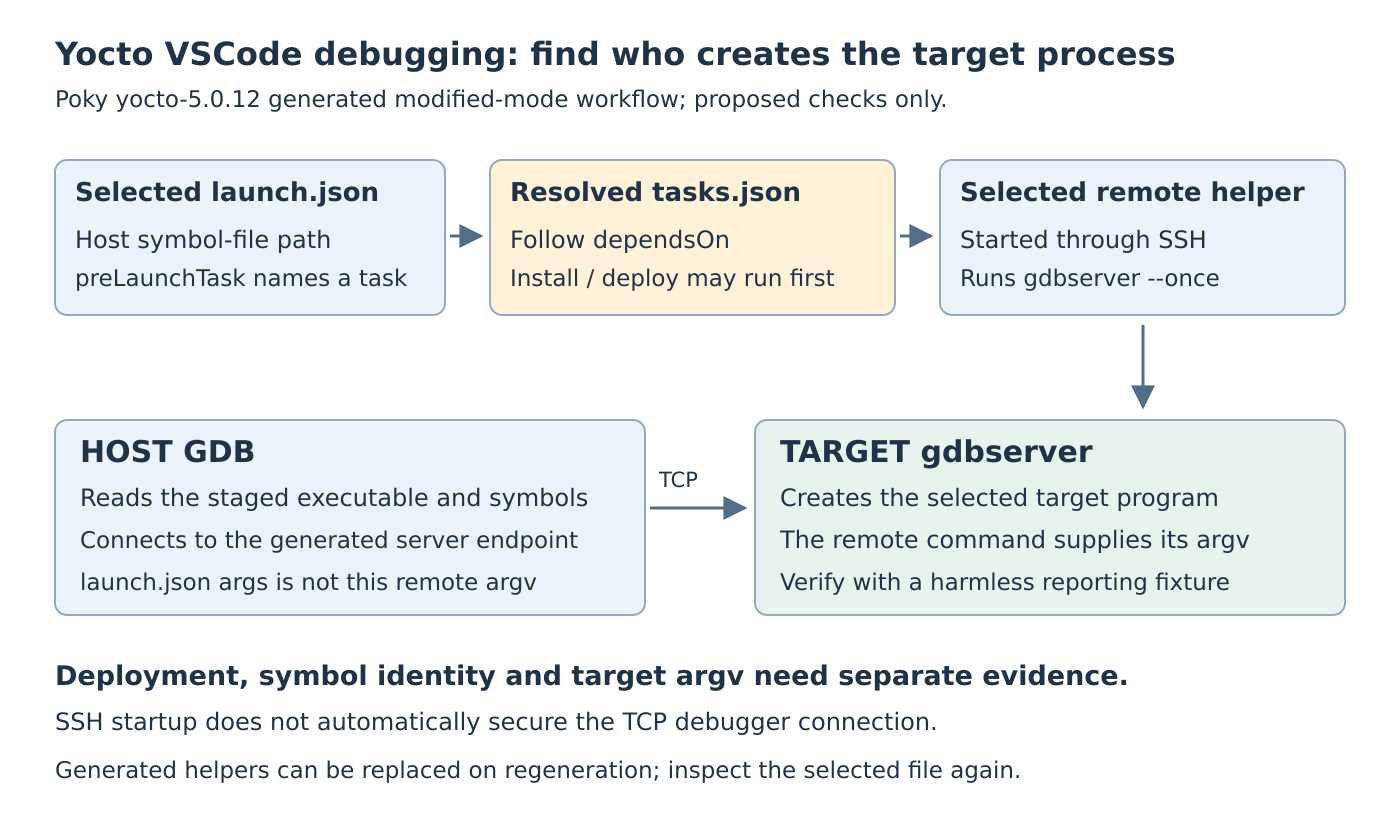
The VSCode plugin implementation supplies program, miDebuggerPath, miDebuggerServerAddress, and preLaunchTask. These fields identify different participants. program points into the host-side installed staging directory for the selected executable; it is not the remote launch command. The debugger path selects host GDB, while the server address identifies its remote connection.
Resolve preLaunchTask to the matching task label in .vscode/tasks.json. Then follow that task’s command and dependsOn entries. Generated names include per-binary information, so do not guess a universal helper filename or edit the first gdbserver_* file found.
Notice the deployment prerequisite
For the generated C/C++ integration path, the generated debugger-start task depends on an install-and-deploy task. The SDK generator constructs its helper to force the recipe’s install task, then invoke a generated deployment script. This is target-changing work, not just host symbol loading.
The fallback task path has its own explicit build-and-deploy dependency chain. Inspect the generated branch that applies to the recipe instead of assuming every project invokes the same install command.
Before launching on a disposable development target, establish whether deployment is intended. Preserve the target executable’s identity and the staged artifact’s identity. A changed target hash after deployment may explain why a failure disappeared or a new behavior appeared before the first breakpoint.
The documentation describes removing the deployment dependency when that action is unwanted. Treat such a change as a deliberate diagnostic configuration: preserving an old target executable also creates a separate obligation to verify matching host symbols and libraries. Removing a task dependency cannot prove that correspondence.
Put arguments at the process-creation point
The VSCode-specific class selects the non-multi mode of the shared debugger helper generator. That branch constructs an SSH invocation whose remote shell starts gdbserver --once with the target executable. It differs from the generic --multi branch, which can start without naming an initial program.
For this generated workflow, the SDK guide explicitly places application parameters in the selected oe-scripts/gdbserver_* helper and says that setting launch.json's args does not work. The explanation is ownership: the helper’s remote command supplies the program and arguments when creating the debugged process.
A proposed diagnostic could use a harmless application that reports its argument vector. Give its launcher one literal marker, such as --diagnostic-id=case_a, only if the diagnostic application supports that option. Compare the target-reported arguments with the intended marker. Editing only the host configuration is the negative control, not evidence that the remote launcher changed.
Review the actual nested shell quoting before using spaces or metacharacters. Do not interpolate untrusted text into the generated command. This simple fixture does not require a general-purpose shell-argument repair recipe.
Separate SSH startup from debugger transport
Launching the helper through SSH does not automatically protect the generated TCP debugger connection. The GNU GDB server manual, read on October 19, 2026, warns that gdbserver has no built-in security. Use an authorized isolated lab network or a separately reviewed protected transport; do not expose the listener publicly.
The same manual describes --once as closing the listening port after the first debugger connection and terminating after that connection closes. It does not mean that the target process inherits arguments from an unrelated host configuration. This connection-lifetime rule is separate from process-launch ownership.
Preserve the change across regeneration
The tagged SDK generator recreates the recipe’s workspace ide-sdk directory during initialization. A hand-edited generated helper can therefore be replaced by a later generation. Keep the intended customization in a reviewable record and recheck the selected task’s actual helper after regeneration.
A useful validation record would contain the selected launch entry, resolved task dependencies, helper content, target binary identity, host symbol identity and observed argument vector. All target checks remain proposed here. That evidence distinguishes an argument change, an executable replacement and a symbol mismatch instead of treating all three as an IDE configuration problem.