SoftAP or BLE Provisioning for ESP32? Compare Setup Flow, Security and Maintenance
Choose the provisioning transport around the installation workflow you can support. BLE is a strong candidate when a maintained phone app is part of the product; SoftAP deserves a prototype when local Wi-Fi access is the practical entry point. Neither choice removes the need for device authentication, understandable failure messages, and an authorized way to replace credentials.
Scope: ESP32-family product design, using ESP-IDF v5.5 provisioning terminology. Confirm radio support on the exact chip. ESP-IDF v6.0 moves provisioning into a separate component; this article compares designs rather than claiming a tested firmware implementation.
Start with Product and Phone Constraints
Write three installation stories before comparing APIs: a customer at home, an installer at a site, and a production operator. Identify who has the network password, who may change it, whether the phone has internet access, and whether installing an app is permitted. An installer using a managed phone may face a different constraint from a consumer who already uses your app.
Record the module, available RAM, ongoing Bluetooth functions, supported phones, expected product lifetime, and local recovery controls. Treat a radio missing from the selected chip as a hard constraint. Treat an app with no maintenance owner as an unresolved delivery risk, even if a demonstration app works.
Map the SoftAP Setup Flow
A typical SoftAP design asks the phone to join the device’s temporary network, obtain an address, establish the provisioning session, submit target-network settings, and observe the connection result. The phone must eventually return to an appropriate network. Espressif documents SoftAP with an HTTP transport, but that alone does not supply a finished browser portal or guarantee automatic portal detection. See the v5.5 transport overview.
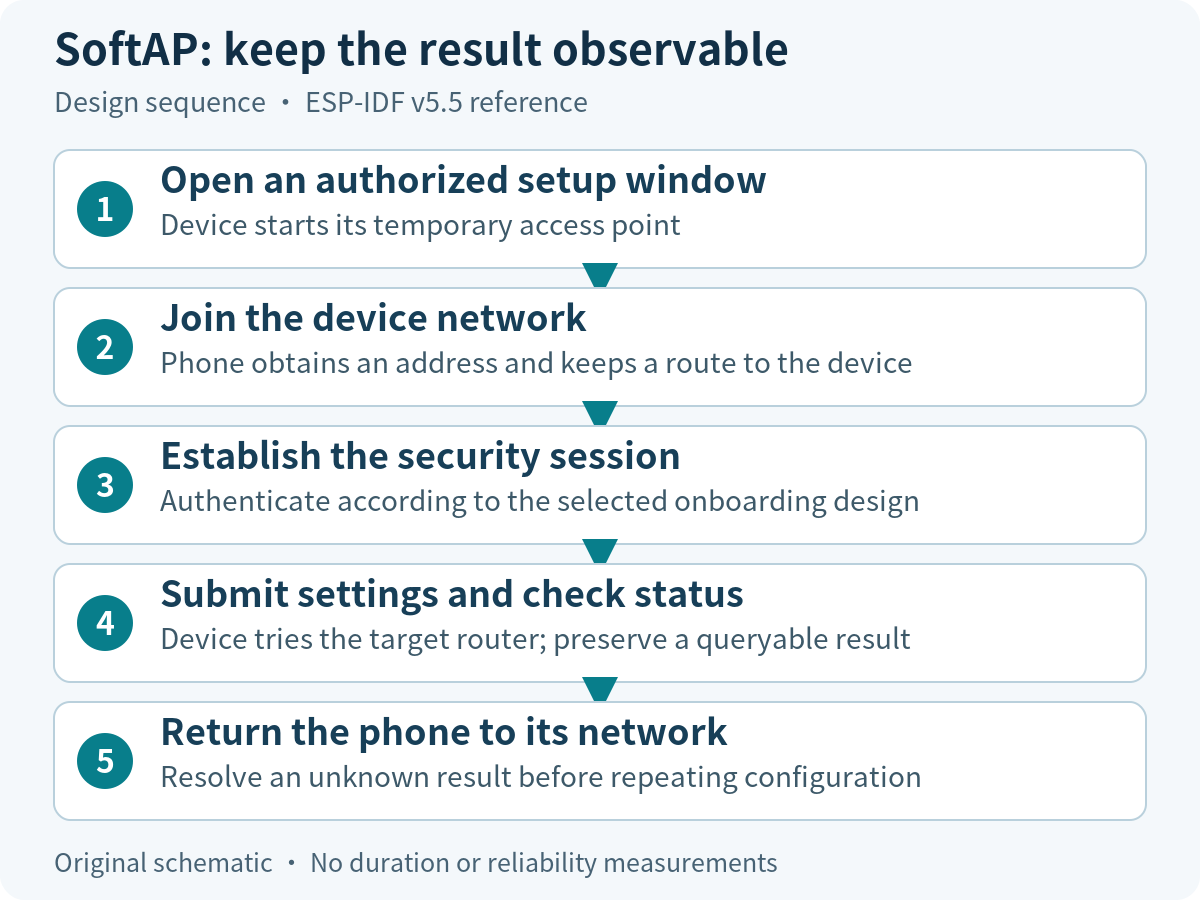
Prototype the awkward transitions deliberately. Does the phone display a no-internet warning? Does cellular routing or automatic network selection interrupt access? What does the user see if the device joins the target router but the last response is lost? Keep a session identifier and a status-check path so that a missing acknowledgement does not require entering the password again blindly.
Map the BLE Setup Flow
For BLE, the phone discovers the device, connects to its provisioning service, establishes application security, transfers settings, and obtains progress. The phone can keep its existing network connection, subject to actual OS and app behavior. A successful BLE connection establishes a transport; the product still needs evidence that the intended device accepted settings and joined the intended network.
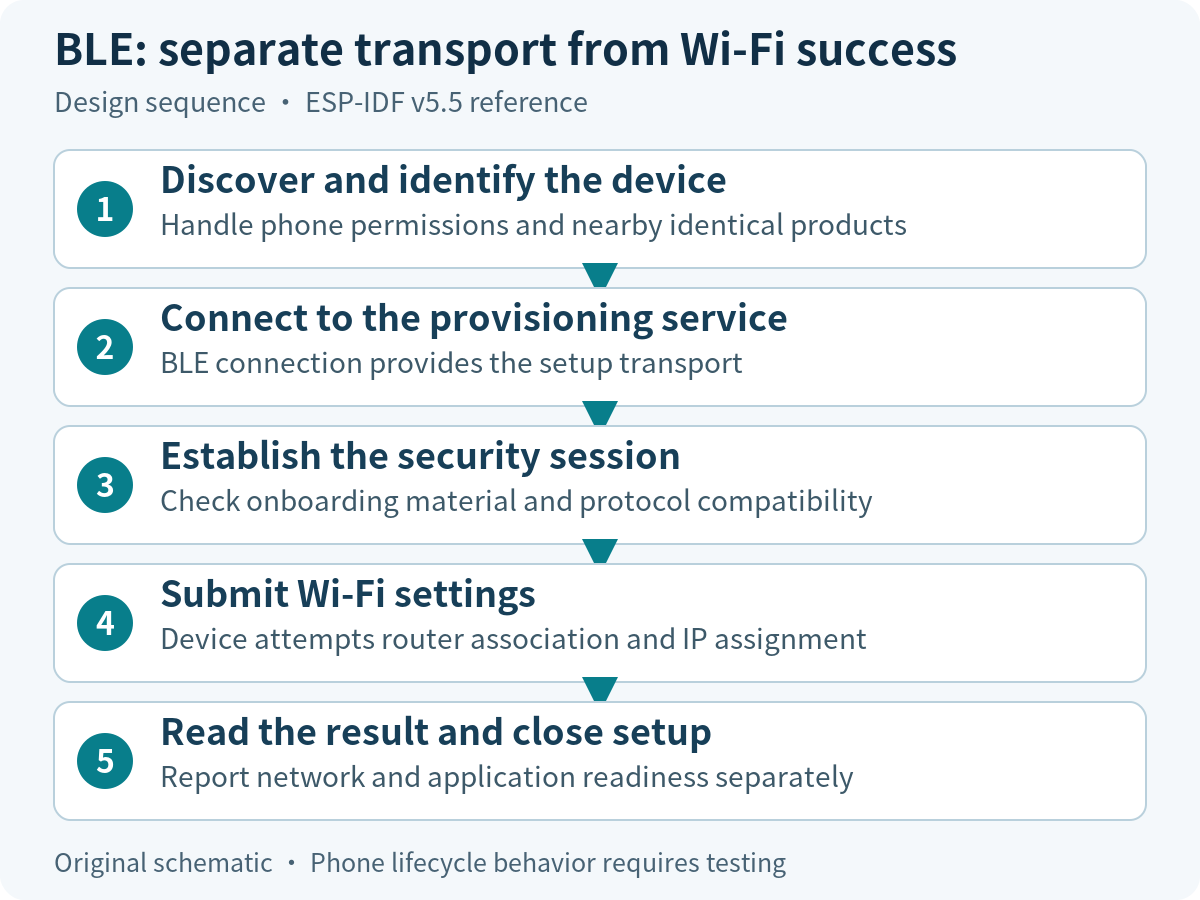
Assign ownership for permission-denied screens, Bluetooth-disabled handling, foreground/background transitions, device selection, cancellation, and library updates. Specify how a user distinguishes two nearby identical devices. Advertising names are useful labels, but a familiar name should not be the sole basis for trusting the peer. When designing additional product services, keep their contract separate from the provisioning transport.
Choose Security Beyond the Transport
Review four questions separately: how the phone authenticates the device, how the device authorizes setup, how settings are protected in transit, and when configuration is allowed. A short physical setup window and per-device onboarding material can reduce accidental access, but they do not replace a sound security protocol.
| Gate | Evidence required before approval |
|---|---|
| Device identity | The phone rejects an unexpected peer using the chosen authentication design. |
| Setup authority | Invalid onboarding material cannot configure the device; replacement ownership has a defined process. |
| Secret handling | Passwords, session material and onboarding secrets are absent from release logs. |
| Setup lifetime | Unattended configuration expires; re-entry requires the documented authorized action. |
Pin firmware and phone-library security support together. The protocomm reference distinguishes security schemes from transports. Security 0 provides no protection; do not use it as a production compatibility workaround. Where Security 2 is selected, include the manufacturing and app handling of its onboarding material in the design review.
Assess Memory and Coexistence Constraints
Measure the actual build at boot, while discovering networks, during the security handshake, while the main application is active, and after provisioning stops. Collect minimum free internal heap, largest free block, task stack margins, allocation failures, and relevant radio events. A single free-heap reading after success can miss the peak demand that caused a field failure.
The v5.5 manager documentation describes scheme-specific Bluetooth resource release. Choose a lifecycle compatible with the product’s later Bluetooth use; verify whether re-entering setup requires a reboot. Do not copy a release handler simply because it makes a demonstration’s heap larger. No universal RAM saving or setup-time advantage is claimed here.
Build a Decision Table and a Recovery Entry
| Product constraint | Candidate | Decision gate |
|---|---|---|
| Maintained app; uninterrupted phone network useful | BLE | Permission, background and device-selection tests pass on supported phones. |
| Local Wi-Fi is the accepted installer workflow | SoftAP | Joining, no-internet handling and return-network steps are usable. |
| No app installation allowed | SoftAP with a separately implemented client flow | The actual browser or tool completes security and status handling. |
| Very tight runtime resources | Measure both feasible options | Peak memory and main-function operation meet the product budget. |
| Both channels proposed | Dual transport only with a justified need | One owner maintains both security paths and regression suites. |
Define recovery access before choosing a winner: which button or authenticated command opens setup, what state is retained, how long the window lasts, and how to exit. Automatic permanent reopening after any cloud outage creates an avoidable configuration exposure. Detailed retry and power-loss handling belongs in the provisioning recovery guide.
Define the Prototype Evidence Package
Run both candidates against the same task and hardware where possible. Start timing at the documented user action and stop at a precisely defined result, such as valid IP plus an authenticated local status response. Keep cloud registration as a separately reported outcome. Include cancellation, a wrong password, a missing router, app backgrounding, and a second setup attempt.
For every run retain phone model and OS, app build, chip and module, firmware and library versions, router configuration, event logs, outcome, and recovery action. Report the sample size and untested combinations; leave timings and success rates blank until measured. Select a primary path only after the unresolved support costs and failed gates have an owner.
For a product-specific review, bring those constraints to Obeita’s device connectivity team: the useful starting point is the chip, phone workflow, installation site, and required support lifetime.