LVGL Screen Layers: Put Global Alarms Above Pages Without Blocking Every Input
Place the persistent alarm view under the display’s top layer, then specify which rectangles may capture a pointer. Keep the full-screen top layer non-clickable unless the product deliberately requires a modal barrier. Visibility above a page and ownership of every touch are separate choices.
Applicability: LVGL v9.3.0, one display, pointer input, rectangular untransformed objects and no screen-transition animation in the baseline fixture. This article defines presentation and input routing, not a safety alarm system or a keyboard/encoder focus policy. All coordinates and tests are hypothetical; no device execution is claimed.
1. Give the persistent view a persistent parent
The screen-layer documentation places the top layer above the active screen and the system layer above the top layer. Those extra layers remain independent of which page is active. Create the alarm banner under lv_display_get_layer_top(disp), using the known display handle, rather than as a child of whichever page happens to be open.
Keep an application-owned alarm-view record with the banner, acknowledgement control and current alarm identity. A page builder should neither recreate this record nor delete it on navigation. Conversely, display teardown must retire it. Persistence across page loads is not indefinite lifetime beyond the owning display.
Reserve the system layer for the system-level elements your integration actually needs. An alarm placed on the top layer can still be covered or intercepted by an eligible object on the system layer. Document that higher-priority population; “top” is not a promise that nothing can appear above it.
2. Write a capture map before setting flags
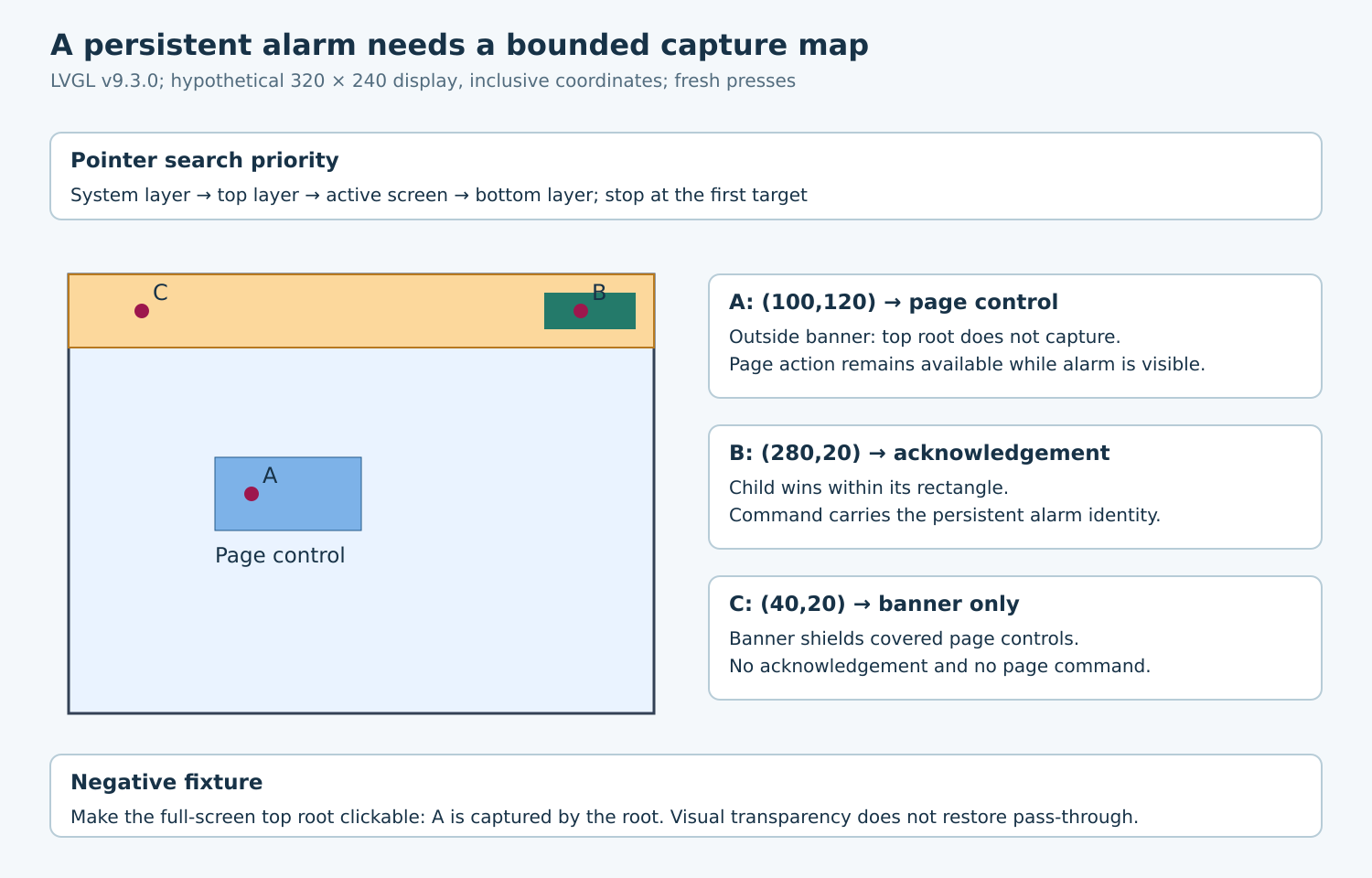
For a hypothetical 320 × 240 display, let the banner occupy x=0..319 and y=0..39. Its acknowledgement button occupies x=260..309 and y=10..29. A page control occupies x=80..159 and y=100..139. Coordinates are inclusive and refer to final display geometry after layout.
| Object | Proposed pointer policy | Reason |
|---|---|---|
| Top-layer root | Non-clickable | Unused display area can reach the page |
| Banner rectangle | Clickable, no page action | Visible banner area shields covered controls |
| Acknowledgement button | Clickable | One explicit alarm acknowledgement target |
| Decorative text/icon | Non-clickable | Decoration must not steal the button’s target |
The banner consumes touches within its rectangle without converting them into acknowledgement. That is a product choice. A different product may allow unused banner space through, but it must deliberately remove that capture and assess the hidden page controls underneath. Do not infer the intended policy from a transparent background style.
3. Check the actual target-selection path
The tagged display constructor explicitly removes CLICKABLE from the top and system layer roots. Preserve that baseline. A helper which later adds CLICKABLE to the full-screen root changes input routing far beyond the banner.
The pointer search examines system layer, top layer, active screen and bottom layer in that order, stopping when it finds a target. Inside an object, eligible children are searched in reverse child order before the object itself is returned. Therefore an acknowledgement child can win inside a clickable banner, while the banner wins elsewhere inside its rectangle.
The ordinary hit-test gate checks clickability and the click area; it does not consult background opacity. A fully transparent clickable full-screen object can still capture the page’s touches. Likewise, making a parent non-clickable does not automatically make its children ineligible. Audit each overlay child, including utility containers introduced by component builders.
A hidden object prunes its subtree during pointer search. Hiding the banner therefore removes both its own capture and its acknowledgement descendants from this fixture. Test hiding the owning banner, rather than merely hiding its label while leaving an invisible clickable container behind.
4. Keep acknowledgement independent of page lifetime
Attach the acknowledgement action to the explicit alarm identity in the persistent view record. Do not store the current page’s button or label as the command destination. Navigation may replace those objects while the alarm remains visible.
When acknowledgement succeeds, update the alarm model first under the application’s serialization policy, then hide or rebuild the view as appropriate. A delayed response must carry enough identity to avoid dismissing a newer alarm. The visual overlay alone cannot decide whether the same message text represents the same alarm instance.
Do not simulate click-through by sending a second click to an underlying page object. That bypasses the normal target search and can duplicate actions. Event bubbling follows an ancestor route after target selection; it is not a request to search again through the layers below a sibling overlay.
5. Run an open, navigate and close target matrix
- With the banner hidden, inject a complete fresh press/release at (100,120). Expect the page control and one page command.
- Show the banner. Repeat (100,120); the page control should still work.
- Press (280,20). Expect the acknowledgement control, one acknowledgement request and no page command.
- Press (40,20), outside the acknowledgement button but inside the banner. Expect the banner target and neither command.
- Replace the active page while leaving the banner visible. Repeat all three points against the new page’s defined control map.
- Hide the banner. Confirm its former rectangle no longer captures input; the resulting target depends on the new page underneath.
- As a negative test, make the top root clickable. Confirm that the page-control point is captured by the root, then restore the intended policy.
Record target identity, command identity, coordinates and overlay state for each sequence. Directly sending LV_EVENT_CLICKED is insufficient because it bypasses pointer selection. Include a deliberately clickable decorative child as a second negative test to prove that the trace reveals unintended interception.
6. Qualify transitions separately
The matrix begins with a released pointer. Showing or hiding the overlay while a press is already active requires another interaction policy; do not assume the next event is automatically retargeted. Exercise held presses, cancellation, page replacement and repeated close requests in the integrated application.
Then add production transformations, scrolling, transition animations and system-layer utilities one at a time. Accept the overlay when its visible coverage, persistent owner and exact capture map remain consistent, and when an acknowledgement never depends on a page object that navigation can retire.