Several Saved Wi-Fi Networks: Make Profile Priority and User Override Predictable
Use profile priority to choose among eligible automatic-connection candidates, and define manual selection as a separate product action. A higher-priority network becoming visible does not automatically replace an already active connection in NetworkManager. Without that distinction, an interface can promise “preferred network” while implementing an unexplained mix of current connection, remembered priority and temporary blocking.
This guide pins NetworkManager 1.50.0 and its connection settings and nmcli contracts. It covers selecting saved profiles on one managed Wi-Fi device, not BSSID roaming within one profile or multi-interface failover. No profile, device or network setting was modified for the article.
Make candidate eligibility visible
Before ranking profiles, establish whether each is usable for the intended device and current network conditions. Record profile UUID, user-facing name, device compatibility, security requirements, availability of required secrets, autoconnect setting and any manager-reported activation block. Two profiles with the same SSID can have different security or access policy; do not collapse them into one row solely by display text.
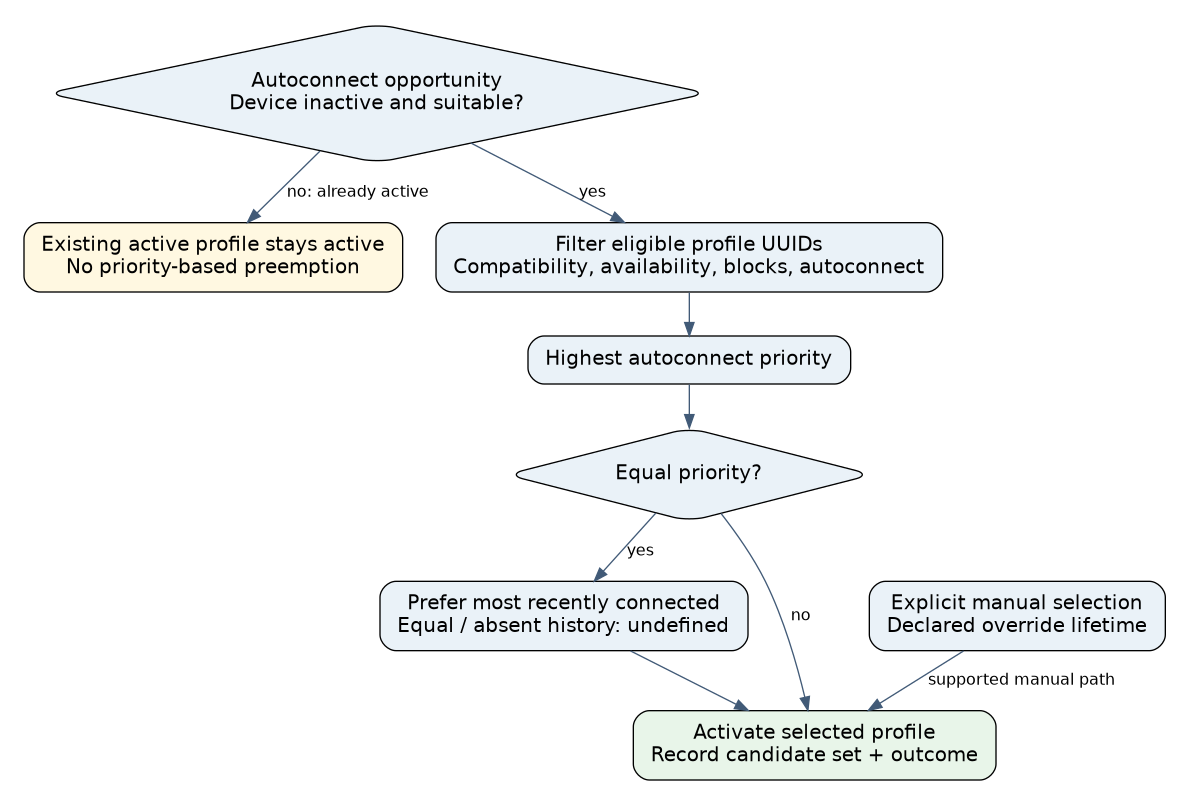
NetworkManager 1.50.0 documents autoconnect as activation when circumstances are suitable, including a managed, inactive device. It explicitly says autoconnect does not replace or compete with an already active profile. This is selection at an activation opportunity, not a continuous command to move to the highest-priority visible network. NetworkManager 1.50.0 connection.autoconnect
Keep “saved,” “eligible,” “selected,” “activating” and “active” distinct in diagnostics. A saved profile whose secrets are unavailable should not be shown as a guaranteed fallback. An active profile with no application service is still a separate condition from an inactive device waiting for profile selection.
Use the documented ordering without inventing a tie-break
Among eligible candidates, higher connection.autoconnect-priority wins. Equal priorities prefer the most recently connected profile. If earlier use is absent or timestamps are identical, the documented choice is undefined. Do not make a product requirement depend on alphabetical profile names, scan order or whichever candidate happened to win one trial. NetworkManager 1.50.0 priority and timestamp selection
| State | Expected selection interpretation | Product responsibility |
|---|---|---|
| A is active; higher-priority B appears | Autoconnect does not preempt A | Explain whether an explicit switch policy exists |
| Device is eligible and inactive; A and B usable | Rank eligible profiles by priority | Record the candidate set and selected UUID |
| Equal priority, different prior-use times | Most recently connected wins | Do not attribute this to stronger RSSI |
| Equal priority and equal/absent history | No documented deterministic winner | Assign intentional priorities if deterministic choice is required |
| Profile has autoconnect disabled | Not an automatic candidate | Manual activation can remain a separate supported action |
Define what the manual button changes
A “connect to B” action should identify the exact profile and initiate the supported activation path. It need not silently rewrite B’s persistent priority or disable every other saved profile. If the product offers “always prefer B,” make that a separately understood settings change with a clear resulting profile order.
Choose an override lifetime: current connection only, until a declared user action, or a persistent preference change. Then specify what happens after B disappears, the device reboots or activation fails. A current-session choice and a permanent preference are different promises. Store only the policy state required by the product, under one owner, and reconcile it with the manager after restart.
Do not implement override expiry by blindly disconnecting the active network on a timer. First establish the intended next action and available candidates, especially when the connection carries remote management. Any required disruptive transition needs its own authorized recovery plan.
Distinguish profile-down from device-down
The 1.50.0 nmcli manual states that connection down deactivates a profile but leaves the device available for other autoconnect candidates. The deactivated profile is internally blocked from autoconnect until reboot or an unblocking action such as modifying or explicitly activating it. device down instead prevents the device from automatically activating further connections without manual intervention. NetworkManager 1.50.0 nmcli manual
These are source-checked command semantics, not commands executed here. They explain why a test that “disconnects Wi-Fi” can produce different selection results depending on which operation the application actually called. Record that operation and its completion rather than treating every disconnect as equivalent to an accidental radio loss.
Autoconnect retry limits add another state dimension. In 1.50.0, zero means unlimited retries, minus one selects the global default, and a positive limit can temporarily block a failed candidate; the manager may try again after its timeout. The setting is not a permanent exclusion list or the application’s total service-recovery deadline. NetworkManager 1.50.0 nm-setting-connection.c
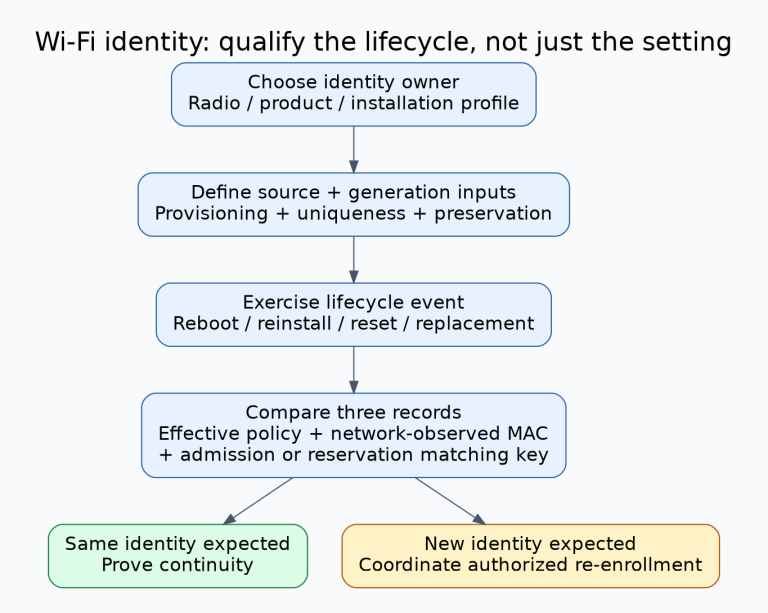
Qualify selection and override as separate cases
- Inventory effective profiles. Use dedicated test networks and record UUIDs, priorities, autoconnect state and last-use evidence without exporting secrets.
- Test an inactive selection opportunity. Make two profiles eligible and verify the higher-priority choice. Repeat with one candidate unavailable or blocked and record the changed eligible set.
- Test non-preemption. Establish the lower-priority connection first, then make the higher-priority network available. Verify that the UI does not falsely promise an automatic switch.
- Test tie behavior. Compare equal priorities with different histories, then identical or absent histories. Treat the final case as unspecified rather than freezing an accidental implementation order into acceptance criteria.
- Exercise manual override. Select the lower-priority profile, lose it, restore it and reboot. Compare each outcome with the declared override lifetime and unchanged or intentionally changed persistent settings.
- Exercise both disconnect operations. Verify profile blocking, alternate-profile activation and device-wide autoconnect suppression separately. Restore the intended state through the authorized owner.
For a hypothetical maintenance terminal, production profile A has priority 20 and service profile B has priority 5. A technician selects B for a local task. B should not be described as “ignored because A has higher priority” while B is active. After B ends, the next selection depends on eligibility, blocking and the declared override policy, not priority alone.
A Python 3.12.14 model tested this reduced ordering contract, active-profile non-preemption and explicit unresolved ties. It did not run NetworkManager, retrieve secrets or model every activation failure. Target tests must confirm the actual manager and UI integration. Release with a profile-selection table and override-lifetime evidence, so saved-network behavior remains explainable after reconnect and reboot.