Yocto devtool Changes: Export a Reproducible Patch Before Leaving the Workspace
A component works after editing it through devtool, but the next clean product build still contains the old behavior. The local source tree may be correct while the maintained layer does not contain the change. The important handoff is from an editable workspace to recipe-visible, reviewable inputs that another build can consume.
This procedure follows the Yocto Project 5.0.12 Scarthgap documentation for modifying an existing component. It uses the invented recipe name sensor-agent and an illustrative destination layer. The commands are proposed steps, not a record of executed changes, and they should be adapted to the actual recipe and release workflow.
Identify what the workspace currently supplies
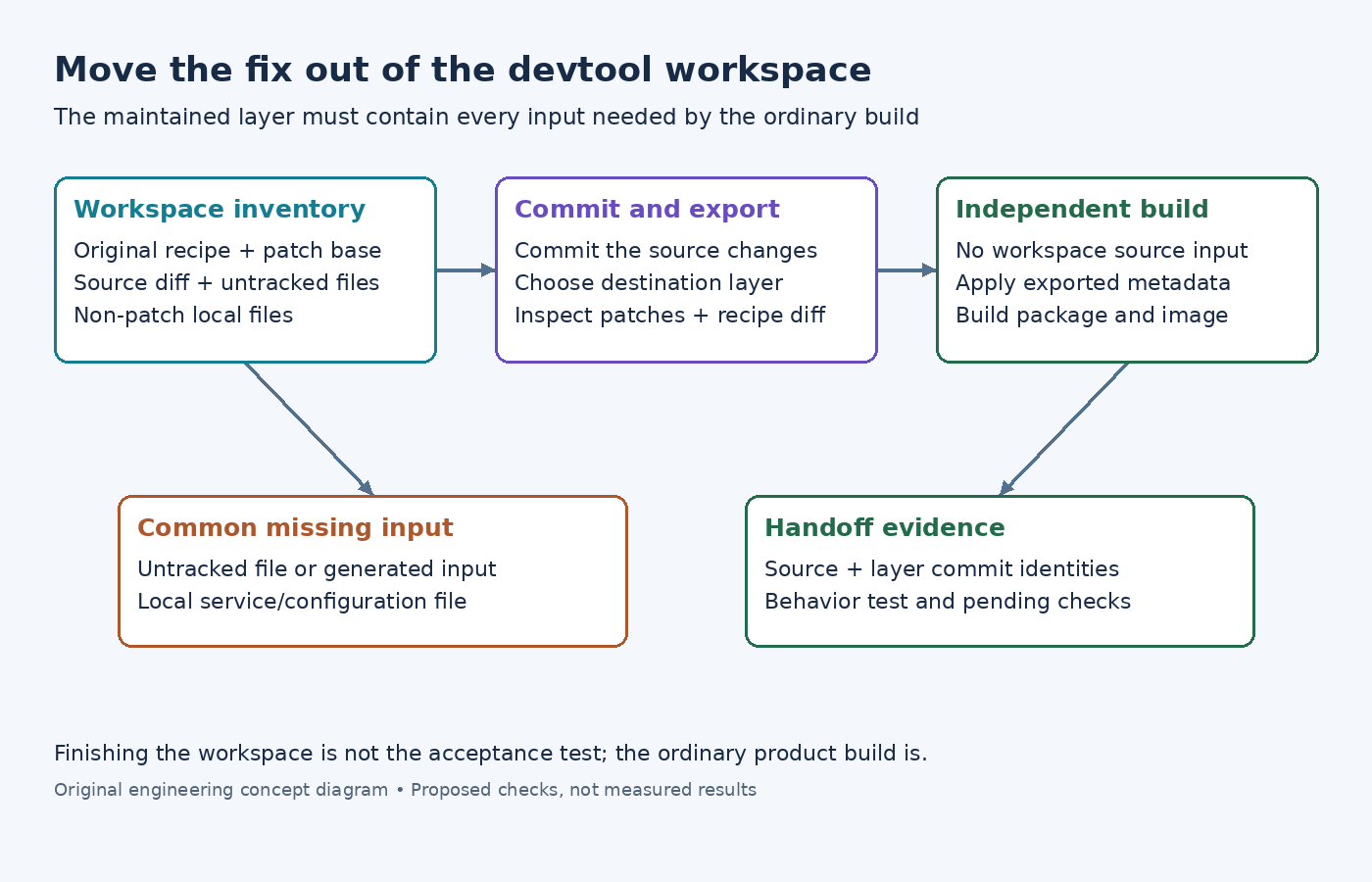
Before exporting anything, record the original recipe location, source revision, existing patch set, workspace source directory, and destination layer. Inspect the workspace state and the source repository's status. A developer can have a working change in a different directory from the one currently used by the recipe.
The devtool quick reference explains that devtool modify prepares the existing recipe's source for development and represents existing recipe patches in that source history. Therefore, identify the baseline before deciding which commits represent the new product change.
Write a short description of the intended behavior change and its test. Keep unrelated formatting, generated output, debug instrumentation, and temporary credentials out of the patch. This is easier before export than after a large generated diff obscures the change the reviewer is supposed to evaluate.
Commit the source change deliberately
Inspect both tracked modifications and untracked files. A new source file can be essential to the working build while remaining absent from the commit that will become a patch. Conversely, a generated file may be present locally but should be recreated by a declared build step.
Stage the intended source changes and commit them with a message explaining the problem and the chosen correction. Review the commit's diff rather than relying only on a clean status afterward. Confirm that it includes the new file, removal, executable mode, or other property the change requires.
The existing-component workflow explicitly requires changes intended as patches to be committed before finishing. A successful local compile does not establish that this requirement has been met. Preserve the source repository until the exported metadata has been inspected and independently built.
Review local files separately from source patches
Recipes can also refer to non-patch local files, such as configuration or service files. The same workflow documents the oe-local-files area used during development. Inspect these files as their own category, because an application source commit and an installed service-file change may need different evidence in the layer diff.
This matters especially when working from an already prepared source tree. Check the documented handling of oe-local-files before finishing; an absent directory can be interpreted as removal of previously supplied local files in that workflow. Do not assume that a successful source build proves those files will survive export.
Compare the original recipe's local-file references with the intended final set. Mark each file as unchanged, modified, newly added, or deliberately removed. That small checklist can prevent a missing service configuration from being discovered only after the image boots.
Finish into an explicit maintained layer
After committing the intended changes, use the documented form devtool finish sensor-agent /path/to/meta-product, replacing both arguments with the real recipe and destination. The destination choice affects whether the original recipe is updated or an append is created. Confirm the layer is the intended maintained location, rather than a temporary workspace directory.
The devtool update reference is useful when a workflow instead needs to update recipe patches while retaining development context. Choose the command that matches the intended transition; do not substitute reset for exporting the work. Resetting workspace use is not evidence that the maintained metadata contains the change.
Inspect the complete destination diff after the export. Check patch contents, filenames, source references, local files, and append matching. Verify that no absolute path to the developer's workspace became a required input. Commit the resulting layer changes only after reviewing them as the actual integration deliverable.
Rebuild without the workspace dependency
The strongest handoff check is a separate build configuration or clean checkout containing the exported layer commit and the recorded source inputs, with no reliance on the original workspace. Build the recipe normally, then build the image that will carry its package. Inspect the generated artifact and run the behavior test defined at the start.
- Confirm the source commit contains every intended change and no unrelated files.
- Export to the maintained layer and inspect the recipe or append plus all generated patches.
- Verify that the ordinary build selects that metadata and applies the intended patch set.
- Build from the recorded inputs without the development workspace supplying source.
- Test the resulting package in the image context, including startup configuration and runtime dependencies.
If the independent build fails, preserve its first error and compare the input boundaries. Missing source files, undeclared generated inputs, incorrect append matching, and omitted local configuration require different repairs. Do not copy the successful workspace output into the release directory to make the failure disappear.
Leave evidence that can be reviewed later
The handoff should identify the source change, destination layer commit, recipe version, patch set, and independent verification result. State any target testing that remains pending. A patch that applies cleanly is only one checkpoint; it does not establish runtime correctness or full binary reproducibility.
Keep the workspace until the integration result is understood, then retire it through the project's normal process. The completed outcome is not merely that the local development command succeeded. It is that another build can obtain the intended change from maintained metadata and reproduce its required behavior without access to the developer's working directory.