Yocto License Flags: Bound the Scope of a Build Acceptance Entry
A Yocto configuration adds one short entry to LICENSE_FLAGS_ACCEPTED so a restricted recipe can build. A later layer addition unexpectedly becomes eligible under the same entry. The build system may be following its matching rules exactly: a short accepted prefix can cover more flags than the original engineer intended.
Review the expanded flag and its underscore-separated prefixes before selecting an acceptance entry. This article explains the build gate, not whether a product has permission to distribute a component.
Expand the recipe-specific flag first
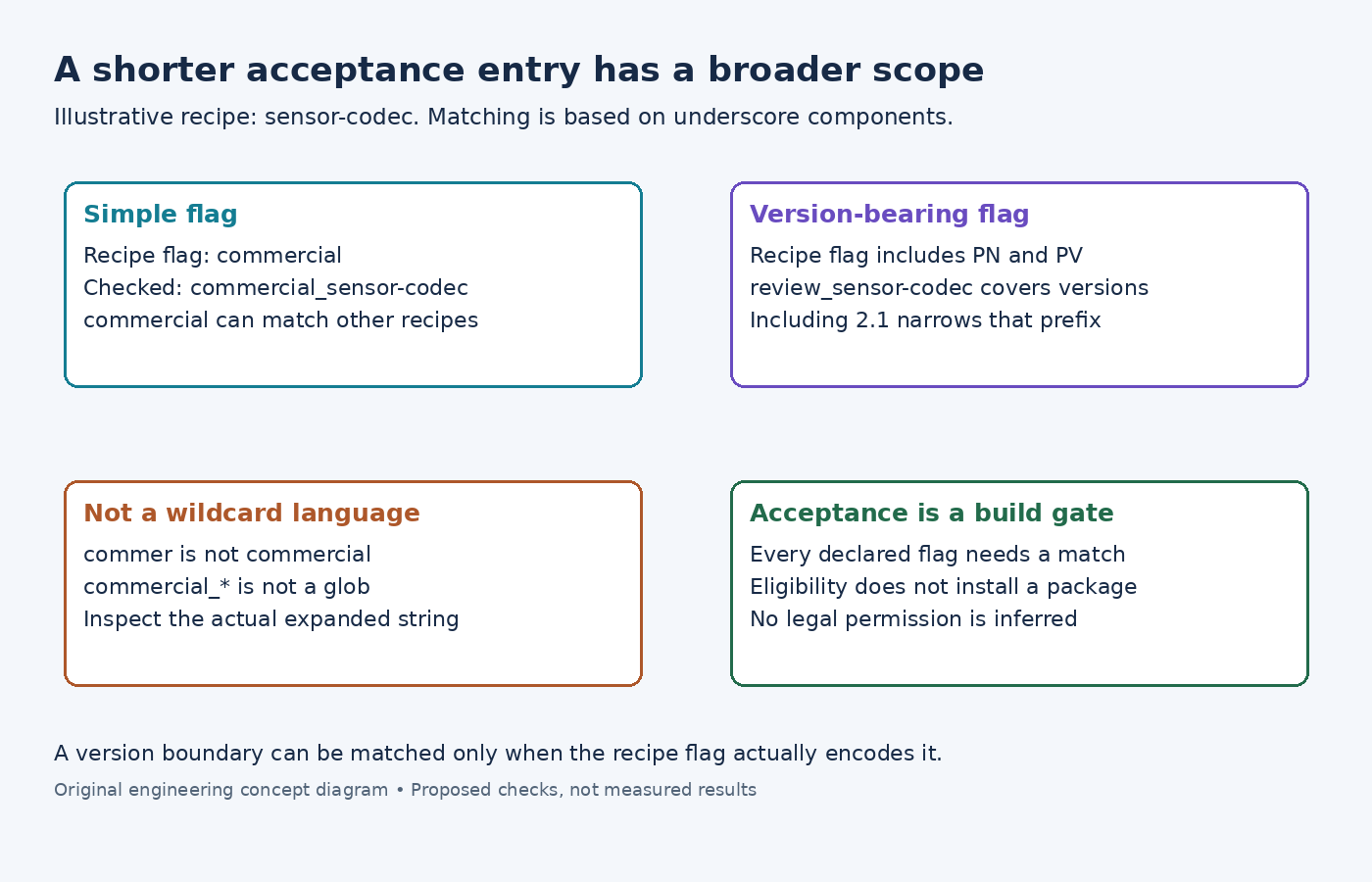
The license-flag matching guide explains that the recipe name is appended before matching. An illustrative recipe named sensor-codec with LICENSE_FLAGS = "commercial" is checked using commercial_sensor-codec.
An accepted entry commercial_sensor-codec can therefore target that recipe's flag. An entry commercial is broader: it can also match the corresponding flag from another recipe, such as display-codec.
The distinction is easy to miss when only one flagged recipe exists in the current layer set. Inspect potential matches across the maintained layers, not only the error that prompted the edit. A future recipe can inherit the broader acceptance without requiring another configuration change.
Matching occurs at underscore boundaries
The examined license matcher implementation first checks the full expanded string, then constructs prefixes by accumulating underscore-separated components. It does not implement an arbitrary regular-expression match.
For the example above, commercial is a valid prefix candidate. commer is not. Likewise, writing commercial_* does not turn the accepted entry into a shell wildcard. The intended scope should be expressed using the actual matching strings.
Version scope depends on what the recipe puts in its flag. Suppose it defines LICENSE_FLAGS = "review_${PN}_${PV}". With an illustrative version of 2.1, the expanded check string includes review_sensor-codec_2.1_sensor-codec. Accepting review_sensor-codec covers more versions than accepting the prefix that also includes 2.1.
This does not mean that every recipe's default commercial flag automatically contains its version. If the flag does not encode a version, appending a guessed version to the accepted entry cannot create a matching version restriction. Read the recipe's actual definition first.
Every declared flag must be covered
A recipe can declare several space-separated flags. The examined matcher collects every flag that lacks a match; matching one does not automatically approve the others. A remaining skip message may therefore identify a second restriction rather than a spelling error in the first accepted entry.
Inspect the final LICENSE_FLAGS and global LICENSE_FLAGS_ACCEPTED values, including configuration contributions. Do not replace the entire accepted list while adding one entry unless removing its other entries is intentional. A local test edit can otherwise break unrelated eligible recipes.
The examined base class integration uses unmatched flags to skip the recipe. It can include information from LICENSE_FLAGS_DETAILS in the diagnostic. Follow that information when it identifies an actual review requirement, rather than treating every skip as a build defect.
Validate the intended acceptance boundary
Build a small matching table from real metadata: the intended recipe, another recipe sharing the broad prefix, a newer version when the flag encodes one, and a recipe with two flags. State which should become eligible under the proposed entry.
Then inspect parsing outcomes in the controlled build configuration. Eligibility still does not force the package into an image; package selection and other dependencies remain separate. Conversely, an image that omits the component does not prove the global acceptance entry is narrow.
The LICENSE_FLAGS_ACCEPTED reference identifies this variable as the list of accepted license flags. Keep its entries connected to the scope actually reviewed. If policy approves one recipe and version, ensure the recipe's flag design can express that boundary before recording a broader prefix simply because it clears the current error.