EEZ Studio FileRead Encodings: Keep Binary Blobs Separate from Encoded Strings
In EEZ Studio FileRead, binary and latin1 are different output contracts. Binary requests a blob. The other supported encoding names request strings, including hex and base64, which are printable representations of the file bytes rather than unchanged binary payloads.
That difference can disappear in a debugger that displays every value as text. It becomes important when the next action expects a blob for a chart, a string for JSON parsing or a printable encoding for a report. Establish the representation before comparing lengths or adding a conversion.
The FileRead documentation states this distinction. The pinned FileRead implementation shows how it is implemented in EEZ Studio v0.29.0, commit 3000161d09d40a5c1dc2477ddc30b38037b3a612. This article concerns the Dashboard action, not a native target's filesystem API.
Binary is handled before calling readFile
The action evaluates File path and Encoding and requires both to be strings. It then checks Encoding against an explicit list. The accepted names include utf8, utf-8, latin1, binary, hex, base64 and several UTF-16 aliases.
For binary, the call to fs.promises.readFile receives undefined as its encoding argument. For the other accepted names, the action forwards the requested encoding. The resulting content is emitted through an output declared any, so the port label alone does not tell a consumer whether this particular execution produced a string or a blob.
The distinction is also consistent with the Node.js readFile contract: omitting the encoding yields a Buffer, while supplying an encoding yields a string. The EEZ action uses binary as its own selector for the no-encoding case; do not infer the result from how another Node API treats an encoding alias with the same spelling.
Use a fixture that cannot be mistaken for ordinary text
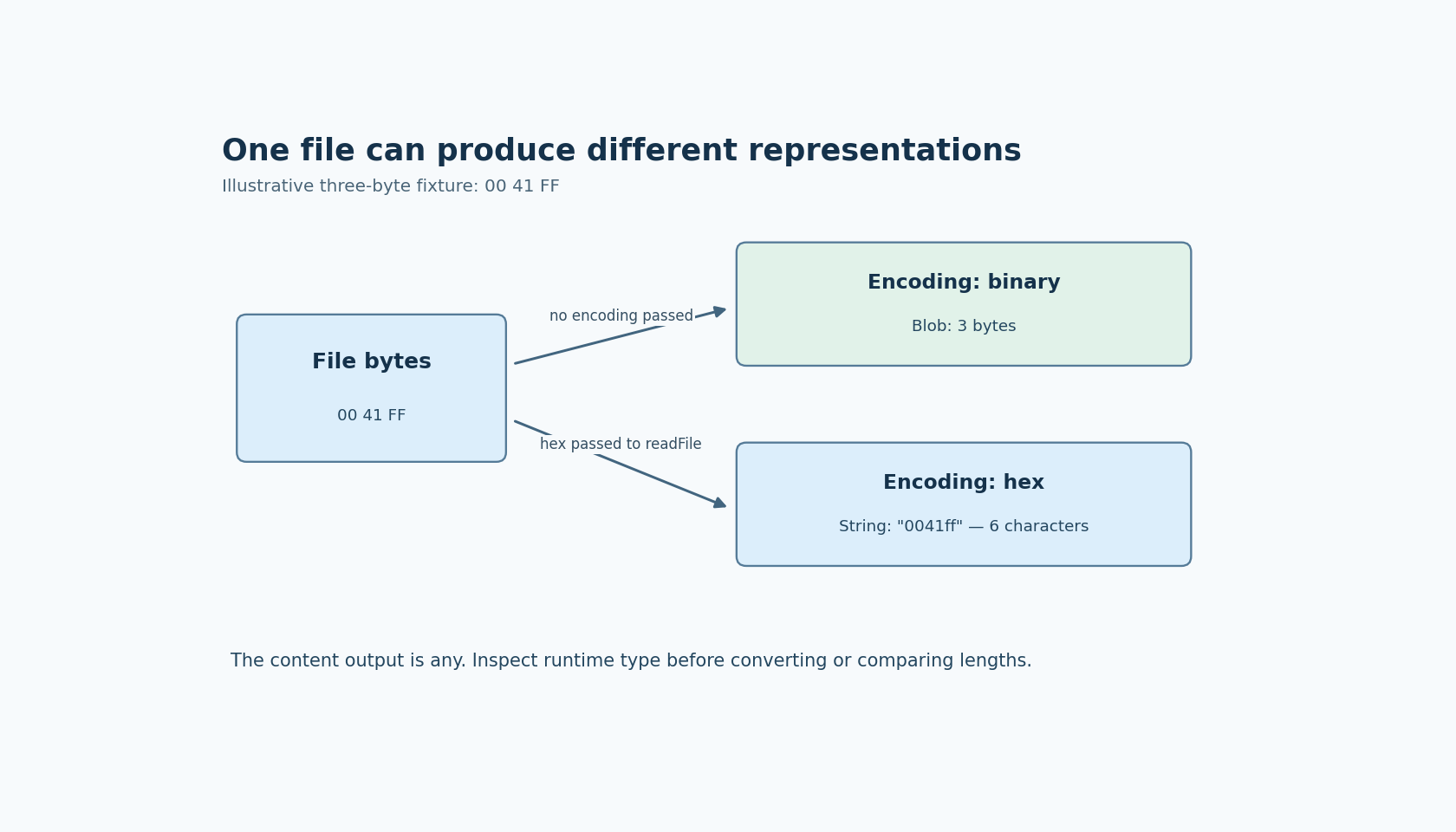
A proposed diagnostic file contains the three bytes 00, 41 and FF. In binary mode, the expected content is a three-byte blob. In hex mode, the expected content is the six-character string 0041ff. The hex string describes the bytes; it is not itself those three bytes.
Record the runtime value type and the representation-specific length before displaying or converting the result. A display may omit a zero byte, substitute a character for an undecodable byte or show a blob summary. None of those presentations establishes the underlying value type.
Repeat with a small known text file if the intended consumer is a text parser. Use the encoding that belongs to that file rather than choosing an option because its output looks readable. An arbitrary binary file passing through a text decoder is a different experiment from a binary read followed by an explicitly chosen display conversion.
No file was read through EEZ Studio for this article. The fixture outcomes are expectations derived from the documented mode distinction and the inspected call arguments.
Define the next component's input representation
For a packed-sample chart, retain the blob until the chart's decoder receives it. A hex string may be useful for diagnostics, but feeding it into a packed-float decoder changes the data contract. For a JSON parser, provide decoded JSON text; a blob is not a string merely because its original bytes happened to contain JSON.
Place any required conversion where it is visible in the Flow. Name variables by their actual role, such as sampleBlob or reportText, rather than using one content variable whose meaning changes according to an unrelated setting.
If an export format requires base64, decide whether the consumer wants the base64 text or the decoded bytes. Avoid an accidental second encoding step. An already encoded string passed through another encoder produces a valid-looking result with a different meaning.
Do not silently repair unsupported encoding settings
The pinned action reports an unsupported encoding instead of forwarding any arbitrary string. A project variable containing a misspelled name should therefore be diagnosed at the action's encoding gate before investigating the file itself.
Keep that error separate from a missing file, a denied read or a later parser error. FileRead emits content and then sequence continuation on its successful asynchronous read path; an exception reports an error instead. This tells the consumer when data became available, but it does not make all possible content representations interchangeable.
The useful check is not simply “did the read finish?” It is “did this read produce the representation that this consumer expects?”