CU1128 Topology in TwinCAT: Keep the Three Internal Slaves Together
A CU1128 occupies one place on the DIN rail but appears as three
EtherCAT slaves. Deleting the extra entries to make the project resemble
the cabinet removes part of the device’s real topology. The useful
commissioning question is whether each physical branch has the correct
predecessor, including the junction’s internal connections.
This article follows Beckhoff’s CU112x documentation retrieved in
October 2026. Its illustrated configuration workflow uses TwinCAT System
Manager and specifies automatic CU1128 recognition from TwinCAT 2.10
build 1340. Treat those versioned instructions as the reference, rather
than assuming that every newer editor has identical menus.
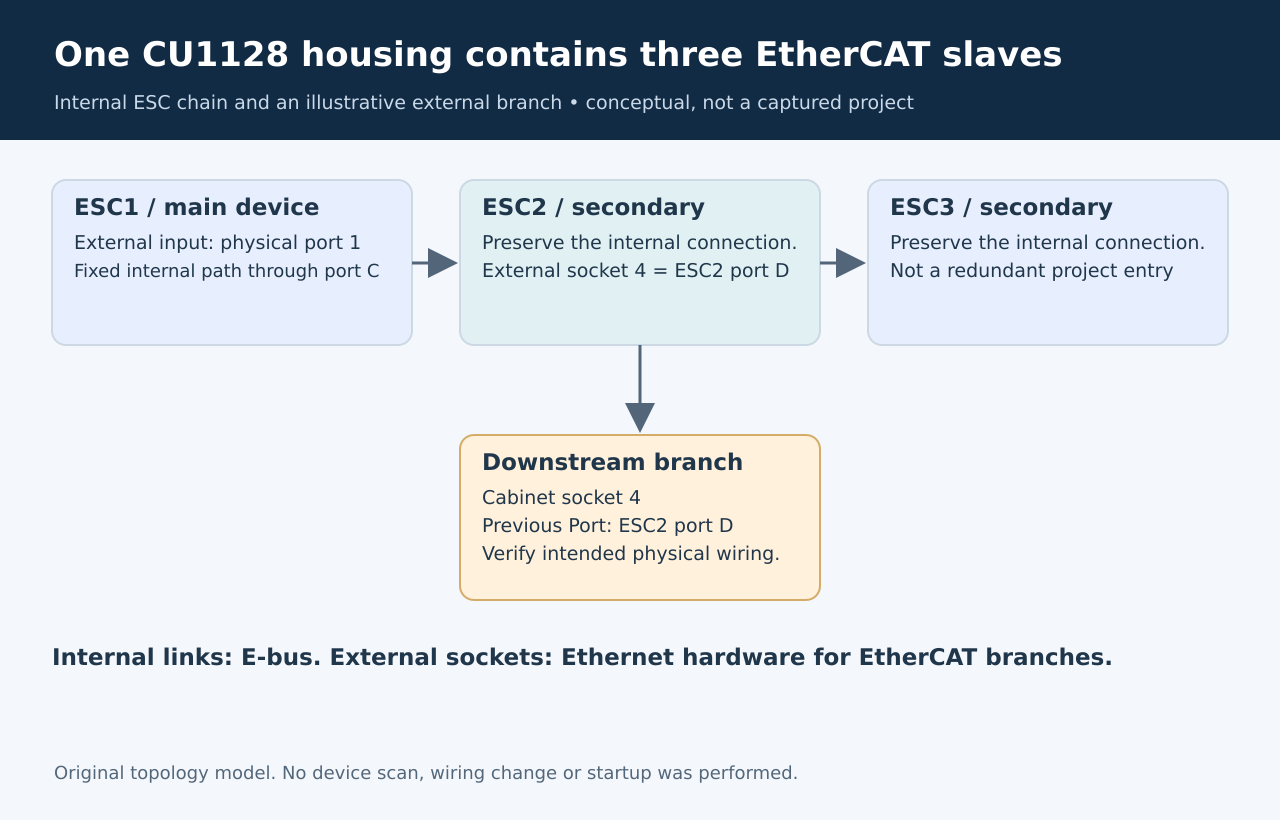
Original diagram. No measured topology or timing result is
represented.
Start with the
physical connection contract
The CU1128 is an EtherCAT junction, not a general-purpose Ethernet
switch. Its product page identifies port 1 as the incoming connection
and ports 2 through 8 as connections for downstream EtherCAT equipment.
A spare RJ45 socket therefore does not establish that an ordinary
Ethernet host belongs on that branch. Beckhoff
CU1128 product information
For a branch schedule, record the cabinet label, CU1128 socket number
and first downstream device. Keep that schedule independent of the order
in which somebody dragged items into an editor. An easily readable
project tree is useful, but its visual order is not the wiring
contract.
Preserve the internal
structure
Three EtherCAT slave controllers, or ESCs, are connected inside the
housing. The configurator exposes all three. Beckhoff explicitly warns
against deleting the secondary devices after configuration. These are
infrastructure components without controllable I/O or a CoE object
directory; an empty application-data view is not evidence that a
secondary entry is redundant. CU112x
basic function principles
The important distinction is between a fixed internal link and an
external branch. For example, ESC2 follows port C of ESC1. That is a
hardware relationship, not a spare attachment point to repurpose.
Internal links use E-bus, whereas the external connections use Ethernet
hardware. The ESI description gives the configurator information about
those port types.
A useful review annotation is therefore “internal, preserve” or
“external, match cabinet socket” for each connection. It prevents a
cleanup operation from being mistaken for a harmless display change.
Resolve the
physical socket to Previous Port
The documented scan creates the main CU1128 entry plus CU1128-0001
and CU1128-0002. Manual insertion requires the appropriate ESI file and
must preserve the same internal relationship. Beckhoff’s worked example
connects another junction to physical port 4 by selecting port D of ESC2
as its Previous Port. Merely placing the new device somewhere after the
first CU1128 is insufficient. CU1128
configuration procedure
For that example, a commissioning record should read “cabinet branch
→ CU1128 socket 4 → ESC2 port D → downstream device.” The physical and
logical names can then be compared without guessing which numbering
system a technician meant.
The basic-principles page contains a shortened “2..7” output-port
statement. For the complete external range, use the product page’s
explicit ports 2 through 8 description and the eight-port hardware
diagram. Do not propagate the shortened range into installation
labels.
Review the change as a graph
Before activation in an approved commissioning environment, compare
three things:
- The photographed or otherwise verified socket assignments
- The three internal slaves and their preserved connections
- Each downstream device’s configured predecessor and external
port
A scan is useful evidence of the connected arrangement. It does not
decide whether the physical arrangement matches the intended machine
design. Conversely, a saved project is evidence of intended
configuration, not proof of where a cable currently lands.
If a branch has moved, explain that single edge change and check the
resulting topology view. Do not delete secondary slaves or repeatedly
rearrange entries until the error disappears. The desired outcome is a
traceable physical-to-logical mapping that another engineer can
reproduce. No hardware scan, startup or topology change was performed
for this article.